

What changed in Reign 8.1.0
Also called: Reign update changed my site, removed widgets, missing widget after update, sign-in popup changed, colours changed after update, what replaced the Reign widgets.
What this does
Section titled “What this does”This page lists what Reign 8.1.0 removed or changed, and what to use instead. Reign is a standard theme. It no longer carries styling for plugins it does not support. Those plugins now show their own design, and Reign stays fast and easy to update.
Your content and settings are not deleted. If you roll back to 8.0.8, everything comes back as it was.
After the update, Reign shows a one-time notice on your dashboard. It lists only what applies to your site.
Go through the sections below. Act only on the ones that match your site.
- If you used a removed widget or shortcode, replace it (see Removed widgets and shortcodes).
- If a plugin looks different, check Plugins Reign no longer styles.
- If you want the new colours, see Your colours stay the same.
Course pages for every supported LMS
Section titled “Course pages for every supported LMS”LearnDash, Tutor LMS, LifterLMS, Sensei LMS and LearnPress courses now share one Udemy-style course page. It is built from each plugin’s own parts. The old per-plugin course styling is gone.
To keep a plugin’s own course page, set Course page layout to LMS default. See Online course plugins (LMS platforms). MasterStudy LMS keeps its own course page, now with the theme’s background and dark mode.
Plugins Reign no longer styles
Section titled “Plugins Reign no longer styles”These plugins keep working. They now use their own built-in design, inside Reign’s header, footer, colours and fonts.
| Plugins | More detail |
|---|---|
| Dokan, WCFM, WC Vendors, MultiVendorX | Multi-vendor store plugins |
| PeepSo | Set up PeepSo |
| Divi, WPBakery, Thrive Architect | Elementor and the block editor (Page builders) |
| Easy Digital Downloads, Paid Memberships Pro, SureCart, FluentCart | The plugin’s own design |
| rtMedia, MediaPress, Better Messages, wpForo | The plugin’s own design |
| Directorist, GeoDirectory, ShopLentor, IdeaPush | The plugin’s own design |
| Product Roadmap, LearnDash Dashboard, Stachethemes Event Calendar | The plugin’s own design |
Easy Digital Downloads, FluentCart and SureCart store pages are full width with no blog sidebar. These are products, product categories, shop, cart, checkout, receipt and account. Reign adds no second title above a product’s own title. A layout you set on the page itself still wins.
Reign still styles WooCommerce, BuddyPress, bbPress, LearnDash, The Events Calendar, WP Job Manager and Elementor. Reign Settings > Integrations shows which of them are active on your site.
Product category tiles: three layouts
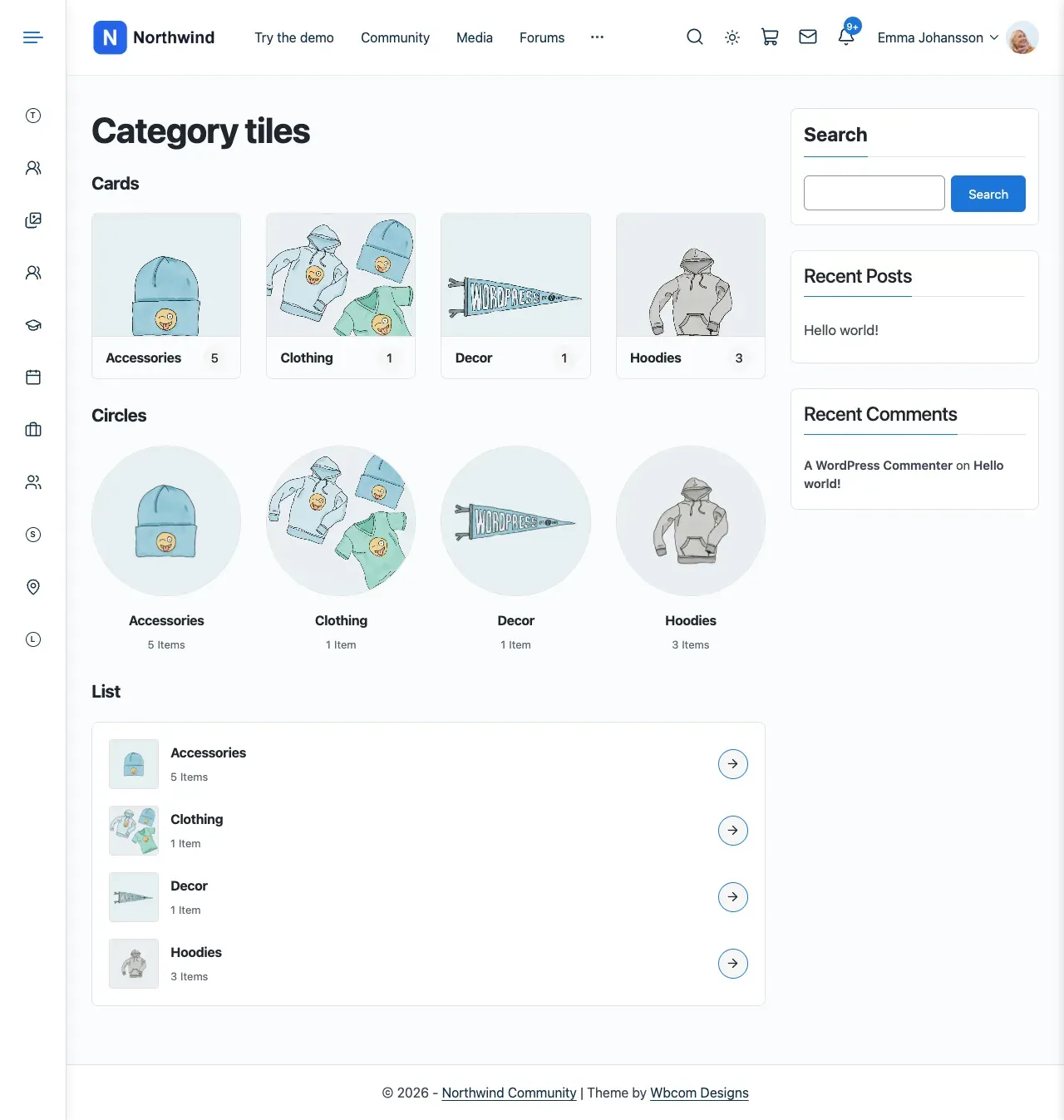
Section titled “Product category tiles: three layouts”The Reign - Product Categories widget and the [rg_woo_product_categories] shortcode now offer three layouts: Cards, Circles and List. Cards show the category name on a solid bar, so it reads on any photo and in dark mode.
Widgets and pages that used layout 2, 3 or 6 now show as Cards, Circles and List. You need to change nothing. [rg_woo_product_category_with_subcategory] still works. It is the same as show_subcategories="1". See Sidebar, header and footer widgets.
Login popup: no sign-up form or magic link
Section titled “Login popup: no sign-up form or magic link”The popup is now for logging in only. Its “create an account” link and the header Register button go to your registration page. That is the Registration Page you set in the Customizer, or the WordPress or BuddyPress register page.
These popup settings are gone:
- Form Display (login, register or both).
- Register Form Label.
- Register Redirect.
- Register Custom URL.
After sign-up, WordPress or BuddyPress decides where the new member lands.
The magic link option for Solid Security’s Passwordless Login is gone too. If your security plugin offers passwordless login, use it on the full login page. See Login popup (Sign-in popup).
Removed widgets and shortcodes
Section titled “Removed widgets and shortcodes”Five Reign widgets were removed. If you had placed one, it no longer shows in your sidebar. Replace it with the matching block or widget.
| Removed widget | Use instead |
|---|---|
| Reign - Site Wide Activity | Wbcom Essential Activity Feed, or BuddyPress’s Latest Activities block |
| Reign - Groups | Wbcom Essential Groups Grid, or BuddyPress’s Groups block |
| Reign - Groups Carousel | Wbcom Essential Group Carousel |
| Reign - Members Carousel | Wbcom Essential Members Carousel |
| Reign - Login | Wbcom Essential Login Form, or WordPress’s Login/out block |
Four of those Wbcom Essential blocks need BuddyPress or BuddyBoss Platform. They are Activity Feed, Groups Grid, Group Carousel and Members Carousel. On a BuddyNext site they show “BuddyPress is required for this block.” Use BuddyNext’s own blocks from the BuddyNext category instead. They are Activity Feed, Spaces showcase (or Space Directory) and Members showcase (or Member Directory). Login Form works on every site. See Which blocks need a community plugin.
Reign - Profile Completion stays. Wbcom Essential has no profile completion block. The widget is still part of Reign, with the same settings.
Wbcom Essential is free. Install it from Reign Settings > Extend.
Three shortcodes went with them. A page that still uses one shows the shortcode text. Replace it with a block.
| Removed shortcode | Use instead |
|---|---|
[bp_member_carousel] |
Wbcom Essential Members Carousel (BuddyPress or BuddyBoss), or BuddyNext’s Members showcase |
[bp_group_carousel] |
Wbcom Essential Group Carousel (BuddyPress or BuddyBoss), or BuddyNext’s Spaces showcase |
[reign_bp_user_menu] |
The header user menu, or a WordPress navigation menu |
Your colours stay the same
Section titled “Your colours stay the same”Reign 8.1.0 colour schemes use darker shades where text did not meet WCAG AA contrast. Colours you never set now follow your Theme Color.
When you update from an earlier Reign, your site keeps exactly the colours it showed before, in light and dark mode. Colours you saved are never changed.
To use the 8.1.0 colours, select Switch to the 8.1.0 colours in the update notice on your Dashboard. Only the colours the update kept are cleared. Any colour you changed since stays.
The Editorial and Dark site skins are retired. A site that used the Dark skin keeps its dark colours. A site that used Editorial keeps its look.
Smaller changes
Section titled “Smaller changes”- Member, group and directory menus. Tab rows no longer scroll sideways. Tabs that do not fit move into a “…” menu at the end of the row. The tab you are on always stays on the row. The Navigation view and Sub navigation view settings are gone. A site that used the icons-only Swipe view now uses the new Icon only navigation style, so its tabs look the same.
- Reign add-ons. The Reign LearnDash Addon and the Reign WP Job Manager Addon keep their own layouts and settings. Without them, Reign gives LearnDash courses and WP Job Manager pages a clean default look of its own.
- Missing plugin notice. A page with a shortcode from an inactive plugin now shows the shortcode text, as WordPress does on any theme. The red warning box is gone.
- WP Job Manager and Resume Manager. A single job opens with a header (logo, title, company, type, location, posted date). A side card holds the salary, the plugin’s Apply button and the company. The description and job details sit below. A resume reads like a profile. The header has the photo, title, links and resume file. Contact is in the side card. Skills, experience and education follow. The jobs list shows each job as a card with its salary. Resumes show as a grid of profile cards. Fields that other plugins add show in the details block on their own.
- Keep the job plugin’s own page. Set Customize > Content Layouts > Jobs: Job and resume pages to Plugin default.
- Job page colours and buttons. Colours, dark mode and corners follow Customize > Reign Settings. Every plugin hook and button (apply, contact, bookmarks, deadlines) shows again.
- Child themes with job templates. A child theme that copied Reign’s old
job_manager/orwp-job-manager-resumes/templates still loads them. The Reign-only parts they called now print nothing. Delete the copies to get the new look. - Resume extras. The resume head band, tab bar and sidebar contact form belong to the Reign WP Job Manager Addon.
- The Events Calendar. Event lists, the calendar and single events now use The Events Calendar’s own layouts, coloured by Reign. Colours, dark mode and the corner radius follow Customize > Reign Settings. Colours you set in The Events Calendar’s own Customizer section still win. A child theme that copied Reign’s old event templates keeps working, but no copy is needed.
- Youzify. Reign no longer has any Youzify support or styling. The plugin uses its own design.
- AMP. Reign no longer declares AMP support. If you use the AMP plugin, its own template mode setting applies.
- Wordfence and CartFlows. Wordfence’s two-factor screen and CartFlows funnel pages use their plugin’s own styling.
You’ll know it worked when
Section titled “You’ll know it worked when”You see the one-time notice on your dashboard. Each plugin on your list shows its own design inside Reign’s header and footer.
Good to know
Section titled “Good to know”Why does my plugin look different after updating?
Section titled “Why does my plugin look different after updating?”Reign stopped styling it. Open the plugin’s own settings to change its look. See Plugins Reign no longer styles.
Why did my widget disappear from the sidebar?
Section titled “Why did my widget disappear from the sidebar?”It was one of the five removed widgets. Use the replacement in the table above.
Can I go back?
Section titled “Can I go back?”Yes. Roll back to 8.0.8 and your content and settings come back as they were.
For developers
Section titled “For developers”- Developers can add store pages with the
reign_commerce_page_idsfilter.