

Choose your login, register and 404 pages (Page mapping)
Also called: login page setting, register page setting, custom login URL, link the Register button, set my own 404 page, register button goes to 404.
What this does
Section titled “What this does”Page mapping tells Reign which of your pages to use for login, for registration and for “page not found”. Leave a setting empty and WordPress uses its own page. Set it and visitors go to your page instead.
Which one do I need?
Section titled “Which one do I need?”Three settings change what visitors see when they log in. They do different jobs.
| I want to… | Use |
|---|---|
| Send the Login and Register buttons to my own pages, or set my own 404 page | Choose your login, register and 404 pages (Page mapping) |
| Let visitors log in from a window on top of the page they are reading | Login popup (Sign-in popup) |
| Put my logo and colours on the standard WordPress login screen | Put your logo on the login page (Branded login screen) |
If a popup is on, the Login button opens the popup. If not, and you picked a Login Page, it opens that page. Otherwise it opens the WordPress login screen, with your branding if you turned it on.
Before you start
Section titled “Before you start”Build the pages you want to use first. A login page can be any page made with your page builder. It can also hold the login form from a plugin.
-
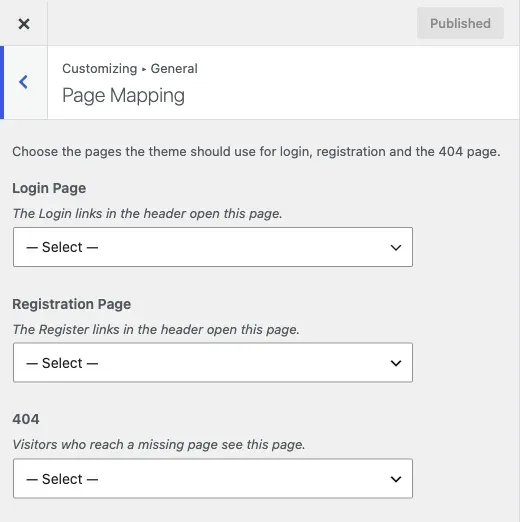
Go to Appearance > Customize > General > Page Mapping.
-
Under Login Page, pick the page people should see when they log in.
-
Under Registration Page, pick the page people should see when they sign up.
-
Under 404, pick the page to show when a link is broken. Read “Good to know” below before you do this.
-
Click Publish.
Each picker starts at “— Select a Page —”. That means WordPress uses its own page.
You’ll know it worked when
Section titled “You’ll know it worked when”Log out and click Login or Register in the header. You land on the pages you picked. Type a made-up address on your site to test the 404 page.
Good to know
Section titled “Good to know”Use either a mapped login page or the branded login screen, not both. The branded screen restyles the standard login screen. A mapped page replaces it.
Why does my Register button go to a 404?
Section titled “Why does my Register button go to a 404?”The page you picked may be unpublished or deleted. Check that it is published. On a community site, also check that the community plugin has its Register page set. See member or group pages return 404 for a worked example.
Why does my broken link show a normal page and not an error?
Section titled “Why does my broken link show a normal page and not an error?”That is how a custom 404 page works. Reign sends visitors to your page, so the address no longer looks broken. When you fix a bad link, set the 404 picker back to “— Select a Page —” so you can see the real response.
Is a custom 404 page bad for search engines?
Section titled “Is a custom 404 page bad for search engines?”It can be. A real 404 tells Google the page is gone. A redirect to a normal page tells Google the address moved. Many broken addresses then look like deliberate redirects. Use a custom 404 as a friendly landing spot, such as a search page. If you see many 404s, fix the links or add real redirects instead.
For developers
Section titled “For developers”Reign hooks template_redirect. On any request WordPress already treats as a 404, it calls wp_safe_redirect() to the mapped page. Static assets, AJAX, REST and admin requests are excluded.