

Make pages load faster (Smart performance)
Also called: speed, faster site, page speed, performance, reduce CSS, unused CSS, load time, load styles per page.
What this does
Section titled “What this does”Reign has styles and scripts for plugins such as WooCommerce, BuddyPress, LearnDash and bbPress. With this switch on, each plugin’s files load only on pages that use that plugin. Pages carry less weight.
This is not a cache. It does not minify or combine files.
-
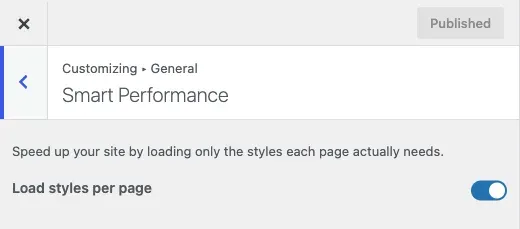
Go to Appearance > Customize > General > Smart Performance.
-
Check that Load styles per page is on. It is on by default since 8.0.0.
-
Click Publish.
You’ll know it worked when
Section titled “You’ll know it worked when”A page without a shop or a course no longer loads that plugin’s styles. Open your browser’s developer tools, then the Network tab, to check.
Good to know
Section titled “Good to know”Should I turn it off?
Section titled “Should I turn it off?”Leave it on. Turn it off only as a quick test if a page looks unstyled and you cannot find why. Off, every plugin’s files load on every page.
Why did my styles break after I turned it on?
Section titled “Why did my styles break after I turned it on?”A page was not recognised as using that plugin. Turn the switch off to confirm. Then report the page so it can be fixed. Do not leave the switch off for good.
LifterLMS styles also load when a LifterLMS shortcode or block shows up in a place Reign cannot see ahead of time. Examples are a page builder widget, a widget area or a template.
Does this replace a caching plugin?
Section titled “Does this replace a caching plugin?”No. The main theme stylesheet loads as one file on every page, whatever this switch says. For page caching or per-page critical CSS, use a cache plugin such as WP Rocket, LiteSpeed Cache or Perfmatters. Reign does not get in their way.