

WB Listora Documentation
Building a business directory on WordPress usually means stitching together a listings plugin, a reviews plugin, maps, and a search add-on.
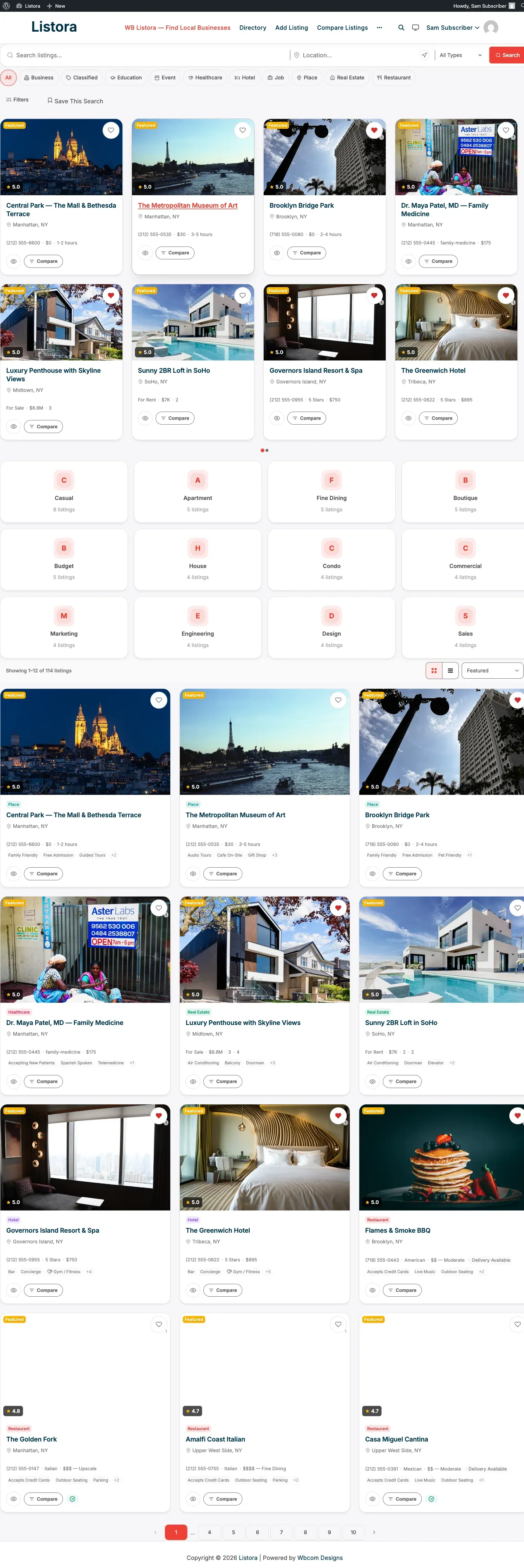
WB Listora is a complete WordPress directory plugin. Build any type of listing directory - business, restaurant, hotel, real estate, jobs, events, and more - using native Gutenberg blocks and the WordPress Interactivity API.
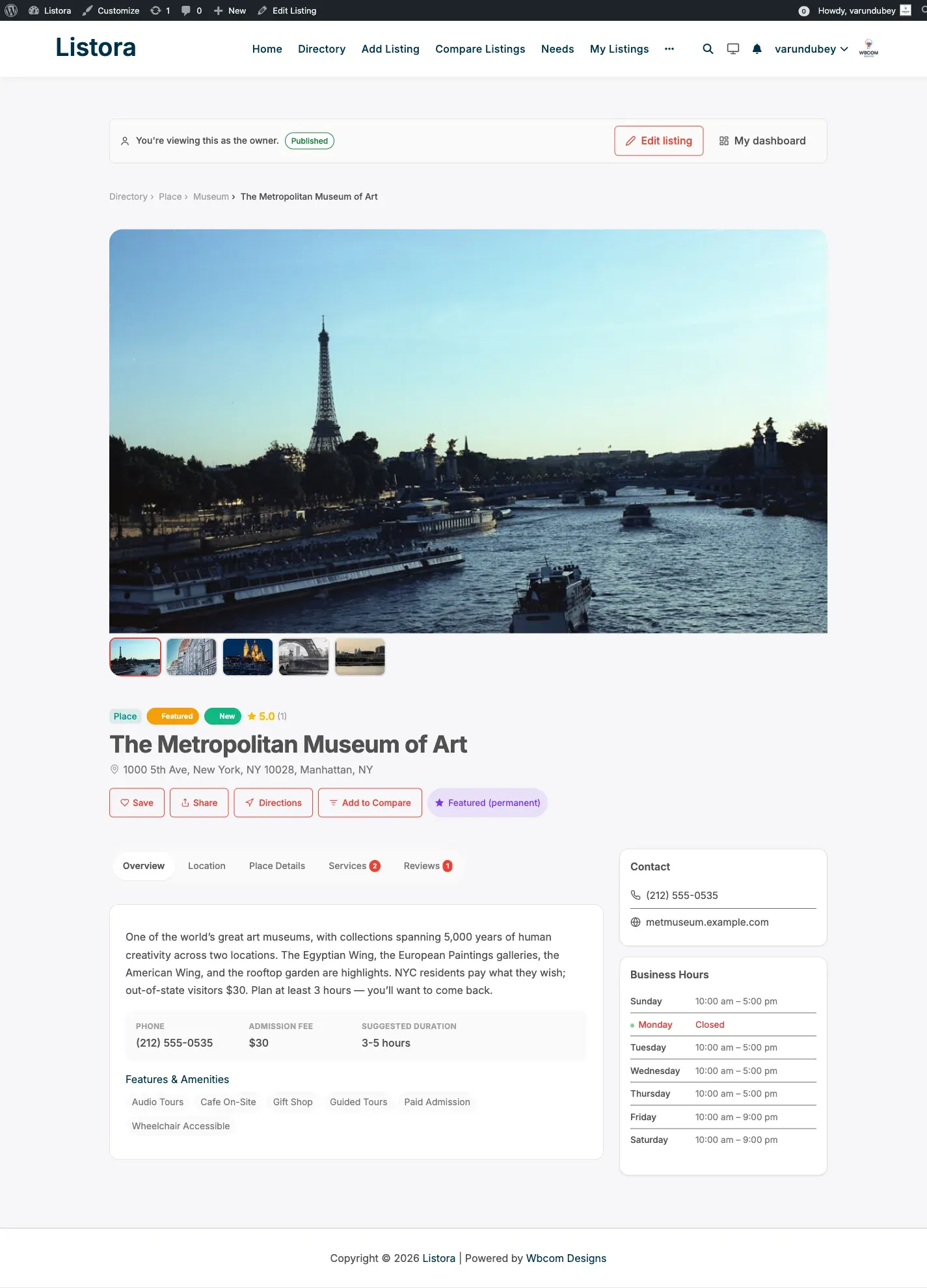
Single listing page
Section titled “Single listing page”Each listing renders with a uniform tabbed layout: Overview, Location (with embedded map), Place Details, Services, and Reviews. Empty tabs are suppressed automatically. The gallery, ratings, save / share / directions actions, and a sidebar with contact info + business hours sit alongside.
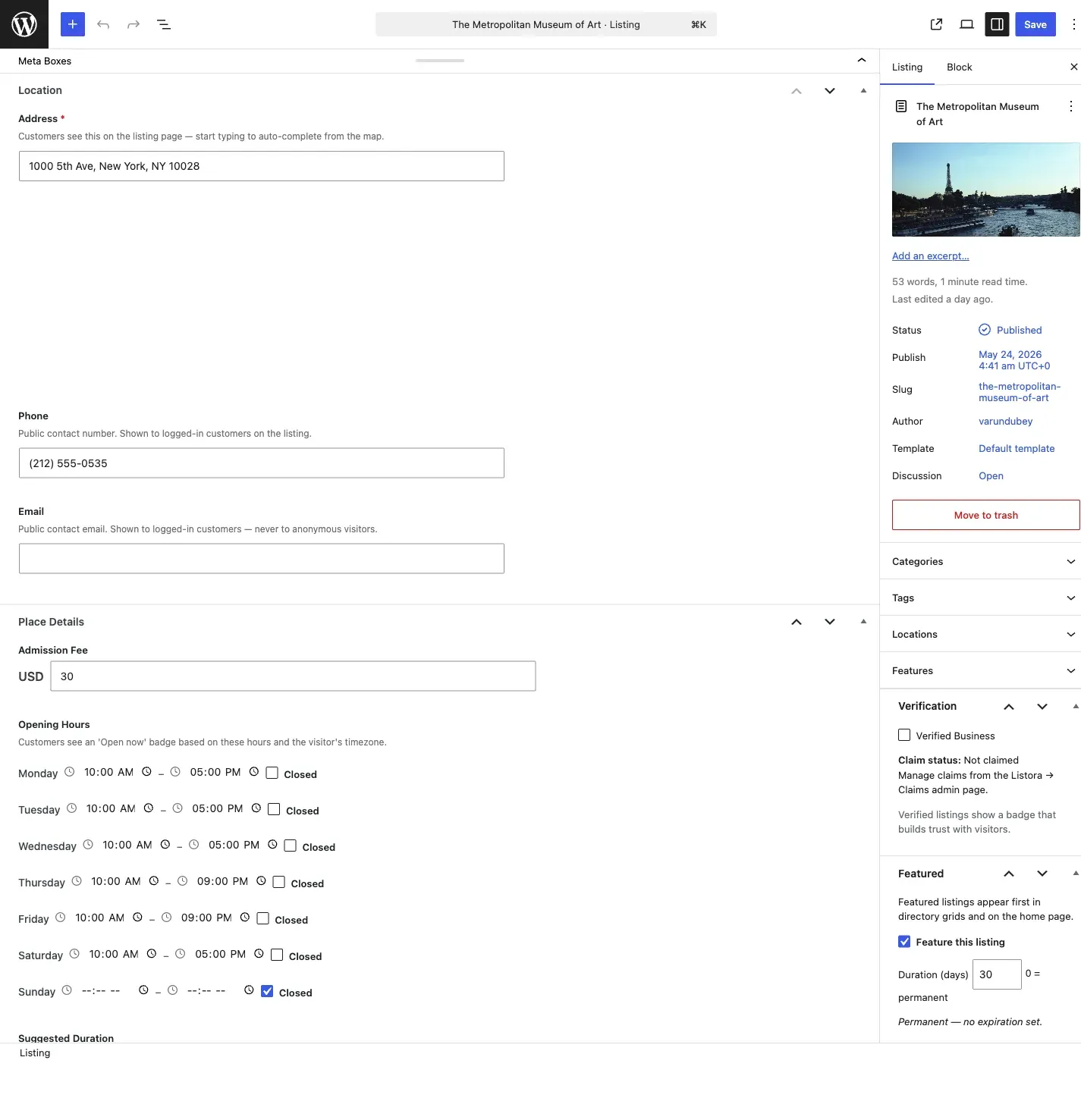
Editing listings in wp-admin
Section titled “Editing listings in wp-admin”Site admins and editors edit every listing field directly from the WordPress edit screen. The edit page now exposes a meta box per type-defined field group (Location, Place Details, Media, Services) alongside the existing Verification, Featured, and Badges boxes. No more switching to the frontend submission wizard to change a phone number or business hour.
This documentation covers both WB Listora Free and WB Listora Pro. Pages that document Pro-only features are marked with a Pro feature callout at the top. Browse by what you’re trying to do:
Find the docs you need by role
Section titled “Find the docs you need by role”Setup & Configuration
Section titled “Setup & Configuration”“How do I install and configure my directory?”
Start here if you’re standing up a new directory. Covers installation, the setup wizard, your first directory page, listing types, Pro activation, and every settings tab.
For Site Owners
Section titled “For Site Owners”“How do I run my directory day-to-day?”
Moderating reviews, approving claims, managing moderators (Pro), tracking analytics (Pro), running coupons (Pro), awarding verification badges (Pro), coming-soon mode (Pro), white-label (Pro).
For Listing Owners
Section titled “For Listing Owners”“How do I add and manage my listings?”
Submitting a listing from the frontend, the user dashboard, adding services, and (Pro) buying credits to activate listing plans.
For Visitors
Section titled “For Visitors”“How do I find what I need and engage with listings?”
Search and filters, saving favorites, saved-search alerts (Pro), writing reviews (incl. multi-criteria and photo reviews on Pro), contacting owners through the contact form, comparing listings (Pro), posting needs to the reverse marketplace (Pro).
“How do I use maps in my directory?”
OpenStreetMap on Free (no API key), Google Maps on Pro (Places autocomplete, marker clustering).
→ Maps
Migration & Import
Section titled “Migration & Import”“How do I move from another directory plugin?”
Step-by-step guides for migrating from Directorist, GeoDirectory, Business Directory Plugin, and ListingPro.
Developer Reference
Section titled “ Developer Reference”“How do I extend or integrate with WB Listora?”
The 11 Free + 5 Pro Gutenberg blocks, every action and filter hook, the complete REST API contract, custom-field types, and the Pro extension surface.
Setup & Configuration
Section titled “Setup & Configuration”Bring your directory online in under an hour.
| What you do | Guide |
|---|---|
| 1. Install WB Listora | Installation & Activation |
| 2. Run the setup wizard | Setup Wizard |
| 3. Create your directory page | Creating Your Directory Page |
| 4. Define listing types (Restaurant, Hotel, etc.) | Understanding Listing Types |
| 5. (Pro) Install and activate WB Listora Pro | Installing WB Listora Pro |
| 6. (Pro) Activate your license key | License Management (Pro) |
| Configure global behaviour | General Settings |
| Tune search behaviour | Search Settings |
| Configure submission & moderation | Submission & Moderation Settings |
For Site Owners
Section titled “For Site Owners”Day-to-day operation of your directory.
| What you do | Guide |
|---|---|
| Manage star ratings, written reviews, helpful votes, replies | Reviews & Ratings |
| Approve or reject business claim requests | Business Claims |
| (Pro) Assign trusted team members as moderators | Moderator Role (Pro) |
| (Pro) Track views and clicks per listing | Analytics (Pro) |
| (Pro) Create discount codes for listing plans | Coupons (Pro) |
| (Pro) Award verified badges to vetted businesses | Verification Badges (Pro) |
| (Pro) Hide the directory while setting up, or run a members-only directory | Coming Soon & Private Mode (Pro) |
| (Pro) Rename the plugin for client handoff | White Label (Pro) |
| (Pro) Batch notifications into a daily digest | Digest Notifications (Pro) |
For Listing Owners
Section titled “For Listing Owners”Adding and managing your own listings.
| What you do | Guide |
|---|---|
| Submit a listing from the frontend | Submitting a Listing |
| Manage your listings, reviews, favorites from one place | User Dashboard |
| Add a service catalog to your listing | Services on Your Listing |
| (Pro) Purchase credits and activate a listing plan | Credits & Pricing Plans (Pro) |
For Visitors
Section titled “For Visitors”Finding what you need and engaging with listings.
| What you do | Guide |
|---|---|
| Search, filter, narrow by geography | Search & Filters |
| Save listings to revisit | Favorites |
| (Pro) Save a search and get daily email alerts when new matches arrive | Saved Searches (Pro) |
| Write a review (star rating + text) | Reviews & Ratings |
| (Pro) Rate per criterion (Food, Service, Ambiance for restaurants etc.) | Multi-Criteria Reviews (Pro) |
| (Pro) Attach photos to your review | Photo Reviews (Pro) |
| Contact a listing owner | Contact Form |
| (Pro) Compare listings side by side | Documentation in progress - see Comparison block |
| (Pro) Post what you need; businesses respond | Needs Marketplace (Pro) |
Maps in WB Listora work on both Free and Pro - the difference is the provider.
| What you do | Guide |
|---|---|
| Use OpenStreetMap (no API key required) | OpenStreetMap (Free) |
| (Pro) Replace OSM with Google Maps + Places autocomplete + clustering | Google Maps (Pro) |
Migration & Import
Section titled “Migration & Import”Moving from another directory plugin?
Developer Reference
Section titled “Developer Reference”Build on top of WB Listora.
| What you need | Guide |
|---|---|
| Block-by-block overview (11 Free + 5 Pro blocks) | Gutenberg Blocks Overview |
| Every action and filter hook | Hooks Reference |
| Full REST API contract | REST API |
| Define your own field types | Custom Fields & Field Types |
| Extend the Free plugin from Pro or a third-party add-on | Extending with WB Listora Pro |
Also useful
Section titled “Also useful”- Feature Catalog - every feature on one page, with tier (Free / Pro) and audience.
- Why WB Listora? - what makes it different from competitors.
- Plugin Comparison - side-by-side vs other directory plugins.
Start here
Section titled “Start here”All documentation
Section titled “All documentation”Video tutorials
Section titled “Video tutorials”71 tutorials in 11 series. Each one opens in the video library on listora.org, with chapters and a transcript.
How to Find Your Way Around the Listora Admin in WB Listora 3:11
Tutorials: Start Here6 videos
Set up the directory from a fresh install: the admin, the wizard, the pages, your basics, features and your first listing.
- How to Find Your Way Around the Listora Admin in WB Listora 3:11
- How to Run the Setup Wizard in WB Listora 3:03
- How to Connect the Directory Pages in WB Listora 2:23
- How to Set Your Directory Basics in WB Listora 2:35
- How to Turn Directory Features On or Off in WB Listora 2:26
- How to Add a Listing from the WordPress Admin in WB Listora 2:50
Tutorials: Listing Types and Fields6 videos
Choose listing types, add and arrange fields, hide fields, set moderation and reviews per type, and rate several aspects.
- How to Choose the Listing Types Your Directory Offers in WB Listora 2:17
- How to Add and Arrange the Fields of a Listing Type in WB Listora 2:30
- How to Hide a Field from the Listing Page or the API in WB Listora 2:15
- How to Set Moderation and Reviews for One Listing Type in WB Listora 2:23
- How to Create a New Listing Type in WB Listora 2:25
- How to Rate Listings on Several Aspects in WB Listora Pro 2:19
Tutorials: Categories and Places5 videos
Categories with icons, locations by country, state and city, features and amenities, and term pages.
- How to Add Categories with an Icon and a Colour in WB Listora 2:28
- How to Build Your Locations: Country, State and City in WB Listora 2:02
- How to Add Features, Amenities and Tags for Each Type in WB Listora 2:35
- How to Use Category, Location, Tag and Feature Pages in WB Listora 1:58
- How to Show a Browse Categories Page in WB Listora 2:17
Tutorials: For Business Owners11 videos
Add a listing, hours, photos and video, services, the dashboard, reviews, leads, claims and your emails.
- How to Add a Listing from the Front End in WB Listora 2:46
- How to Set Business Hours, Including Split Shifts, in WB Listora 2:16
- How to Add Photos and a Video to a Listing in WB Listora 1:53
- How to Add Services with Prices to a Listing in WB Listora 2:03
- How to Use My Dashboard in WB Listora 2:13
- How to Deactivate or Reactivate a Listing in WB Listora 1:35
- How to Reply to Reviews on Your Listing in WB Listora 1:51
- How to Read the Messages People Send You (Leads) in WB Listora 1:52
- How to Claim a Business Listing in WB Listora 1:55
- How to Edit Your Profile and Choose Your Emails in WB Listora 1:52
- How to Block a Member in WB Listora 1:38
Tutorials: For Visitors10 videos
Search and filter, find listings near you, reviews, favorites, contacting owners, reporting, featured listings, events and compare.
- How to Search and Filter the Directory in WB Listora 2:28
- How to Find Listings Near You on the Map in WB Listora 2:23
- How to Find Your Way Around a Listing Page in WB Listora 2:21
- How to Write a Review in WB Listora 2:20
- How to Save Listings to Your Favorites in WB Listora 1:54
- How to Send a Message to a Listing Owner in WB Listora 1:36
- How to Report a Listing in WB Listora 1:37
- How to Show Featured Listings in WB Listora 2:15
- How to Show Event Listings on a Calendar in WB Listora 1:58
- How to Compare Listings Side by Side and Use Quick View in WB Listora 2:27
Tutorials: Moderation and Trust9 videos
Approve listings, reviews and claims, handle reports, spam, moderators, verification, badges and the audit log.
- How to Approve or Reject New Listings in WB Listora 2:21
- How to Moderate Reviews in WB Listora 2:14
- How to Approve or Reject an Ownership Claim in WB Listora 2:04
- How to Handle a Reported Listing in WB Listora 1:53
- How to Protect Your Forms from Spam with a CAPTCHA in WB Listora 1:54
- How to Add Moderators Who Are Not Admins in WB Listora 2:24
- How to Mark a Business as Verified in WB Listora 2:03
- How to Create Badges for Listings in WB Listora 2:25
- How to Read the Audit Log in WB Listora 1:50
Tutorials: Emails and Leads4 videos
Choose and edit emails, the email log, every lead in one place and daily digests.
Tutorials: Listora Pro12 videos
Analytics, photo reviews, saved searches, SEO pages, plans, credits, coupons, transactions, post-a-need, webhooks, visibility and white label.
- How to Read Directory Analytics in WB Listora 2:37
- How to Let Reviewers Add Photos in WB Listora 1:40
- How to Save a Search and Get Alerts in WB Listora 1:45
- How to Create SEO Landing Pages for a Type in a Place in WB Listora 2:31
- How to Sell Listing Plans in WB Listora 2:14
- How to Sell Credit Packs in WB Listora 2:11
- How to Add Coupons for Listing Plans in WB Listora 2:03
- How to Read Transactions and Set Up Receipts in WB Listora 2:21
- How to Run a Post a Need Marketplace in WB Listora 2:53
- How to Send Listing Events to Other Apps with Webhooks in WB Listora 2:07
- How to Make the Directory Private or Coming Soon in WB Listora 2:09
- How to Rename Listora for Your Clients with White Label in WB Listora 1:47
Tutorials: Import, Export and Maintenance4 videos
Import, export and migrate, the visual importer, map providers and maintenance.
Tutorials: With BuddyNext2 videos
Show listings in the BuddyNext feed and on profiles, and add businesses to a space.
Tutorials: What's New2 videos
Short walkthroughs of what changed in the latest WB Listora releases: owner replies to reviews, deleting your own listing, review moderators and credit receipts.