

Coming Soon Mode
Listora overviewFree + ProGet Listora →
Availability: Pro only. Requires WB Listora Pro. Free sites are always publicly visible once the directory page is published.
What it does
Section titled “What it does”Coming Soon Mode hides your directory from the public while you set up content, configure settings, and import listings. Users with the manage_listora_settings capability (administrators) keep full access. Everyone else, including logged-in members, sees a “Coming Soon” page instead of the directory.
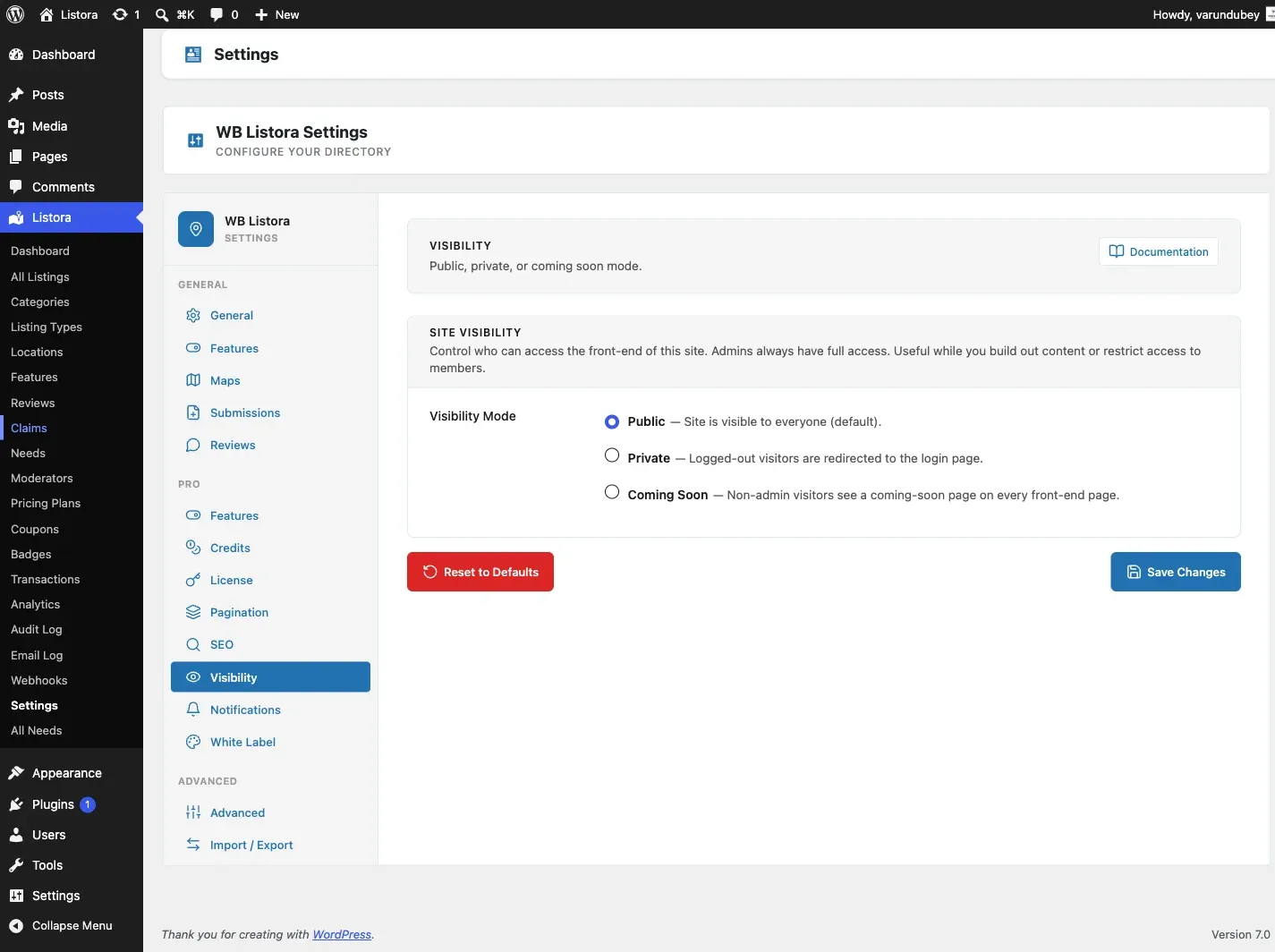
There is also a Private mode that sends logged-out visitors to the login page and lets every logged-in member in - useful for members-only directories. Both modes can cover just the directory or the whole site.
Why you’d use it
Section titled “Why you’d use it”- Set up a complete directory before going public - no half-finished pages visible to visitors or search engines.
- The Coming Soon page is noindex by default, keeping your directory out of Google until it’s ready.
- Private mode creates a gated directory accessible only to registered users.
- Private mode lets clients or stakeholders preview the directory with an ordinary member account, without making it public.
How to use it
Section titled “How to use it”For site owners (admin steps)
Section titled “For site owners (admin steps)”- Go to Listora → Settings → Visibility. The tab is always there while Pro is active; there is no Features toggle to switch on first.
- Under Site Visibility, choose a Visibility Mode:
- Public - the directory is visible to everyone (default).
- Private - logged-out visitors who open your directory are sent to the login page and back to the page they asked for after logging in. Every logged-in user can see it.
- Coming Soon - every visitor except administrators sees the Coming Soon page, logged-in members included.
- Choose what it Applies To:
- Directory only (default) - listings, directory pages, member listing tabs, listing search, sitemaps and the API are hidden. The rest of your site stays public.
- Whole site - every front-end page is hidden, not just the directory. The setting has no effect while the mode is Public. A site that was already Private or Coming Soon before this option existed was set to Whole site on update, so nothing it hid becomes visible.
- Save settings.
Who can bypass Coming Soon and Private mode:
Users with the manage_listora_settings capability (administrators) see everything in every mode. In Private mode, any other logged-in user with the standard read capability (every role from Subscriber up) can see the directory too. A logged-in user without it gets an “Access denied” page.
The Coming Soon page:
The built-in page shows the heading “Our Directory is Coming Soon!”, a short message and a link back to your site, and the browser tab reads “Your Site Name - Coming Soon”. It includes a noindex, nofollow meta tag to keep search engines out, and it follows the visitor’s prefers-color-scheme setting for dark mode.
The page is built in, so there is no template to override. Developers can change which requests are gated with the wb_listora_pro_visibility_should_gate filter.
Switching back to public:
Change Directory Visibility back to Public and save. The directory is immediately accessible to all visitors.
For end users (visitor/user-facing)
Section titled “For end users (visitor/user-facing)”In Coming Soon mode, visitors to a directory page (a listing URL, an archive, a taxonomy page or a page with a Listora block) see the Coming Soon page. With Whole site selected, they see it on every page.
In Private mode, visitors are redirected to the WordPress login page. After logging in, they are sent back to the page they requested.
- Use Coming Soon mode during a migration from another directory plugin. Import and verify all content before going public.
- With Directory only, your regular WordPress pages stay public. Only directory pages are intercepted. Choose Whole site to hide those too.
- To let clients preview the directory without admin access, use Private mode and give them a Subscriber account. Coming Soon mode shows its page to every non-administrator, even when logged in.
- Switch to Public mode at a specific date and time by scheduling it manually - Coming Soon has no built-in countdown timer, but you can schedule an admin task or use a WordPress scheduler plugin.
- Private mode lets in anyone logged in who has the standard
readcapability, which every default WordPress role has.
Common issues
Section titled “Common issues”| Symptom | Fix |
|---|---|
| Admin still seeing Coming Soon page | Confirm your user account has the manage_listora_settings capability - Administrators have it by default |
| Regular site pages showing Coming Soon | Applies To is set to Whole site. Switch it to Directory only. If it is already Directory only, a page with a Listora block counts as a directory page. |
| A logged-in member sees Coming Soon | By design: only administrators bypass it. Use Private mode for member access. |
| Coming Soon page not showing your site name | Ensure your site name is set under Settings → General → Site Title |
| Google still indexing the directory | Coming Soon adds noindex to the page; it may take Google several weeks to deindex existing pages |