

Advanced Search
Listora overviewFree + ProGet Listora →
Availability: Pro only. Requires WB Listora Pro. Power-user search that goes beyond keyword + category - multi-facet filtering (price range, rating, distance radius, custom field values), saved-search alerts that email new matches daily, and a wider field weight tuned for relevance. Built on the same query engine as Free search, just unlocked with more signal.
What it is
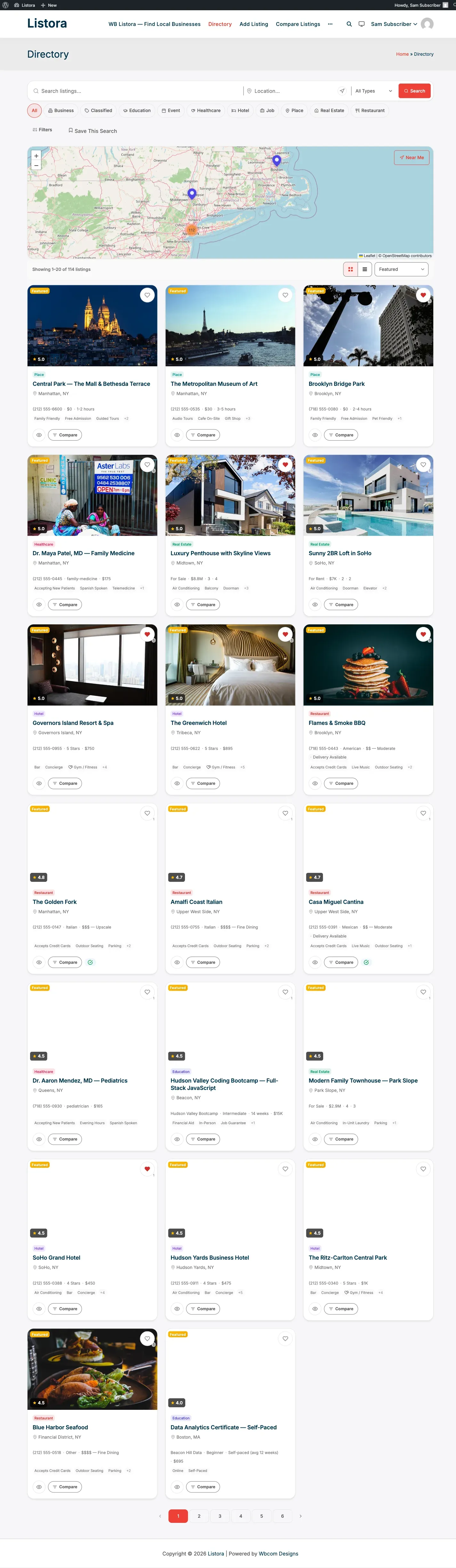
Section titled “What it is”Free WB Listora ships a solid search experience - keyword + listing type + category + map radius. Advanced Search extends it for the segments that need more:
- Multi-facet UI - open a “More filters” panel and combine: keyword, type, category, location (with adjustable radius), price range, rating threshold, custom-field values (e.g. amenities for hotels, “remote OK” for jobs), open-now-only for businesses with hours.
- Saved searches - once a visitor finds a filter combo they like, they save it (in their
wp_user_metaunder_listora_saved_searches). - Daily email alerts - Action Scheduler job
wb_listora_pro_saved_search_alertsruns daily, finds new listings matching any user’s saved searches since the last run, and emails matches via thesaved-search-alert.phptemplate. - Tuned relevance - Advanced Search uses a different MySQL
MATCH AGAINSTweight + a larger candidate pool than Free search, so long-tail queries return more results. - REST routes -
GET /listora/v1/saved-searches,POST /listora/v1/saved-searches,PATCH /listora/v1/saved-searches/{id},DELETE /listora/v1/saved-searches/{id}- usable by your own mobile app.
Combined with Programmatic SEO Pages, Advanced Search turns the directory into a real search destination - not just a browsing surface.
How you use it
Section titled “How you use it”As a site owner - enable + configure
Section titled “As a site owner - enable + configure”- Enable the feature: Listora → Settings → Features → Saved Searches & Alerts (default: off per product design - turn on intentionally; defaults emphasize the simpler search UX).
- Visit your Directory page in an incognito window - verify a More filters button appears next to the existing search bar. Click it; the multi-facet panel slides open.
- Saved-search alerts: members switch email alerts on or off for each saved search from their own dashboard. There is no site-wide alerts setting, and there are no settings for which filters appear.
As a visitor - power-search
Section titled “As a visitor - power-search”- On the Directory page, click More filters.
- Set price range, rating, radius, custom fields. Hit Apply.
- The grid + map update. Refine until you have what you want.
- Click Save this search → name it (“Pet-friendly hotels in NYC under $200”). The search is stored against your user account.
- From now on, when a new listing matches your search, you receive an email digest (daily) listing the matches with one-click links.
- Manage saved searches from your dashboard → Saved Searches tab - edit, rename, disable, delete.
Settings & options
Section titled “Settings & options”| Setting | Location | Default | Notes |
|---|---|---|---|
| Feature toggle | Settings → Features → Saved Searches & Alerts | Off | Off by default - enable if your audience benefits from filter density |
| Email alerts | Each saved search, in the member’s dashboard | Set per saved search | The daily run is scheduled for you |
| Alert cron | wb_listora_pro_saved_search_alerts |
Daily | Action Scheduler |
| Storage (saved searches) | wp_usermeta._listora_saved_searches |
- | Per-user, JSON-encoded |
| Storage (alert state) | wp_usermeta._listora_saved_search_last_alert_at |
- | Per-saved-search timestamp |
REST routes (logged-in):
GET /wp-json/listora/v1/saved-searches- list the current user’s saved searches.POST /wp-json/listora/v1/saved-searches- create one.PATCH /wp-json/listora/v1/saved-searches/{id}- rename, change filter, toggle alerts.DELETE /wp-json/listora/v1/saved-searches/{id}- delete.
Developer hooks:
wb_listora_pro_advanced_search_facets(filter) - modify the facet list shown in the More-Filters panel per page.wb_listora_pro_saved_search_alert_subject(filter) - modify the daily alert email subject.wb_listora_pro_saved_search_match_query(filter) - modify the candidate-match SQL (e.g. exclude listings older than 1 hour).
Related
Section titled “Related”- Search & Filters (Free) - the underlying search engine; Advanced Search is the extended UX on top.
- Saved Searches (Pro) - companion doc focused on the alert flow specifically.
- Programmatic SEO Pages (Pro) - turn high-value filter combinations into indexed landing pages.
- Developer Reference: REST API -
/saved-searches/*endpoint shapes.