

Top bar: phone, email and social icons (Topbar)
Also called: top bar, announcement bar, notice bar, contact bar, info bar, utility bar, top strip.
Not to be confused with the Header. The Header holds your logo and menu, below the top bar. The page title banner is the Page title area (Sub header).
What this does
Section titled “What this does”The top bar is a thin strip at the very top of every page, above your logo. Use it for a phone number, an email address, opening hours and links to your social profiles.
-
Go to Appearance > Customize > Header > Topbar.
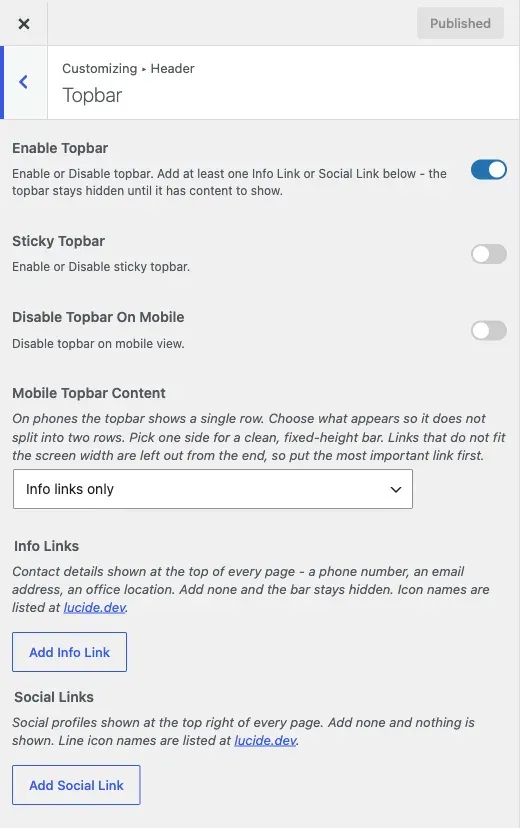
-
Turn on Enable Topbar.
-
Add at least one row under Info Links or Social Links. Until you do, the bar stays hidden on purpose, so a new site never shows an empty coloured strip.
-
For each Info Links row, add a title, an icon name and an optional link. Use names such as
phone,mail,map-pinorclock. The full list is at lucide.dev/icons. Start phone links withtel:and email links withmailto:. -
For each Social Links row, add a title, an icon name and the full address of your profile. These names show the brand logo:
facebook,x,linkedin,pinterest,whatsapp,instagram,youtube,telegram,tiktokandreddit. Any other name shows a plain line icon, such asglobeorrss. -
Optional: turn on Sticky Topbar to keep the bar pinned to the top while visitors scroll. It is off by default.
-
Set how it looks on phones (see below), then click Publish.
You’ll know it worked when
Section titled “You’ll know it worked when”The strip shows above the header on every page. Info links show first, then social links, whatever order you added them in.

Good to know
Section titled “Good to know”Why is my top bar missing?
Section titled “Why is my top bar missing?”Enabling it is not enough. The bar shows nothing until you add one Info Link or Social Link.
How do I put my phone number at the very top?
Section titled “How do I put my phone number at the very top?”Add an Info Links row. Use the phone icon and a link such as tel:+15551234567.
How do I add social icons at the very top?
Section titled “How do I add social icons at the very top?”Add a Social Links row for each profile, with the icon name and the full address.
How do I change the top bar on phones?
Section titled “How do I change the top bar on phones?”A phone has room for one row only.
- Disable Topbar On Mobile removes the bar on small screens.
- Mobile Topbar Content appears when the bar is not disabled. Pick Info links only, Social links only or Both (may wrap on small screens). One side keeps the bar a clean height. Both can wrap if you have many links.
How many links should I add?
Section titled “How many links should I add?”Keep it to a few high-value details. Three icons are easier to scan than a dozen crowded into one strip.
Do my old Font Awesome icons still work?
Section titled “Do my old Font Awesome icons still work?”Yes. Icons set before 8.1.0 as a Font Awesome tag show as the matching line icon or logo. You only need the new names when you add or change a row.