

Login popup (Sign-in popup)
Also called: login popup, login modal, pop-up login, lightbox login, login form overlay, ajax login.
What this does
Section titled “What this does”The login popup opens the login form in a small window on top of the page. Visitors log in without leaving the page they are reading. It is off by default. This suits membership and community sites. Leave it off if you send people to a dedicated login page.
Which one do I need?
Section titled “Which one do I need?”Three settings change what visitors see when they log in. They do different jobs.
| I want to… | Use |
|---|---|
| Send the Login and Register buttons to my own pages, or set my own 404 page | Choose your login, register and 404 pages (Page mapping) |
| Let visitors log in from a window on top of the page they are reading | Login popup (Sign-in popup) |
| Put my logo and colours on the standard WordPress login screen | Put your logo on the login page (Branded login screen) |
If a popup is on, the Login button opens the popup. If not, and you picked a Login Page, it opens that page. Otherwise it opens the WordPress login screen, with your branding if you turned it on.
-
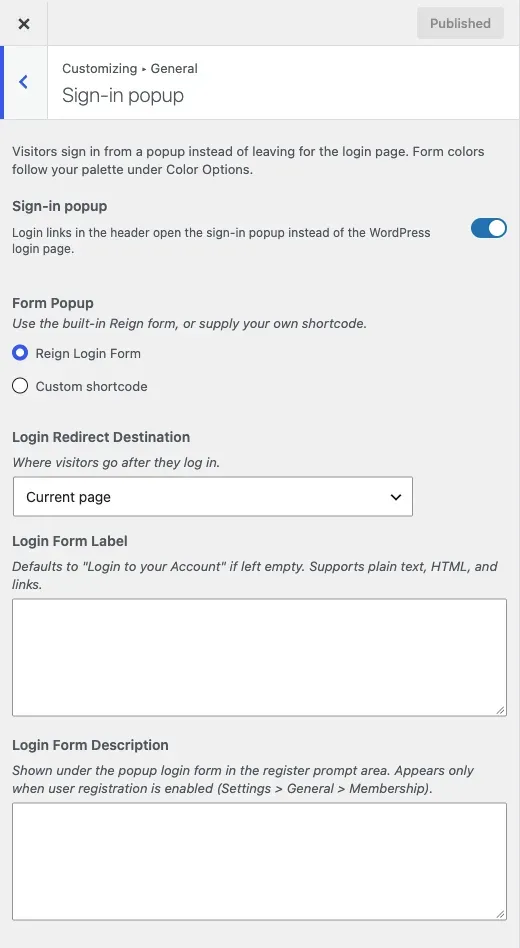
Go to Appearance > Customize > General > Sign-in popup.
-
Turn on Sign-in popup. This is the master switch.
-
Under Form Popup, choose what the popup shows:
- Reign Login Form is the theme’s own form. The other fields in this section control it.
- Custom shortcode lets you add your own HTML or shortcode in Popup Content. The built-in form fields are then hidden.
-
Optional: set Login Redirect Destination, Login Form Label and Login Form Description (see below).
-
Click Publish.
The form colours follow your colour palette under Color Options. There is nothing to style here.
You’ll know it worked when
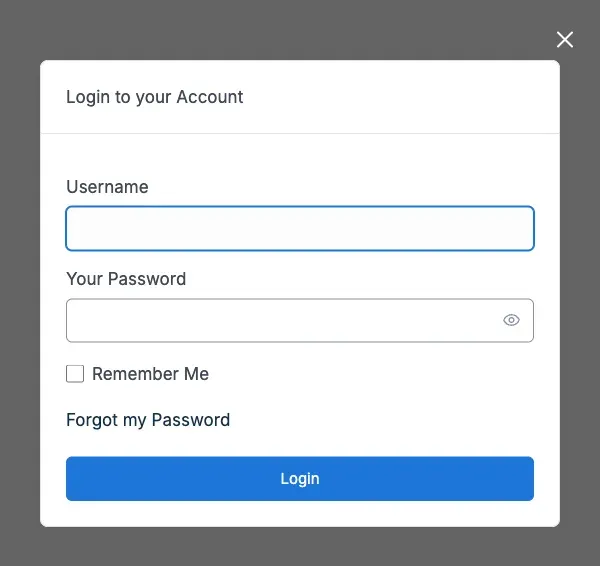
Section titled “You’ll know it worked when”Log out and click Login in the header. A window opens over the page, as in the picture below.
Good to know
Section titled “Good to know”Where does a person register?
Section titled “Where does a person register?”The popup is for logging in only. Its “create an account” link and the header Register button open your registration page. Reign picks it in this order:
- The Registration Page you chose in Page mapping, if it is published.
- Otherwise the WordPress registration address. With BuddyPress, that is the BuddyPress Register page and its Profile Fields.
The sign-up form belongs to WordPress or your community plugin, not to the theme. On BuddyPress, change the fields under Users > Profile Fields.
The Register button needs registration to be open. Go to Settings > General > Membership and tick Anyone can register. On BuddyPress, its own membership-requests setting also counts.
How do I send members to a page after they log in?
Section titled “How do I send members to a page after they log in?”Set Login Redirect Destination. With BuddyPress you can pick Profile page or Activity page. Choose Custom page and a Login Custom URL field appears. There is no setting for where people go after they log out.
How do I change the words in the popup?
Section titled “How do I change the words in the popup?”Login Form Label defaults to “Login to your Account.” Login Form Description appears under the form next to the create-an-account link. It only shows when registration is open. Both are optional and accept HTML and links.
How do I stop the popup and use my own login page?
Section titled “How do I stop the popup and use my own login page?”Turn Sign-in popup off. The Login button then opens the Login Page from Page mapping, or the WordPress login screen.
Does it work with security plugins, two-factor and captcha?
Section titled “Does it work with security plugins, two-factor and captcha?”Yes. The popup uses the normal WordPress login, so lockouts, captcha and two-factor rules still apply. If a plugin needs an extra step, such as a two-factor code, the form continues on the full login page.
Which screen does each header button open?
Section titled “Which screen does each header button open?”Reign checks in this order and the first match wins:
| # | Condition | Login button opens |
|---|---|---|
| 1 | Sign-in popup is on | the popup |
| 2 | A Login Page is set in Page mapping | that page |
| 3 | none of the above | wp-login.php (branded, if you styled it) |
The Register button always opens the registration page described above.
Do other plugins have their own sign-up pages?
Section titled “Do other plugins have their own sign-up pages?”Some do. Learnomy has a student registration page. WP Career Board has an employer page. Eventonomy lets people register for an event with just an email. See how each plugin signs people up.
What changed in 8.1.0?
Section titled “What changed in 8.1.0?”The popup no longer has its own sign-up form or magic link option. See what changed in 8.1.0.