

Activate your licence
Also called: license key, activate license, enter licence key, renewal, licence expired, no theme updates, update problems.
What this does
Section titled “What this does”A licence key turns on theme updates. Reign and its add-ons run without a key, and every feature works the same with or without one. Until you activate, you update by uploading a new zip by hand.
Each of the nine Reign add-ons is a paid product with its own key. The free Wbcom plugins in Reign Settings > Extend need no key at all. Reign add-ons links to the buy page of each add-on.
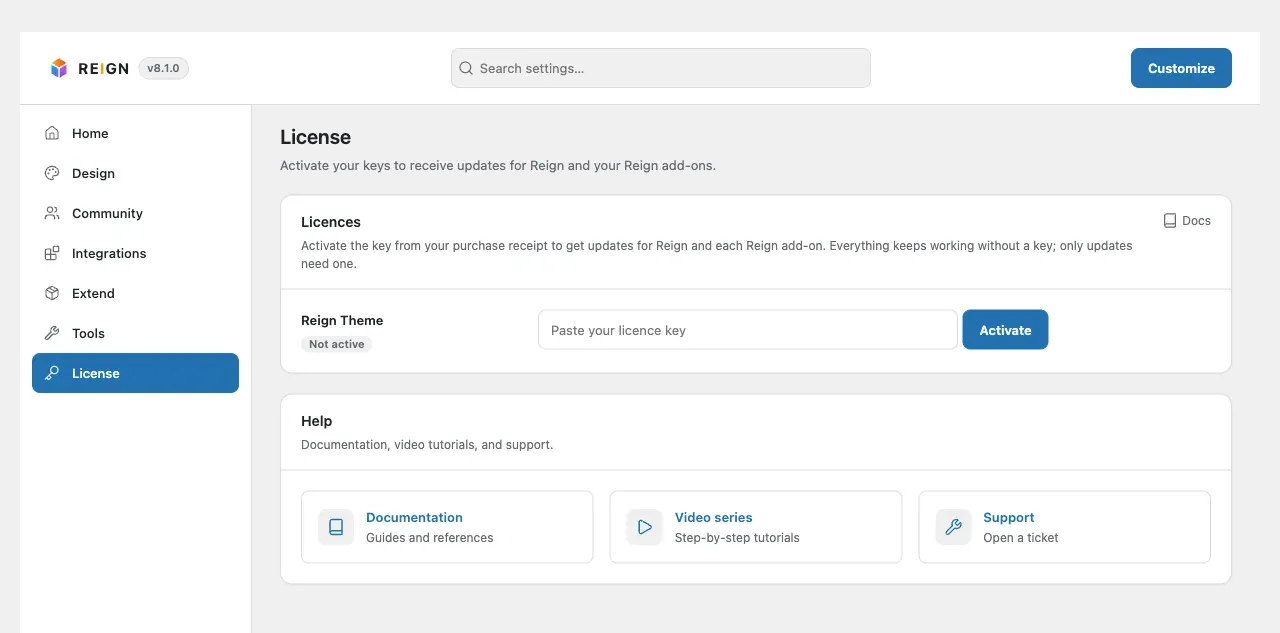
Since Reign 8.1.0 there is one License screen for the theme and every add-on. Each active add-on gets its own row on that screen.
Before you start
Section titled “Before you start”Find your key in your account at wbcomdesigns.com, under your purchase. It is a long string of letters and numbers. It is not your order number.
- In WordPress, go to Reign Settings > License. The License link under each Reign add-on on the Plugins screen opens the same place.
- Find the row for the product the key belongs to.
- Paste the key into the field on that row.
- Select Activate on that row.
To move a key to another site, select Deactivate on its row. The site lets go of the key once the licence server answers. If the server cannot be reached, the key stays and the row says so. Try again in a few minutes.
You’ll know it worked when
Section titled “You’ll know it worked when”The screen confirms the activation, and the row shows Active with its renewal date. From then on, updates appear on the WordPress Updates screen like any other theme or plugin.
Good to know
Section titled “Good to know”What does one licence cover?
Section titled “What does one licence cover?”A licence covers a set number of production sites. The count is per site, not per copy of the theme file. Staging and local development copies do not count. A subdomain counts as a separate site when it runs its own WordPress install. Check the tier you bought if you are not sure how many sites you may use.
I activated before 8.1.0. Do I enter my key again?
Section titled “I activated before 8.1.0. Do I enter my key again?”No. Keys you activated before 8.1.0 carry over by themselves. This happens the first time an administrator opens the dashboard after the update. Reign then checks each licence once a week. If the licence server cannot be reached, it keeps the last known status.
Why is my key refused?
Section titled “Why is my key refused?”Work through these in order. Most refusals are one of the first two.
- The key is for a different product. Each add-on has its own key, and it does not work for the theme. The screen says “This key is not for” the product. Paste the key into the row of the product you bought it for.
- Extra space came along with the key. Copying from an email often adds a space at the start or end. Clear the field, then paste again carefully.
- You have used every seat. The licence may already be active on its maximum number of sites. Deactivate it on a site you no longer use, then activate here. You can see your active sites in your account.
- The site cannot reach the licence server. Your host, a security plugin or a firewall may block outgoing requests. Ask your host to allow outgoing HTTPS to updates.wbcomdesigns.com and wbcomdesigns.com, then try again.
- Your subscription has lapsed. An expired licence stops validating. Renew from your account, then activate again.
If none of these apply, open a support ticket with your site address and the exact message on the License screen. More help is in licence problems after activating.
Why do I get no updates?
Section titled “Why do I get no updates?”Updates arrive only while a key is active. Check the row on Reign Settings > License shows Active. Then look at Dashboard > Updates.
What do I do next?
Section titled “What do I do next?”Choose your plugins for the site you are building. Then work through first configuration.
For developers
Section titled “For developers”Activation is an outgoing HTTPS request to updates.wbcomdesigns.com, with wbcomdesigns.com as the fallback. A host that blocks outgoing requests makes activation fail even with a correct key.