

Which Reign add-on do I need? (Reign add-ons)
Also called: addon, extension, LMS add-on, vendor add-on, compatibility plugin.
What this does
Section titled “What this does”An add-on is a plugin for one other plugin, such as LearnDash or Dokan. It adds extra layouts, buttons and community links for that plugin. Without it, the other plugin still works on Reign. It just uses its own look.
Nine add-ons exist. Every one is paid. Each has its own buy page and its own licence. The plugin each one extends is a separate product from its own maker.
Do I need one?
Section titled “Do I need one?”- Find the plugin you already run in the table below.
- Check “The plugin itself” to see if you need to buy that plugin too.
- Open the add-on’s guide to see what it adds.
| Add-on | For this plugin | Reign add-on | The plugin itself | Documentation |
|---|---|---|---|---|
| Reign LearnDash Addon | LearnDash | Paid. Buy Reign LearnDash Addon | LearnDash is sold by LearnDash. It is not free. | Reign LearnDash Addon guide |
| Reign LifterLMS Addon | LifterLMS | Paid. Buy Reign LifterLMS Addon | LifterLMS has a free edition from its maker. | Reign LifterLMS Addon guide |
| Reign Sensei Addon | Sensei LMS | Paid. Buy Reign Sensei Addon | Sensei LMS has a free edition from its maker. Sensei Pro is not tested with the add-on. | Reign Sensei Addon guide |
| Reign Tutor LMS Addon | Tutor LMS | Paid. Buy Reign Tutor LMS Addon | Tutor LMS has a free edition from its maker. | Reign Tutor LMS Addon guide |
| Reign Dokan Addon | Dokan | Paid. Buy Reign Dokan Addon | Dokan Lite is free and is enough. Dokan Pro is optional. | Reign Dokan Addon guide |
| Reign WCFM Addon | WCFM Marketplace | Paid. Buy Reign WCFM Addon | WCFM Marketplace has a free edition from its maker. | Reign WCFM Addon guide |
| Reign WC Vendors Addon | WC Vendors | Paid. Buy Reign WC Vendors Addon | WC Vendors Free and WC Vendors Pro both work. | Reign WC Vendors Addon guide |
| Reign WP Job Manager Addon | WP Job Manager | Paid. Buy Reign WP Job Manager Addon | WP Job Manager is free from its maker. | Reign WP Job Manager Addon guide |
| Reign GeoDirectory Addon | GeoDirectory | Paid. Buy Reign GeoDirectory Addon | GeoDirectory has a free edition from its maker. | Reign GeoDirectory Addon guide |
Not sure which screen changes what on a course, store, job or place page? See Courses, products, jobs and places: which screen changes what.
What do I get with the add-on that I do not get without it?
Section titled “What do I get with the add-on that I do not get without it?”Reign keeps small built-in styling only for WooCommerce, BuddyPress, bbPress, LearnDash, The Events Calendar, WP Job Manager and Elementor. Dokan, WCFM, WC Vendors, LifterLMS, Sensei, Tutor LMS and GeoDirectory work on Reign with their own look. They sit inside your header, footer, colours and fonts.
The add-on adds choices on top. The LearnDash add-on, for example, adds course page templates, archive layouts, buy buttons, shortcodes and widgets. It also links courses to BuddyPress or BuddyBoss. Each add-on page lists what that add-on adds.
Do I need an add-on on a brand new site?
Section titled “Do I need an add-on on a brand new site?”Often not. Reign has its own plugins that cover the same ground. Here is how they match:
| Instead of | Consider |
|---|---|
| LearnDash, LifterLMS, Sensei, Tutor LMS | Learnomy |
| bbPress | Jetonomy |
| The Events Calendar | Eventonomy |
| Dokan, WCFM, WC Vendors | WP Sell Services |
| WP Job Manager | WP Career Board |
| GeoDirectory | Listora |
If you start fresh with these, you do not need the third-party tool. You do not need its add-on either. Reign supports them directly, so there is nothing extra to buy.
If you already run LearnDash, Dokan or another tool in the table, keep it. The add-on is the right way to get the deeper link. Switching platforms just to avoid an add-on is rarely worth the move.
Before you start
Section titled “Before you start”Every add-on needs PHP 8.1, WordPress 6.5 and Reign 8.1.0. It also needs its own third-party plugin installed and active.
If one of these is missing or too old, the add-on pauses. It loads nothing and shows the notice “
This is the notice, shown when Sensei LMS is switched off.

Steps: install an add-on
Section titled “Steps: install an add-on”- Install and activate the third-party plugin first. The add-on has nothing to attach to without it.
- Install the add-on like any other plugin, from your account download.
- Go to Reign Settings > License and enter the add-on’s licence key. Add-on licences are separate from the theme licence. The two keys are not interchangeable.
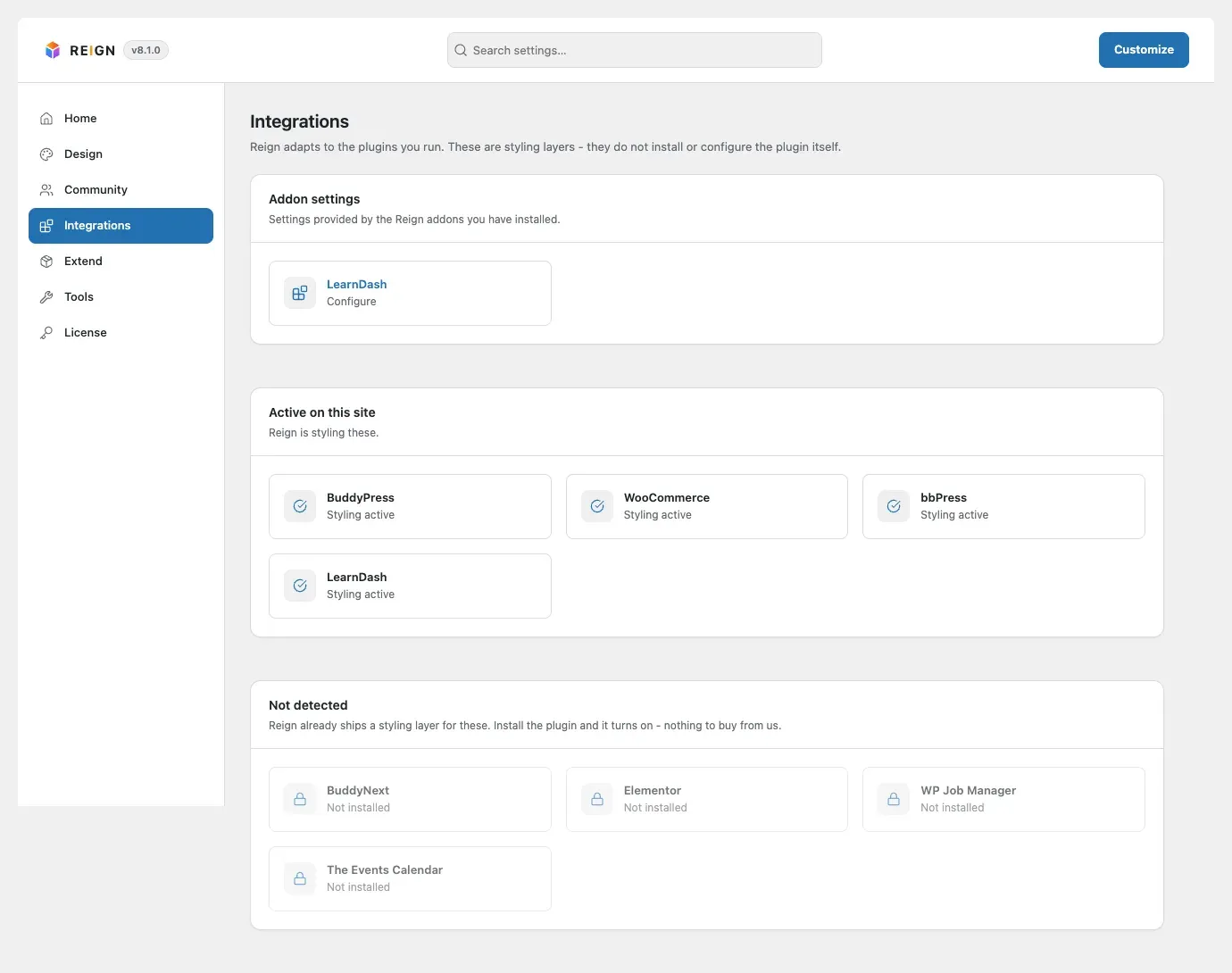
- Go to Reign Settings > Integrations. In the Addon settings card, select Configure on the add-on’s tile.
You’ll know it worked when
Section titled “You’ll know it worked when”The add-on’s tile appears in the Addon settings card, and no “paused” notice shows on your dashboard. Then the add-on’s own page in this section tells you what changes on your site.
Good to know
Section titled “Good to know”The add-on runs without a key. Is it free then?
Section titled “The add-on runs without a key. Is it free then?”No. It is a paid product. Without an active key you only miss updates.
Which add-on version goes with Reign 8.1?
Section titled “Which add-on version goes with Reign 8.1?”Each version below is built for Reign 8.1.0. On an older Reign, the add-on pauses and keeps its settings. An older add-on on Reign 8.1.0 keeps working. Reign shows a notice asking you to update it.
| Add-on | Version for Reign 8.1.0 |
|---|---|
| Reign LearnDash Addon | 5.2.0 |
| Reign Tutor LMS Addon | 2.3.0 |
| Reign LifterLMS Addon | 2.7.0 |
| Reign Sensei Addon | 2.0.0 |
| Reign WCFM Addon | 2.0.0 |
| Reign Dokan Addon | 3.9.0 |
| Reign WC Vendors Addon | 2.8.0 |
| Reign WP Job Manager Addon | 3.2.0 |
| Reign GeoDirectory Addon | 2.5.0 |
Updating from 8.0.8? Follow Updating from 8.0.x to 8.1.
Something looks wrong after an update. What do I do?
Section titled “Something looks wrong after an update. What do I do?”Update the theme and its add-ons in the same sitting. If a page looks odd, deactivate the add-on and reload. If the problem goes away, the add-on is the cause. That is the first thing a support ticket needs. See white screen after activating.