

Keep the menu visible when scrolling (Sticky menu)
Also called: sticky header, fixed header, header stays on top, floating menu, header follows me.
What this does
Section titled “What this does”A sticky header stays pinned to the top of the window while visitors scroll. Without it, the header scrolls out of view with the page.
-
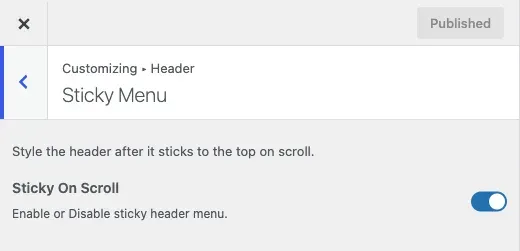
Go to Appearance > Customize > Header > Sticky Menu.
-
Turn Sticky On Scroll on or off. It is on by default.
-
Click Publish.
You’ll know it worked when
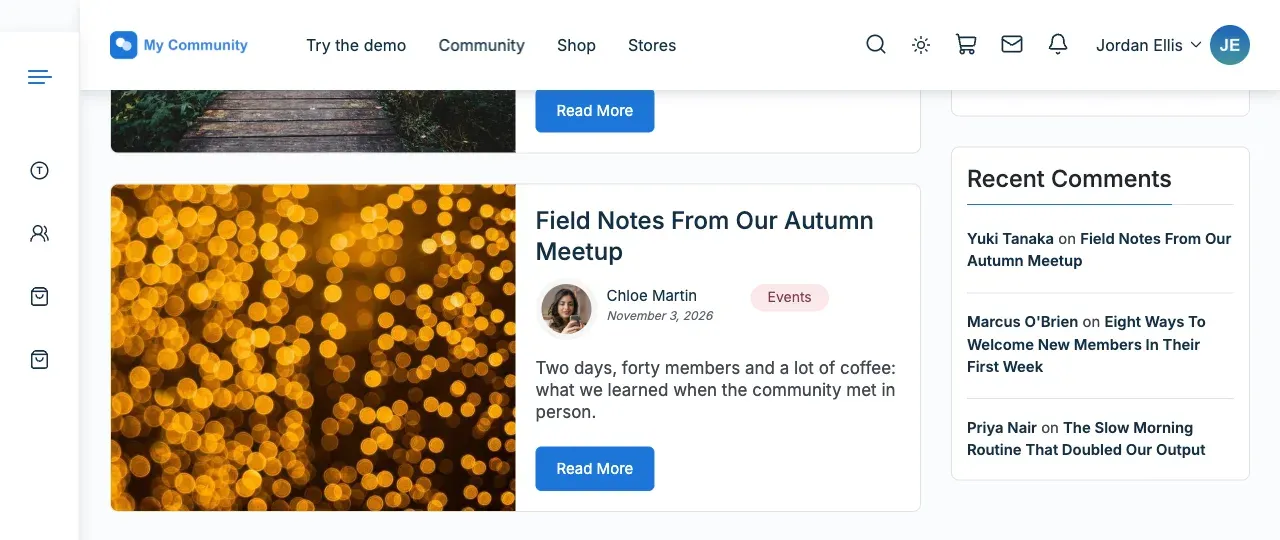
Section titled “You’ll know it worked when”Scroll down any page. The header stays at the top of the window.
Good to know
Section titled “Good to know”How do I change the colours of the stuck header?
Section titled “How do I change the colours of the stuck header?”The stuck header uses the same colours as the normal header. Set them once under Header style (Header layout) and Change your site colours. In dark mode it keeps the dark header colours.
Can I use a smaller logo or different colours when stuck?
Section titled “Can I use a smaller logo or different colours when stuck?”Not in 8.1.0. Version 8.1.0 removed the separate sticky colour controls. These were Customize Sticky Menu Style, the header background, site title, menu item and icon colours, and the alternate Sticky Header Logo. A site that saved colours there on an earlier version keeps them.
Does the side menu need this?
Section titled “Does the side menu need this?”Yes, for one option. Start below the header in the Side menu (Left panel) needs Sticky On Scroll on.