

What do you want to change?
Also called: where do I change this, find a setting, which setting changes what, where is the menu, where is the logo, theme options map.
What this does
Section titled “What this does”You see something on your site and want to change it. This page helps you find the right screen. Look at the picture, find the part you mean, and follow its link.
Most visual changes are in the Customizer. That is WordPress’s live editor. Open it at Appearance > Customize. You see your change in a preview before you save it.
Find the part on the picture
Section titled “Find the part on the picture”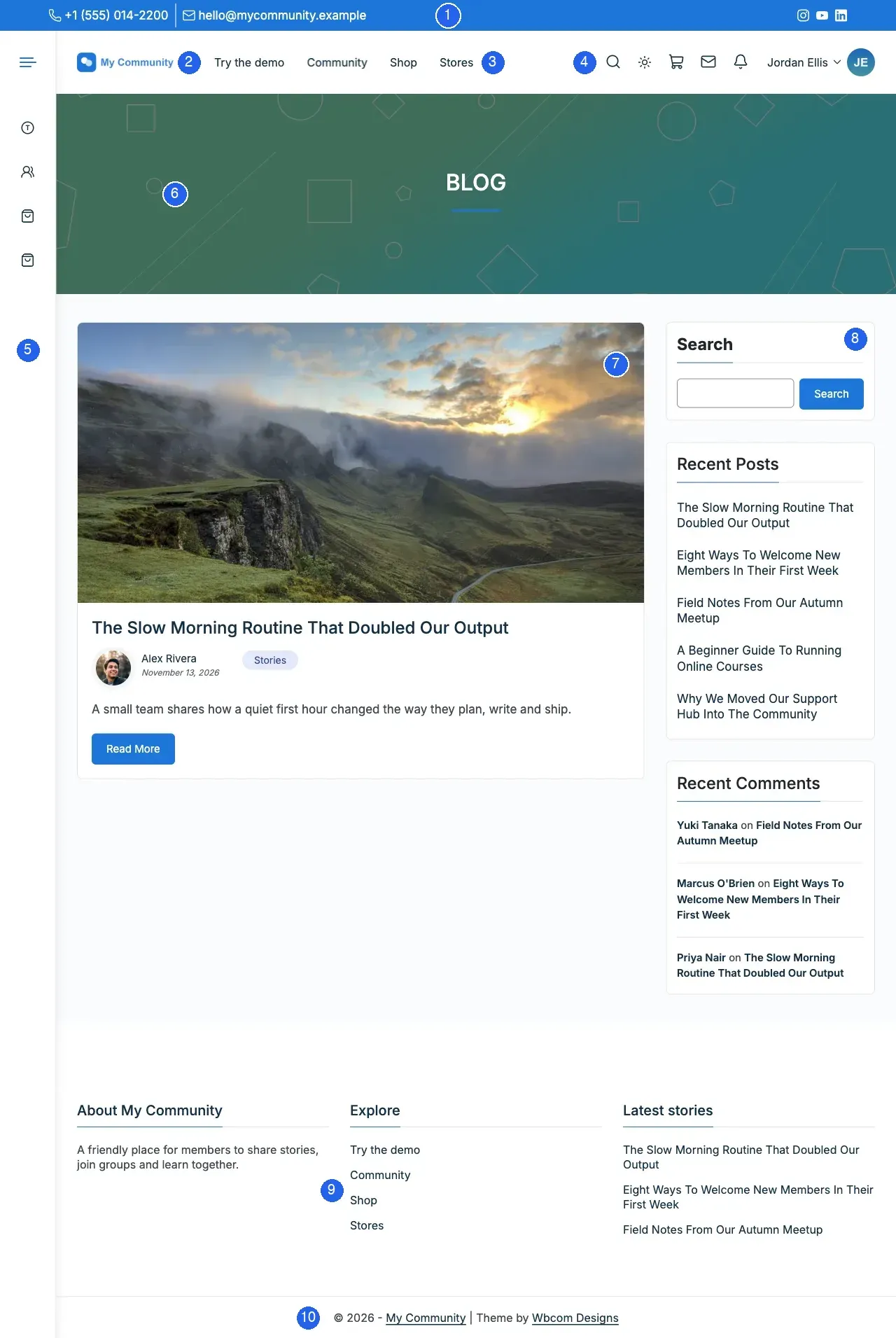
Each number matches a row below. The “Reign term” column is the name you see in the Customizer.
| No. | What you see | Reign term | Change it here |
|---|---|---|---|
| 1 | The thin bar at the very top, with a phone number, email and social icons | Topbar | Top bar |
| 2 | Your logo, top left of the header | Logo (Site Identity) | Brand your site checklist |
| 3 | The row of links next to the logo | Navigation menu, Primary menu location | Set up your menus |
| 4 | The search, dark mode, cart, messages, bell and profile icons | Header Icons Options | Header layout |
| 5 | The narrow icon strip down the left edge | Left Panel | Side menu |
| 6 | The coloured band with the page title | Sub Header | Page title bar and breadcrumbs |
| 7 | The main part of the page: your post, page or listing | Content Layouts | Page layouts and sidebars |
| 8 | The column of small boxes beside the content | Sidebar (widget area) | Sidebars and widgets |
| 9 | The columns of text and links near the bottom | Footer Area | Change the footer |
| 10 | The line at the very bottom with your site name and the year | Copyright | Footer |
The picture joins three screenshots of the same demo site. The top bar is off by default, so turn it on first.
“I want to change…” quick table
Section titled ““I want to change…” quick table”| I want to change… | Go to (screen) | Read (page) |
|---|---|---|
| My logo | Appearance > Customize > Site Identity | Brand your site checklist |
| The colours of the whole site | Customize > Color Options > Color Palette | Colour palette |
| Just one colour, such as buttons or links | Customize > Color Options > Individual Colors | Every colour setting |
| Dark mode | Customize > Color Options > Light & Dark Mode | Turn on dark mode |
| The top bar with my phone number | Customize > Header > Topbar | Top bar |
| The main menu | Appearance > Menus | Set up your menus |
| The side menu (icon strip) | Customize > Header > Left Panel | Side menu |
| The page title area and breadcrumbs | Customize > Sub Header | Page title bar and breadcrumbs |
| The sidebar | Customize > Content Layouts, or Reign Custom Settings on one page | Page layouts and sidebars |
| The footer and copyright text | Customize > Footer, and Appearance > Widgets | Change the footer |
| The login page | Customize > Branded Login & Register | Branded login screen |
| Fonts and text size | Customize > Typography | Typography |
| How wide the site is | Customize > General > Global Layout | Global layout |
| The menu on phones | Customize > Header > Mobile Menu | Mobile menu |
| The member profile page | Reign Settings > Community | Change the member profile page |
| The blog layout (list, grid, masonry) | Customize > Content Layouts > Blog: Archive | Blog archive layout |
You’ll know it worked when
Section titled “You’ll know it worked when”You open the page named in the last column and see the setting named in the middle column. If you cannot find a setting, search this documentation for the words you use. Each page lists other names for the same thing.
Good to know
Section titled “Good to know”Why do I see “sidebar” for two different things?
Section titled “Why do I see “sidebar” for two different things?”People say “sidebar” for the icon strip on the left and for the column of boxes beside the content. In these docs the strip is the side menu (Reign calls it Left Panel). The column of boxes is the sidebar. For the full list of Reign words, see Reign words explained.
Where are Reign Settings, then?
Section titled “Where are Reign Settings, then?”Reign Settings is a separate screen in the admin menu. It holds your licence, plugin installs and tools. It is not where you change how the site looks. The Reign Settings tour shows each screen.
Why is the page title band missing on my page?
Section titled “Why is the page title band missing on my page?”By default a page shows its title inside the content, with no band. Turn the band on under Sub Header. The page title bar page has the steps.