

Media Boosts
MediaVerse overviewFree + ProGet MediaVerse →
PRO - Requires MediaVerse Pro. This feature is not in the free plugin.
Spend your earned points to push a photo to the top of the Explore feed - get more eyes on your best work right when you want it seen. Boosts spend points from the free WB Gamification plugin, which must be active.
What You Can Do (as a User)
Section titled “What You Can Do (as a User)”- Boost your own public, approved photos and videos to increase their visibility in the Explore feed. Private items and documents cannot be boosted, so they show no Boost button
- Choose how many impressions you want to buy (e.g., 500 views)
- See a live point cost preview before committing
- Run boosts on multiple photos at the same time (a boost runs until its impression target or its expiry, 7 days by default; it cannot be cancelled early)
How It Works (for Users)
Section titled “How It Works (for Users)”- Open one of your public photos or videos on its media page, or find it on an Instagram layout feed card
- Click Boost - the Boost Your Media panel shows your point balance (Balance: N points)
- Enter the Target Impressions (for example 500, which costs 250 points at the default rate). The Cost: line updates as you type
- Click Boost - points are deducted immediately from your balance and Boost activated! appears
- Your photo now appears at the top of the Explore feed
- When the impression target is reached (or when the boost expires, after 7 days by default), the boost ends automatically and your photo returns to its normal rank
Where Boosted Content Appears
Section titled “Where Boosted Content Appears”Boosted photos are placed at the top of the first page of the Explore feed. Up to 5 boosted items are promoted at a time. They are not added to later pages, and not to a search, tag, category, author or type filter. If a visitor chooses their own sort order, such as oldest first, boosts do not change it.
For Site Owners
Section titled “For Site Owners”- Go to MediaVerse > Settings > Competitions, tick Competitions, then enable Media Boosts
- Set Max Impressions per Boost (default: 5,000) to control how large a boost can be
- Set Points per 100 Impressions (default: 50 points) to match your community’s point economy
- Set Boost Expiry (Days) (default: 7). A boost ends after this long even if its target is not reached
- Members must earn points through other activity (uploads, challenges, streaks) before they can boost. The Boost button shows to owners on their own media
How Boosts Work (Technical)
Section titled “How Boosts Work (Technical)”- The user clicks Boost on any media item they own
- They set an impression target (100 up to the site maximum)
- The system deducts points from their WB Gamification balance
- The media item is flagged as boosted in
mvs_boosts - The Explore feed query moves boosted items to the front of the first page
- When the impression counter reaches the target, or the boost duration expires, the boost auto-expires and the media returns to organic ranking
A user can have multiple media items boosted simultaneously. One media item can only have one active boost at a time, and only one purchase for an item is processed at a time, so a double click is never charged twice.
Boost Cost Calculation
Section titled “Boost Cost Calculation”Cost is based on the impression target:
cost = ceil( impression_target / 100 ) × mvs_pro_boost_cost_per_100Example: boosting for 500 impressions at the default cost of 50 points per 100 costs 250 points.
The points are deducted through WB Gamification at the moment the boost is created. If the member does not have enough points, the boost is not created. If the boost cannot be saved after points were taken, the points are refunded.
Settings Reference
Section titled “Settings Reference”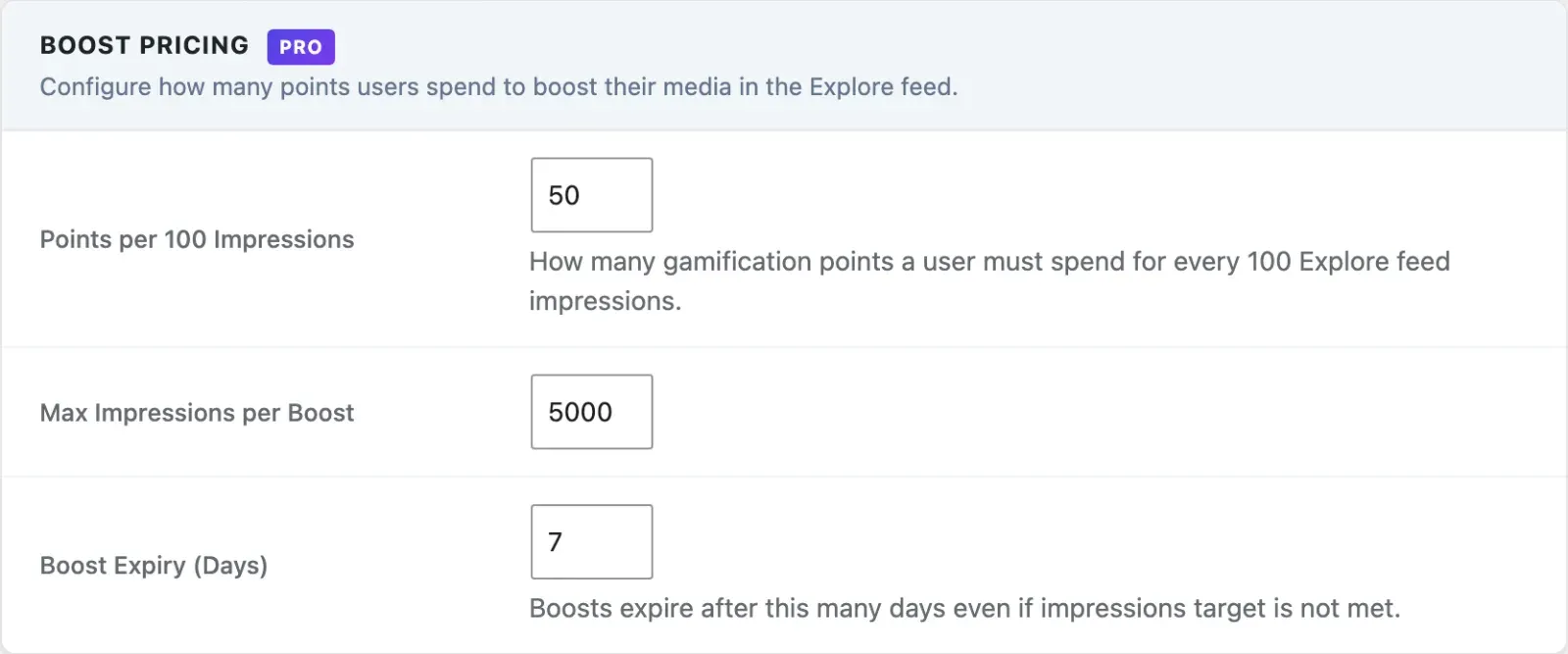
| Setting | Key | Default | Description |
|---|---|---|---|
| Media Boosts | mvs_boosts_enabled |
Off | Master toggle for the boosts feature |
| Max Impressions per Boost | mvs_pro_boost_max_impressions |
5000 |
The highest impression target a member can set |
| Points per 100 Impressions | mvs_pro_boost_cost_per_100 |
50 |
Points deducted per 100 impressions purchased |
| Boost Expiry (Days) | mvs_pro_boost_expiry_days |
7 |
A boost ends after this many days even if the target is not met |
Database Table: mvs_boosts
Section titled “Database Table: mvs_boosts”| Column | Type | Description |
|---|---|---|
id |
bigint | Primary key |
media_id |
bigint | The boosted media item |
user_id |
bigint | User who created the boost |
impressions_target |
int | Impression target set at boost creation |
impressions_delivered |
int | Running impression count |
points_spent |
int | Points deducted from user balance |
boost_type |
varchar | standard |
status |
varchar | active or expired |
started_at |
datetime | When the boost was created |
expires_at |
datetime | Hard expiry datetime (independent of impressions) |
REST API
Section titled “REST API”Base URL: /wp-json/mvs-pro/v1
All boost endpoints require an authenticated user. Boosts are created and listed against the current user - there is no per-media boost route and no cancel endpoint; a boost runs until its impression target is met or its expiry passes.
| Method | Endpoint | Description |
|---|---|---|
GET |
/boosts |
List the current user’s boosts (optional status, page, per_page) |
POST |
/boosts |
Create a boost for one of your media items |
GET |
/boosts/balance |
Get the current user’s gamification point balance |
POST /boosts
Section titled “POST /boosts”{ "media_id": 456, "impressions_target": 500}impressions_target defaults to 500. Returns 400 Bad Request if impressions_target is below 100 or exceeds the Max Impressions per Boost setting, if the media is not yours, is not public and approved, or is a document, or if you do not have enough points. Returns 409 Conflict if the media item already has an active boost. Returns 503 Service Unavailable if WB Gamification is not active.
GET /boosts/balance
Section titled “GET /boosts/balance”{ "balance": 1240}Returns { "balance": 0 } when WB Gamification is not active.
Explore Feed Injection
Section titled “Explore Feed Injection”Boosted media is moved to the front of the first page of an unfiltered Explore feed by a filter on the MediaVerse explore query. Up to 5 boosted items are promoted at a time. Pages after the first do not repeat them.
Impression counts increment server-side each time a boosted item is shown in the feed. Impressions are tracked per page load, not per unique user.
Expiry
Section titled “Expiry”A boost expires when either condition is met:
impressions_deliveredreachesimpressions_target- The current time passes
expires_at
The hard expiry datetime is set when the boost is created, using the Boost Expiry (Days) setting (default 7 days), regardless of the impression target.
Scheduled Actions
Section titled “Scheduled Actions”| Action Hook | Condition |
|---|---|
mvs_expire_boosts |
Runs hourly - sets status = expired on boosts where the impression target is reached or expires_at has passed |