

Direct Messages
MediaVerse overviewFree + ProGet MediaVerse →
Included in Free - This feature is available in the free version of MediaVerse.
Send private messages, share photos, record voice notes, and have real conversations - all without leaving your media community.
What You Can Do
Section titled “What You Can Do”- Send a private message to any member directly from their profile
- Attach photos, videos, or audio, or share a media item from the gallery straight into chat
- Record and send short voice messages
- React to individual messages with any emoji
- See typing indicators and read receipts in real time
- Mute noisy conversations, pin important ones, or archive old chats
- Search across all your messages to find anything instantly
- Control who can message you: everyone, followers only, mutual followers only, or nobody
How It Works (for Users)
Section titled “How It Works (for Users)”Starting a Conversation
Section titled “Starting a Conversation”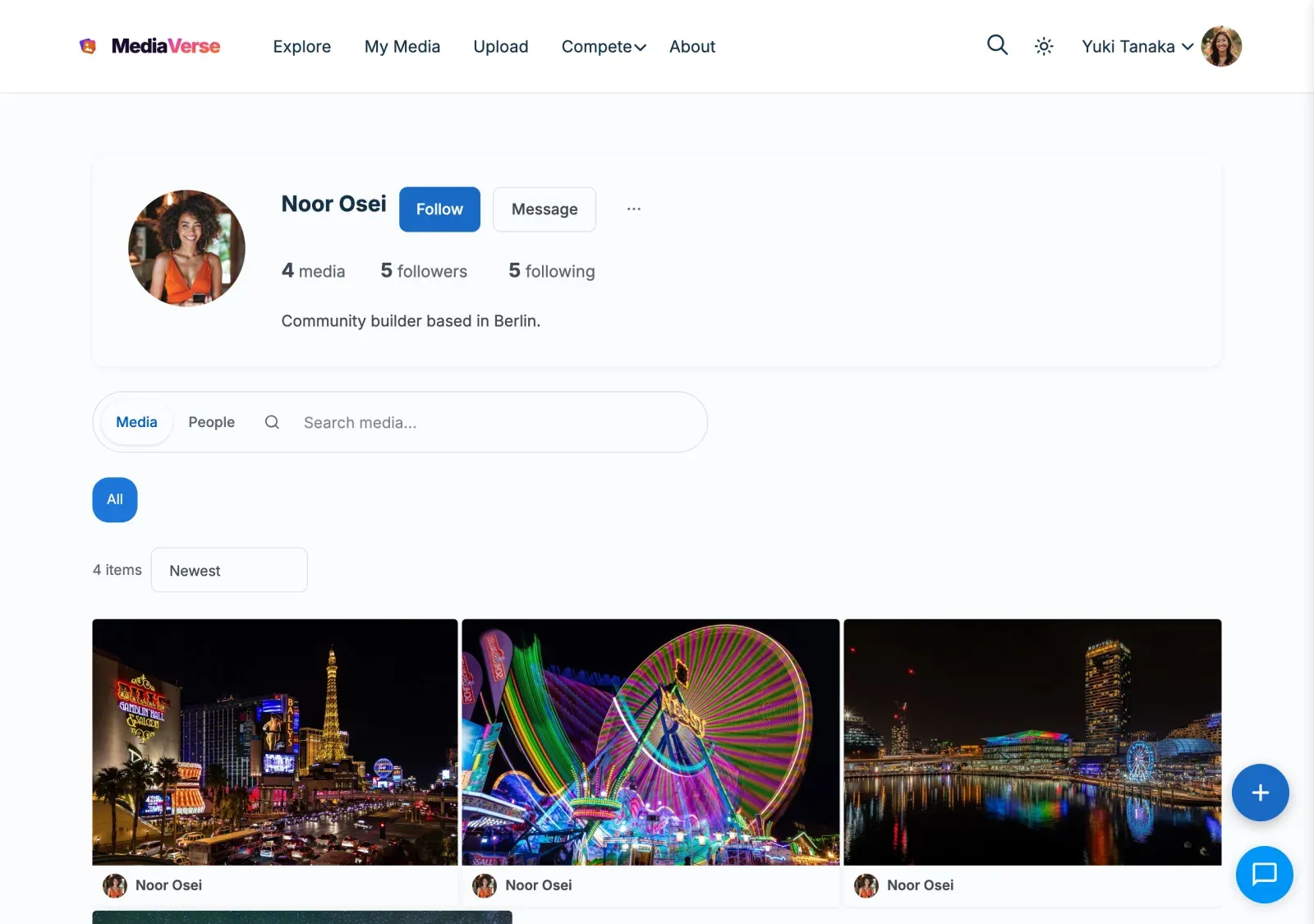
- Visit any member’s profile page
- Click Message - the chat panel opens in the bottom-right corner with that conversation ready
- Type your message and press Enter to send
To start a conversation without visiting a profile:
- Click the chat icon at the bottom of any page
- Click the compose icon inside the chat panel
- Search for the member by display name and select them. Search never matches login names
Sending a Voice Message
Section titled “Sending a Voice Message”- Open a conversation
- Click the microphone icon in the message bar
- Hold to record your message, then release to send
- The recipient sees a playable audio clip in the conversation
Sharing a Photo in Chat
Section titled “Sharing a Photo in Chat”- Open a conversation
- Click the media icon (photo frame) in the message bar
- Browse your uploaded media and click any item to share it directly into the chat
Files you attach in a chat stay in that conversation. They do not appear in My Media, the media list or the WordPress Media Library, and only the people in the conversation can open them. A file you attach but never send is deleted after a day. Developers can change that with the mvs_unsent_chat_file_hours filter.
Managing Conversations
Section titled “Managing Conversations”| Action | How to do it |
|---|---|
| Mute | Open the conversation menu and click Mute - notifications are suppressed |
| Pin | Click Pin to keep the conversation at the top of your list. Only pinned conversations show the “Pinned” label |
| Archive | Click Archive to hide it from the main list. Find archived chats under the Archive tab |
| Search | Click the search icon in the panel header and type any word or phrase |
Message Requests
Section titled “Message Requests”If a member has restricted who can message them to followers only, your message goes to their Requests tab rather than their main inbox. They can accept or decline the request.
- Accept - Your conversation moves to their main inbox and messaging continues normally
- Decline - The request is removed. You are not notified of the decline
What to expect in a conversation
Section titled “What to expect in a conversation”- A conversation opens at the newest message and stays there while photos and videos load.
- A new conversation with no message yet is not shown to the other member until you send the first message.
- The typing indicator clears as soon as the message is sent.
- If a message is refused, the reason appears on the message and there is no Retry button.
- If you block a member, or they block you, neither of you can reopen the conversation, and neither sees the other’s online status.
- A deleted message has no menu, reactions or Reply.
For Site Owners
Section titled “For Site Owners”- Go to MediaVerse > Settings > Messages.
- Messages turns private messaging on or off for the whole site (on by default). Off, the chat, the /messages/ page, Message buttons, the messaging API and Pro group chat all disappear, and so do the Messages pages of integrations built on MediaVerse, such as BuddyNext. Conversations are kept for when you turn it back on.
- Who can send messages sets who may start a conversation: everyone, followers, mutual followers, or nobody. Nobody stops new messages while members keep reading the conversations they already have.
- A member can make their own setting stricter than the site’s (for example, mutual followers only), never looser.
- Set a Minimum Account Age (in days) to stop brand-new accounts from sending messages.
- The chat panel appears automatically for signed-in members, no shortcode needed. Chat Panel Visibility limits where it shows: everywhere (default), MediaVerse pages only, BuddyPress pages only (when BuddyPress is active), or never (members use only the /messages/ page).
- Online Status Visibility sets who can see that a member is online: everyone (default), followers only, or nobody. How often the chat checks for new messages is set in code, see Transport below.
Messaging yourself is refused with “You can’t send a message to yourself”.
Database Tables
Section titled “Database Tables”| Table | Purpose |
|---|---|
mvs_conversations |
One row per conversation, stores metadata (muted, pinned, archived state per participant) |
mvs_conversation_participants |
Maps users to conversations (supports future group chat expansion) |
mvs_messages |
Individual messages with content, type, read status, and soft-delete flag |
mvs_message_reactions |
Emoji reactions attached to individual messages |
Opening a Conversation
Section titled “Opening a Conversation”There are three ways to start or open a conversation:
- From a profile page - Click the Message button on any user’s profile. The chat panel opens with that conversation pre-loaded. No searching required.
- From the chat panel - Click the compose icon inside the chat panel and search by display name.
- Deep links - Link directly to a conversation or user using a URL fragment:
| Fragment | Opens |
|---|---|
#mvs-chat/{conversationId} |
A specific conversation by ID |
#mvs-chat/user/{userId} |
The conversation with a specific user (creates one if none exists) |
Chat Panel Features
Section titled “Chat Panel Features”| Feature | Description |
|---|---|
| Text messages | Plain text with @mention support |
| Media attachments | Attach images, video, or audio. MediaVerse is a media platform, so documents (PDF, DOC, ZIP) are not accepted in chat as of 2.2.0 - a developer can extend the list with the mvs_dm_allowed_file_types filter. While a file uploads, the composer shows an “Uploading…” chip and Send waits for the upload to finish |
| Media sharing | Share a MediaVerse media item directly into a conversation |
| Voice messages | Record and send short audio clips |
| Emoji reactions | React to individual messages with any emoji |
| Typing indicators | Shows a live indicator when the other user is typing |
| Read receipts | Delivered and read timestamps shown per message |
| Message deletion | One “for everyone” control on your own message: Unsend within 15 minutes of sending removes the message and any attached file; after that, Delete replaces its content with “This message was deleted”. Both ask before they act |
Conversation Management
Section titled “Conversation Management”| Action | How |
|---|---|
| Mute | Suppress notifications for a conversation without leaving it |
| Pin | Keep a conversation at the top of the conversation list |
| Archive | Hide a conversation from the main list; accessible via the Archive tab |
| Search | Full-text search across all your messages via the search icon in the panel header |
Privacy Settings
Section titled “Privacy Settings”Each user controls their DM privacy from their account settings. Admins set the site-wide defaults at MediaVerse > Settings > Messages. A member’s own choice can be stricter than the site setting, never looser.
| Option | Key | Values |
|---|---|---|
| Who can message me | mvs_dm_access |
everyone, followers, mutual, nobody |
| Minimum account age | mvs_dm_min_age |
Integer (days). Prevents newly registered accounts from sending DMs. |
| Show online status | mvs_show_online_status |
everyone, followers, or nobody |
When mvs_dm_access is set to nobody, the Message button is hidden on that user’s profile.
Content Moderation (1.9.0)
Section titled “Content Moderation (1.9.0)”Every outgoing DM passes through the mvs_message_content_check filter before it is stored, the same seam other content types on the site already use to reject disallowed words. On its own, MediaVerse Free doesn’t ship a word-blocklist for messages - the filter is what lets a host (a full community stack like BuddyNext, or your own mu-plugin) block a message the moment it’s sent, so a member can’t route banned words through a DM that would otherwise be caught in a comment or activity post. A blocked send returns an error instead of saving the message.
add_filter( 'mvs_message_content_check', function( $result, $content, $sender_id, $conversation_id ) { if ( str_contains( strtolower( $content ), 'bannedword' ) ) { return new WP_Error( 'content_blocked', 'That word is not allowed.' ); } return $result; // true lets the message through.}, 10, 4 );Transport
Section titled “Transport”The chat panel polls the REST API to fetch new messages. There are three intervals (in milliseconds), chosen by context: an open conversation polls fastest, the conversation list slower, and a closed panel slowest. The defaults are active 3000, list 10000, and background 30000.
Filter the intervals with mvs_messaging_poll_intervals:
add_filter( 'mvs_messaging_poll_intervals', function( $intervals ) { $intervals['active'] = 2000; // Poll the open conversation every 2 seconds. return $intervals;} );REST API
Section titled “REST API”Base URL: /wp-json/mvs/v1/
All endpoints require a logged-in user. Pass the X-WP-Nonce header with a nonce from wp_create_nonce( 'wp_rest' ).
POST /conversations
Section titled “POST /conversations”Start a new conversation.
Body:
{ "recipient_id": 42 }Response: 201 Created with the new conversation object, or 200 OK with the existing conversation if one already exists between the two users.
GET /me/conversations
Section titled “GET /me/conversations”List all conversations for the current user. Excludes archived conversations unless ?include_archived=1 is passed.
Parameters:
| Parameter | Type | Default | Description |
|---|---|---|---|
include_archived |
int | 0 |
Set to 1 to include archived conversations |
per_page |
int | 20 |
Conversations per page |
page |
int | 1 |
Page number |
GET /conversations/{id}/messages
Section titled “GET /conversations/{id}/messages”List messages in a conversation. The current user must be a participant.
Parameters:
| Parameter | Type | Default | Description |
|---|---|---|---|
per_page |
int | 30 |
Messages per page |
before |
int | 0 |
Return messages with ID lower than this value (for pagination). 0 means no cursor. |
POST /conversations/{id}/messages
Section titled “POST /conversations/{id}/messages”Send a message. The current user must be a participant and must satisfy the recipient’s mvs_dm_access setting.
Body (JSON or multipart/form-data for file attachments):
| Field | Required | Description |
|---|---|---|
content |
No | Text content. Defaults to empty string. |
message_type |
No | Message type: text (default), media_share, image, video, audio, voice, file, system. Unknown values fall back to text. |
media_id |
No | MediaVerse media ID when message_type=media_share |
attachment_id |
No | WordPress attachment ID from a prior POST /messages/upload, used for image/video/audio/voice/file messages |
parent_id |
No | Message ID to reply to. Creates a threaded reply visible under the parent message. |
metadata |
No | Object of extra data (e.g. { "duration": 12 } for voice messages). |
Response: 201 Created with the new message object.
GET /conversations/{id}/messages/search
Section titled “GET /conversations/{id}/messages/search”Search message content within a single conversation (1.9.0). The current user must be a participant.
Parameters:
| Parameter | Type | Default | Description |
|---|---|---|---|
q |
string | (required) | Search term matched against message content |
per_page |
int | 50 |
Matching messages per page |
Response: Array of matching message objects, same shape as GET /conversations/{id}/messages.
POST /messages/upload
Section titled “POST /messages/upload”Upload a file to use as a DM attachment. Returns the WordPress attachment ID to pass as attachment_id in a subsequent POST /conversations/{id}/messages call.
Body: multipart/form-data with a file field.
Allowed types (2.2.0): media only - image/jpeg, image/png, image/gif, image/webp, audio/webm, audio/mp4, audio/mpeg, audio/ogg, video/mp4, video/webm. The real MIME is sniffed server-side (finfo), so renaming a file does not bypass the check; anything else returns 400 File type not allowed. Extend the list with the mvs_dm_allowed_file_types filter. (The file message type remains for messages sent before 2.2.0.)
Response: 200 OK
{ "id": 123, "source_url": "https://yoursite.com/...", "thumbnail": "https://yoursite.com/..." }PATCH /conversations/{id}
Section titled “PATCH /conversations/{id}”Update conversation state for the current user.
Body:
| Field | Type | Description |
|---|---|---|
is_muted |
bool | Set to true to mute, false to unmute |
is_pinned |
bool | Set to true to pin, false to unpin |
is_archived |
bool | Set to true to archive, false to restore |
Response: 200 OK with the updated conversation object.
DELETE /conversations/{id}
Section titled “DELETE /conversations/{id}”Delete a conversation for the current user. The conversation remains visible to the other participant.
Response: 204 No Content
DELETE /messages/{id}
Section titled “DELETE /messages/{id}”Soft-delete a message. Requires ownership of the message. The message record is kept but its content is replaced and is_deleted is set to 1.
DELETE /messages/{id}/unsend
Section titled “DELETE /messages/{id}/unsend”Hard-delete a message. Only available within 15 minutes after sending. Requires ownership of the message. The message record is permanently removed.
Response: 204 No Content
GET /me/messages/unread-count
Section titled “GET /me/messages/unread-count”Return the total number of unread messages across all conversations for the current user. Used to update the chat panel badge.
Response:
{ "unread": 4 }POST /messages/{id}/reactions
Section titled “POST /messages/{id}/reactions”Add or change a reaction on a message.
{ "emoji": "❤️" }To remove a reaction, call DELETE /messages/{id}/reactions.
Actions and Filters
Section titled “Actions and Filters”mvs_message_sent
Section titled “mvs_message_sent”Fires after a message is successfully saved.
add_action( 'mvs_message_sent', function( $message_id, $conversation_id, $sender_id, $recipient_ids ) { // React to the new message.}, 10, 4 );mvs_message_types
Section titled “mvs_message_types”Filter the list of allowed message types accepted by the send endpoint.
add_filter( 'mvs_message_types', function( $types ) { return $types; // Default: text, media_share, image, video, audio, voice, file, system.} );mvs_messaging_poll_intervals
Section titled “mvs_messaging_poll_intervals”Filter the client-side polling intervals (in milliseconds) delivered to the front end. See the Transport section above.
mvs_message_content_check
Section titled “mvs_message_content_check”Filter fired before a message is stored. Return a WP_Error to block the send; return the passed-in true (or anything not a WP_Error) to let it through. See the Content Moderation section above.