

Photo Battles
MediaVerse overviewFree + ProGet MediaVerse →
PRO - Requires MediaVerse Pro. This feature is not in the free plugin.
Challenge any photographer on the site to a head-to-head photo duel - your best shot vs. theirs, side by side, with the community deciding the winner.
What You Can Do (as a User)
Section titled “What You Can Do (as a User)”- Challenge any member to a 1v1 photo battle from the Photo Battles page
- Pick your strongest photo as your battle entry after your opponent accepts
- Accept or decline incoming battle challenges
- Watch the live vote count during the voting period
- See your battles on the Compete hub
How It Works (for Users)
Section titled “How It Works (for Users)”Challenging Someone
Section titled “Challenging Someone”- Go to
/media/battles/(or open the Compete hub and click Challenge Someone) - Under Challenge Someone, search for a member in Opponent (“Search by username…”)
- Optionally add a Theme (for example “Golden Hour”)
- Click Send Challenge. No photo is chosen yet
- Your opponent receives a notification and can click Accept Challenge or Decline
You cannot challenge yourself, and you cannot start a second battle with someone you already have an unfinished battle with.
After the Challenge is Accepted
Section titled “After the Challenge is Accepted”- Both you and your opponent submit a photo. Under Submit Your Photo, pick one of your photos or upload a new one, then click Submit Photo. The 48-hour submit window starts when the challenge is sent, not when it is accepted
- Once both photos are submitted, the battle opens for community voting
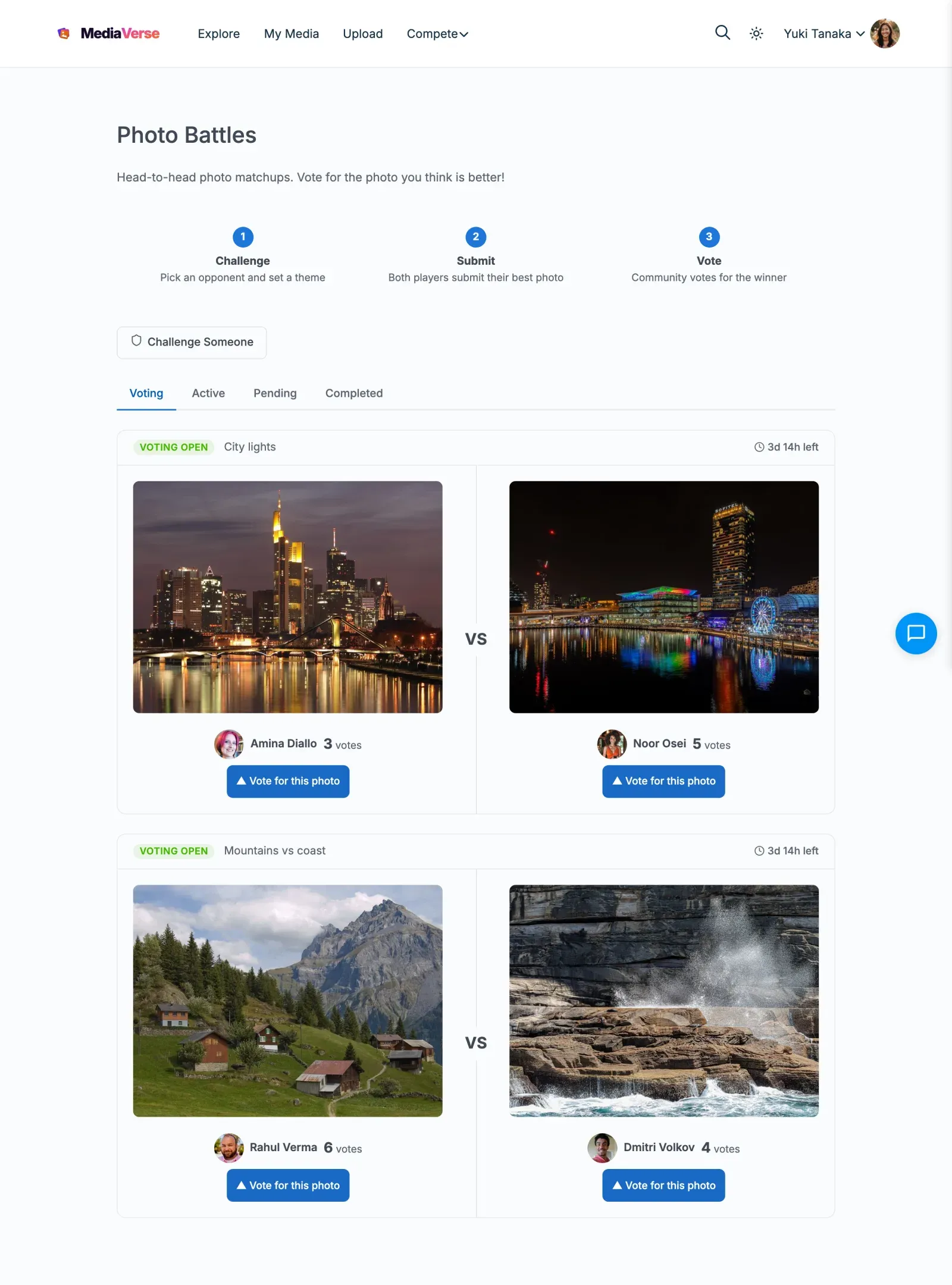
- The VS layout shows both photos side by side with a Vote for this photo button under each
- Any logged-in member except the two players can cast one vote
- When the voting period ends, the winner is announced automatically and points are awarded. If the votes are tied (including a battle nobody voted in), the battle is a draw: nobody wins and no points are awarded
Viewing Your Battles
Section titled “Viewing Your Battles”The Compete hub (/compete/) lists your battles under My Activity and My Results. Open a battle to see the full vote breakdown.
For Site Owners
Section titled “For Site Owners”- Go to MediaVerse > Settings > Competitions, tick Competitions, then enable Photo Battles
- Battles are self-service - members challenge each other directly, no admin involvement required
- The submit and vote windows are 48 hours each by default
- Monitor battles from MediaVerse > Competitions > Photo Battles
- Optionally set Battle win reward (points) in the same settings (default 100)
Lifecycle
Section titled “Lifecycle”| Stage | Description |
|---|---|
| Pending (shown as Awaiting Response) | Challenger sent the invite - waiting for opponent response |
| Accepted | Opponent accepted - both players can now submit their battle photo |
| Active (shown as Submissions Open) | At least one photo is in; waiting for the other |
| Voting | Both photos submitted - community votes (48 hours by default) |
| Completed | Vote deadline passed - winner determined, points awarded |
| Declined | Opponent declined the challenge - battle closed |
| Expired | The submit deadline passed before both photos were in, so there is no winner and no points |
Starting a Battle
Section titled “Starting a Battle”Battles start from the Challenge Someone form on the Photo Battles page, or from the Challenge Someone button in the Battle Arena on the Compete hub.
- Search for and select your opponent by username
- Optionally add a theme
- Click Send Challenge
The opponent receives a MediaVerse notification. On a BuddyPress site it also appears in the BuddyPress bell.
Submitting a Photo
Section titled “Submitting a Photo”Both players have 48 hours from the moment the challenge is sent to submit their battle photo. Each player selects one public, approved photo from their media library or uploads a new one. Accepting a battle does not cost the winner their win points, and a battle is resolved only once. A player can change their photo until the deadline while the battle is still waiting for the other photo.
If either player does not submit within the deadline, the battle expires and no points are awarded.
Voting
Section titled “Voting”Once both photos are submitted, the battle moves to Voting. Any logged-in member can vote for one photo. The two players cannot vote in their own battle. Each member can cast one vote per battle. A battle ends with the higher vote count. Equal votes is a draw: there is no winner, no win points are given, and both players are told it was a draw.
Settings Reference
Section titled “Settings Reference”| Setting | Key | Default |
|---|---|---|
| Photo Battles | mvs_battles_enabled |
Off |
| Battle win reward (points) | mvs_pro_battle_win_xp |
100 |
There is no setting for the deadlines. Developers can change the 48-hour submit and vote windows with the mvs_battle_submit_hours and mvs_battle_vote_hours filters.
REST API
Section titled “REST API”Base URL: /wp-json/mvs-pro/v1/battles
| Method | Endpoint | Description |
|---|---|---|
GET |
/battles |
List battles (optional user_id, status, page, per_page) |
POST |
/battles |
Create a new battle challenge |
GET |
/battles/{id} |
Get battle details, stage, and vote counts |
POST |
/battles/{id}/accept |
Accept a battle invite. Opponent only. |
POST |
/battles/{id}/decline |
Decline a battle invite. Opponent only. |
POST |
/battles/{id}/submit |
Submit your battle photo |
POST |
/battles/{id}/vote |
Cast a vote for one of the two players |
POST /battles
Section titled “POST /battles”{ "opponent_id": 99, "theme": "Golden Hour"}theme is optional. Returns 409 if you already have an unfinished battle with that member, and an error if you try to challenge yourself.
POST /battles/{id}/submit
Section titled “POST /battles/{id}/submit”{ "media_id": 501}Returns 403 if the authenticated user is not one of the two players. Returns 400 if the battle is not accepting photos, the deadline has passed, or the media is not yours, not public, or not approved.
POST /battles/{id}/vote
Section titled “POST /battles/{id}/vote”{ "voted_for_id": 12}voted_for_id is the user ID of the player you are voting for. Returns 403 if the voter is one of the players, and 400 if the battle is not in the Voting stage, voting has ended, or you already voted.
Frontend Behavior
Section titled “Frontend Behavior”The /media/battles/ page shows battles in tabs: Voting, Active, Pending, Completed, plus All battles.
- Voting battles - Shows the VS card layout with both photos and a Vote for this photo button
- Pending battles - Shows a card with the invite status and Accept Challenge and Decline buttons for the opponent
- Active battles - Shows Submit Your Photo for a player who has not yet submitted
- Completed battles - Shows final vote counts with the winner
A visitor who is not logged in sees Log in to vote.
Scheduled Actions
Section titled “Scheduled Actions”| Action Hook | Condition |
|---|---|
mvs_resolve_expired_battles |
Runs about every 5 minutes - resolves battles where the vote deadline has passed; expires battles where the submit deadline passed without both submissions |