

Revision History
Every time a paste is edited, SnipShare saves a revision for each file that changed. Revisions let you see the full history of a paste and compare any two versions side-by-side.
Licence: Viewing revision history and diffs, and the matching REST routes, is part of the Developer licence and above. Every site still records revisions, so the history is there when you upgrade.
How Revisions Work
Section titled “How Revisions Work”When you save an edit:
- Only files that changed get a new revision record - unchanged files are not duplicated
- The paste’s
versioncounter increments - The new revision stores the full file content, filename, language, version number, change author, and an optional change note
- The paste retains its original
share_hash- the URL never changes
Viewing Revision History
Section titled “Viewing Revision History”Navigate to the revision list at:
/paste/{hash}/revisions/This page lists every edit, newest first. Each row is one change to one file and displays:
- The change, for example v2 → v3
- Which file was edited
- Who made the edit, and when
- The change note written for that edit (if provided)
- A Diff link that opens exactly that change, including the most recent edit
The list shows 50 edits per page; use the page links under the table for older edits.
Comparing Two Versions
Section titled “Comparing Two Versions”View a diff between any two versions:
/paste/{hash}/diff/{v1}...{v2}Example: /paste/abc123/diff/1...3 compares version 1 with version 3. The highest version is the current text of the file, so after two edits /diff/2...3 shows the latest edit. For a paste with several files, add ?file_id= to pick the file; the Diff links in the history do this for you.
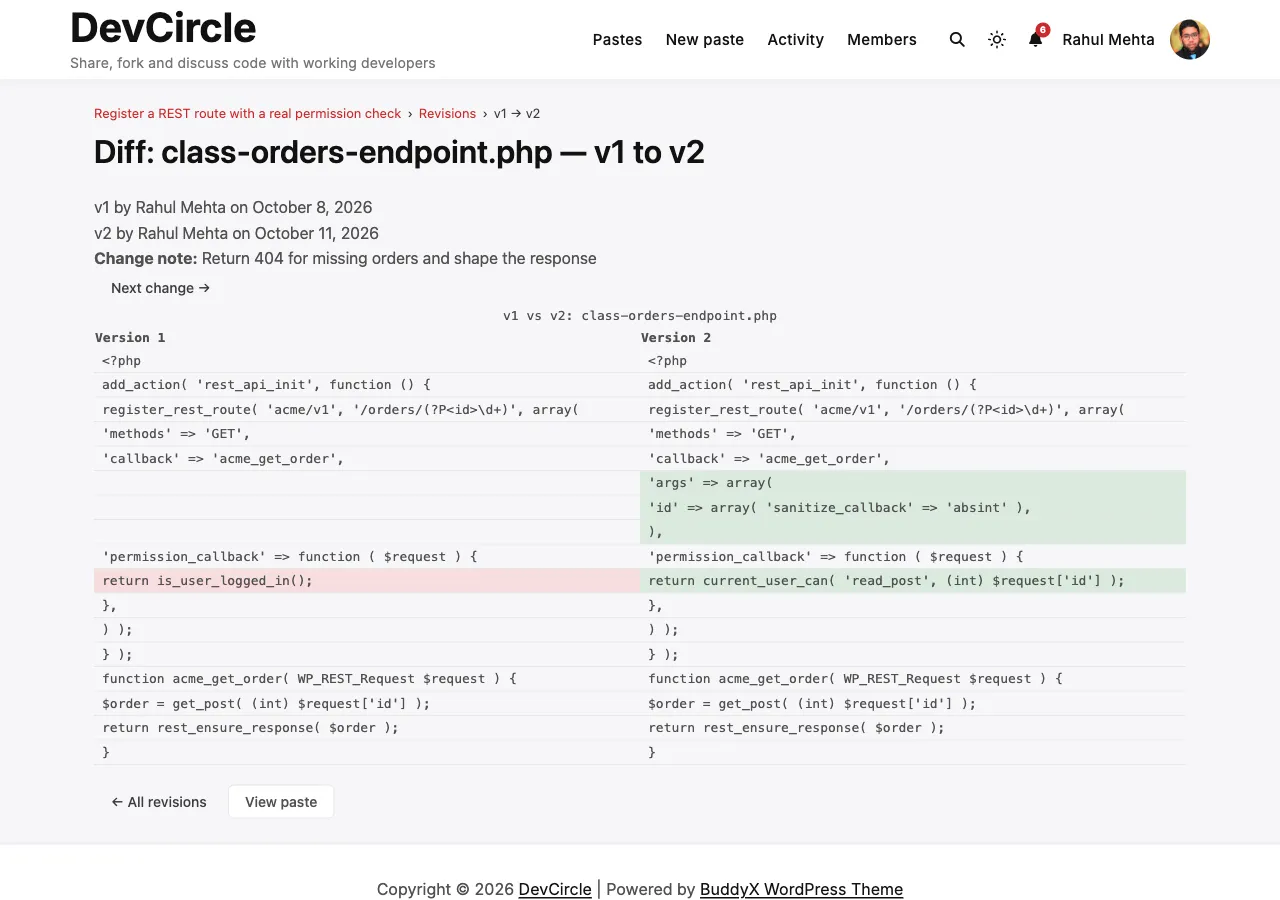
The diff view shows:
- Added lines in green
- Removed lines in red
- Unchanged context lines
- Indentation and blank lines exactly as written
- The change notes of the edits between the two versions
- Previous change and Next change links to step through the history
Writing a Change Note
Section titled “Writing a Change Note”When editing a paste, you can optionally fill in a Change Note field (maximum 500 characters). This note is stored with the revision and appears in the revision history list.
Good change notes make it easy for you and collaborators to understand what changed and why:
Fixed null pointer in the helper function when $user is emptyAccess Control
Section titled “Access Control”Revisions and diffs need the same access as reading the paste itself.
- Owner and moderators can always view revisions and diffs
- Visitors can view revisions and diffs for public pastes, and for unlisted pastes when they have the share link
- Private paste revisions are only visible to the owner and moderators
- Password-protected pastes require unlock before viewing revision history
- Burn-after-read pastes: only the author and moderators can open the revision history, and it is deleted along with the content when the paste is revealed
- Revisions are per-file - the same version number may correspond to different files within the same edit
- Revisions are stored indefinitely and are not pruned automatically
- Forking a paste does not carry over the revision history - the fork starts at version 1