

General Settings
The General tab controls paste defaults, the code editor experience, and feature availability across the plugin.
Navigate to SnipShare → Settings → General to access these options.
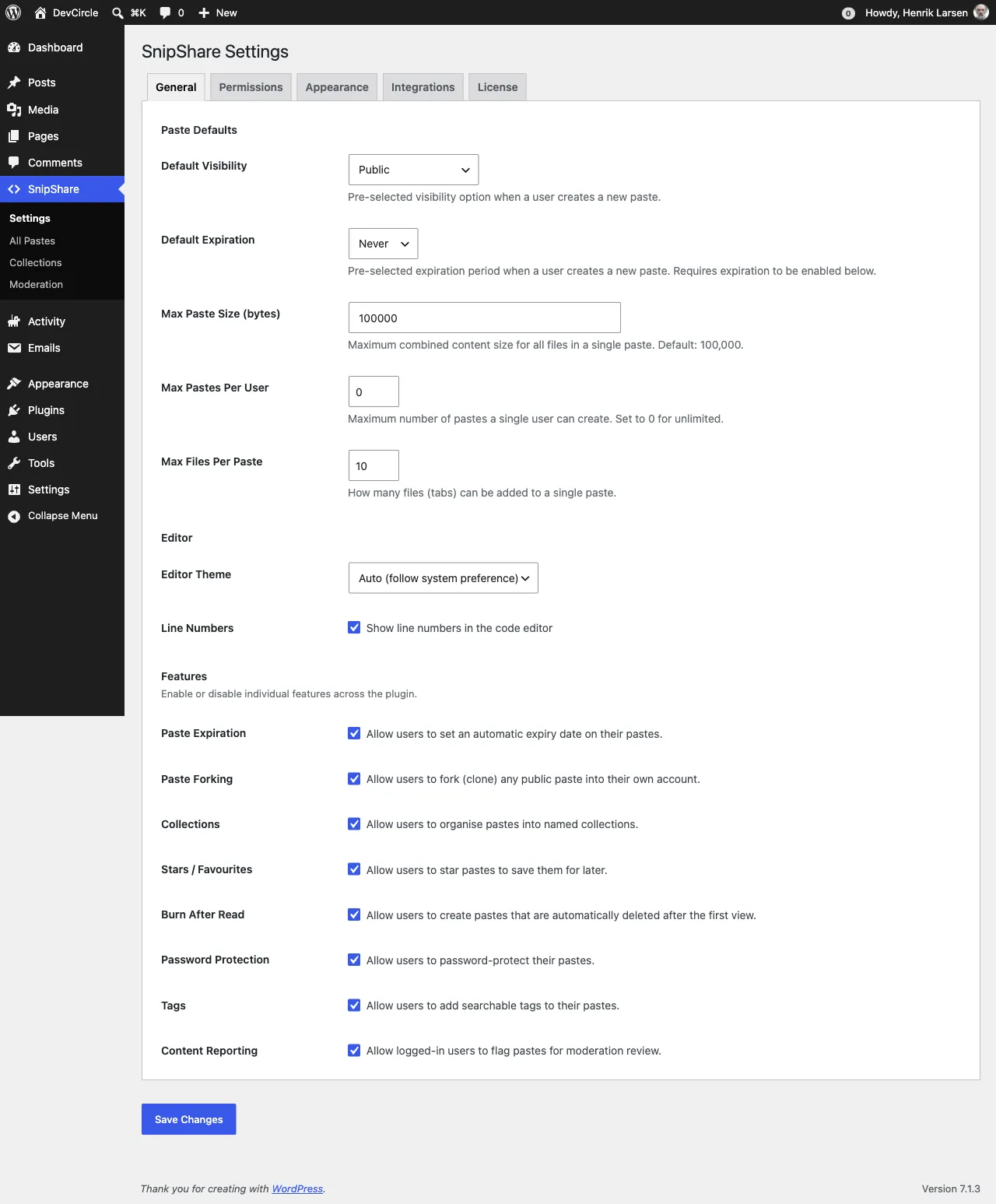
Paste Defaults
Section titled “Paste Defaults”These settings pre-populate the create paste form for all users. Users can override them per paste.
Default Visibility
Section titled “Default Visibility”Controls which visibility option is pre-selected on the create form.
| Value | Description |
|---|---|
| Public | Paste appears in the archive and is browsable by anyone |
| Unlisted | Only accessible via direct link; does not appear in archives |
| Private | Only the paste owner and moderators can view it |
Setting key: default_visibility - Default: public
Default Expiration
Section titled “Default Expiration”Pre-selects an expiration period on the create form. Requires Paste Expiration to be enabled in Feature Toggles.
| Value | Description |
|---|---|
| Never | Paste does not expire |
| 1 Hour | Expires 1 hour after creation |
| 1 Day | Expires 24 hours after creation |
| 1 Week | Expires 7 days after creation |
| 1 Month | Expires 30 days after creation |
Setting key: default_expiration - Default: never
Max Paste Size (bytes)
Section titled “Max Paste Size (bytes)”Maximum combined content size for all files in a single paste. Set in bytes (minimum 1,000; step 1,000). Checked when a paste is created, when it is edited, and when a file is added or edited, always against the paste’s total after the change.
Setting key: max_paste_size - Default: 100000 (100 KB)
Max Pastes Per User
Section titled “Max Pastes Per User”Maximum number of pastes a single member can have (active and trashed; expired pastes do not count). Forks count too. Set to 0 for unlimited. Moderators (admins and editors by default) are not limited; see the snipshare_limits_exempt filter.
Setting key: max_pastes_per_user - Default: 0 (unlimited)
Max Files Per Paste
Section titled “Max Files Per Paste”Maximum number of file tabs allowed in a single paste. Range: 1–50.
Setting key: max_files_per_paste - Default: 10
Editor
Section titled “Editor”Editor Theme
Section titled “Editor Theme”Controls the CodeMirror editor color scheme on the create/edit paste form.
| Value | Description |
|---|---|
| Light | Always use light theme |
| Dark | Always use dark theme |
| Auto | Follow the user’s system preference (prefers-color-scheme) |
Setting key: editor_theme - Default: auto
Line Numbers
Section titled “Line Numbers”When checked, line numbers appear in the left gutter of the CodeMirror editor.
Setting key: line_numbers - Default: true
Features
Section titled “Features”Turning a feature off hides it in the interface and also blocks it in the REST API, so it cannot be used from apps or scripts either. A request that uses a switched-off feature (for example a password while Password Protection is off) is rejected with snipshare_feature_disabled instead of being saved without it.
Individual feature toggles let you enable or disable specific functionality across the plugin. All features are enabled by default.
| Feature | Setting Key | Description |
|---|---|---|
| Paste Expiration | enable_expiration |
Allow users to set an automatic expiry date. When disabled, the expiration field is hidden on the create form. |
| Paste Forking | enable_forking |
Allow users to clone any public paste. When disabled, the Fork button is hidden. |
| Collections | enable_collections |
Allow users to organise pastes into named collections. |
| Stars / Favourites | enable_stars |
Allow users to star pastes to save them for later. |
| Burn After Read | enable_burn |
Allow users to create pastes that auto-delete after the first reader clicks Reveal. |
| Password Protection | enable_password |
Allow users to password-protect their pastes. |
| Tags | enable_tags |
Allow users to add searchable tags. |
| Content Reporting | enable_reporting |
Allow logged-in users to flag pastes for moderation review. |
Disabling a feature hides its UI but does not remove existing data. Re-enabling restores the UI and existing data is still accessible.