

Admin Collections
The Collections admin page lists every member’s collections, so a site owner can see and tidy them without the REST API.
Navigate to SnipShare → Collections in the WordPress admin (administrators).
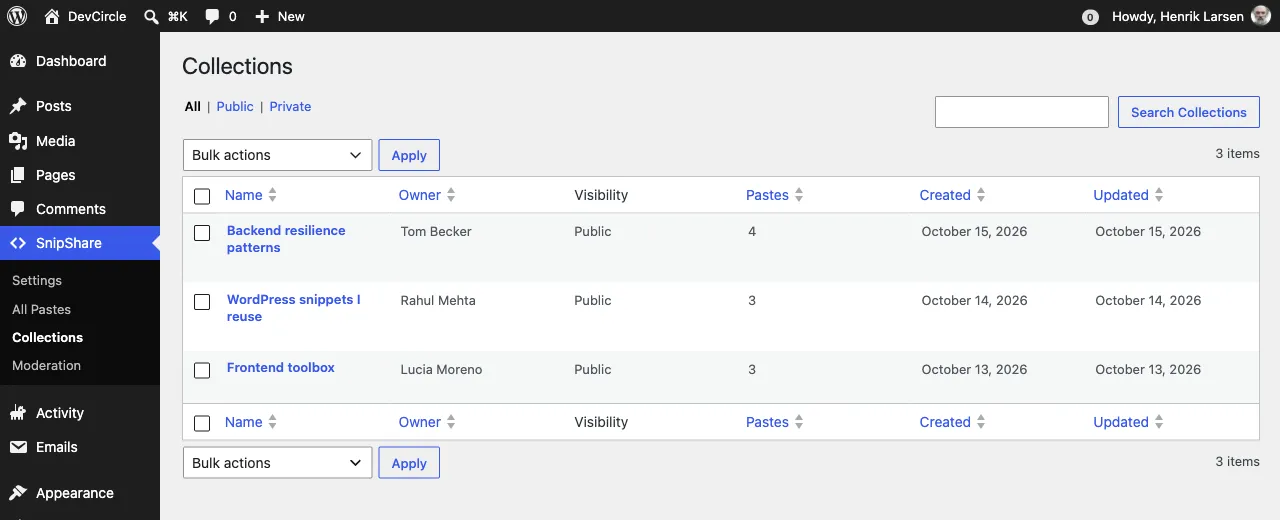
Filters and search
Section titled “Filters and search”| Tab | Shows |
|---|---|
| All | Every collection |
| Public | Collections anyone can open |
| Private | Collections only their owner can open |
The search box matches the collection name, slug and description.
Columns
Section titled “Columns”| Column | Description |
|---|---|
| Name | Opens the collection’s page on the site |
| Owner | The member who made it |
| Visibility | Public or Private |
| Pastes | How many pastes it holds |
| Created / Updated | Dates |
Name, Owner, Pastes, Created and Updated are sortable: click the column header.
Bulk actions
Section titled “Bulk actions”| Action | Effect |
|---|---|
| Make public / Make private | Changes visibility of the selected collections |
| Delete (pastes are kept) | Deletes the selected collections. The pastes they held are not touched |
Members manage their own collections on the site: see Collections.