

BuddyPress Integration
SnipShare integrates with BuddyPress to bring code sharing into your community’s activity feed, member profiles, and notification system.
Activation: Integration loads automatically when class_exists('BuddyPress') is true. No manual activation needed.
Configuration: All features are individually toggled in SnipShare → Settings → Integrations.
Feature 1: Activity Stream
Section titled “Feature 1: Activity Stream”When enabled (bp_activity setting), SnipShare records a BuddyPress activity item whenever a user creates a public paste.
Activity Details
Section titled “Activity Details”| Property | Value |
|---|---|
| Component | snipshare |
| Type | new_paste |
| Action | “{User} shared a new code paste: {Paste Title}” |
| Content | Paste description (trimmed to 30 words) |
| Primary link | Paste frontend URL |
| Item ID | Paste ID |
What is NOT recorded
Section titled “What is NOT recorded”- Unlisted and private pastes
- Burn-after-read pastes
- Forked pastes (handled separately)
- Anonymous pastes (user_id = 0)
Activity is removed when the paste is trashed, deleted, burned, or changed away from public. Recording, star and fork notifications, and removal follow the settings in SnipShare → Settings → Integrations.
Filtering Activity Display
Section titled “Filtering Activity Display”BuddyPress activity items from SnipShare appear in:
- The sitewide activity stream
- The member’s profile activity tab
Users can filter to “Pastes” in the activity stream using the “Pastes” filter label registered with bp_activity_set_action().
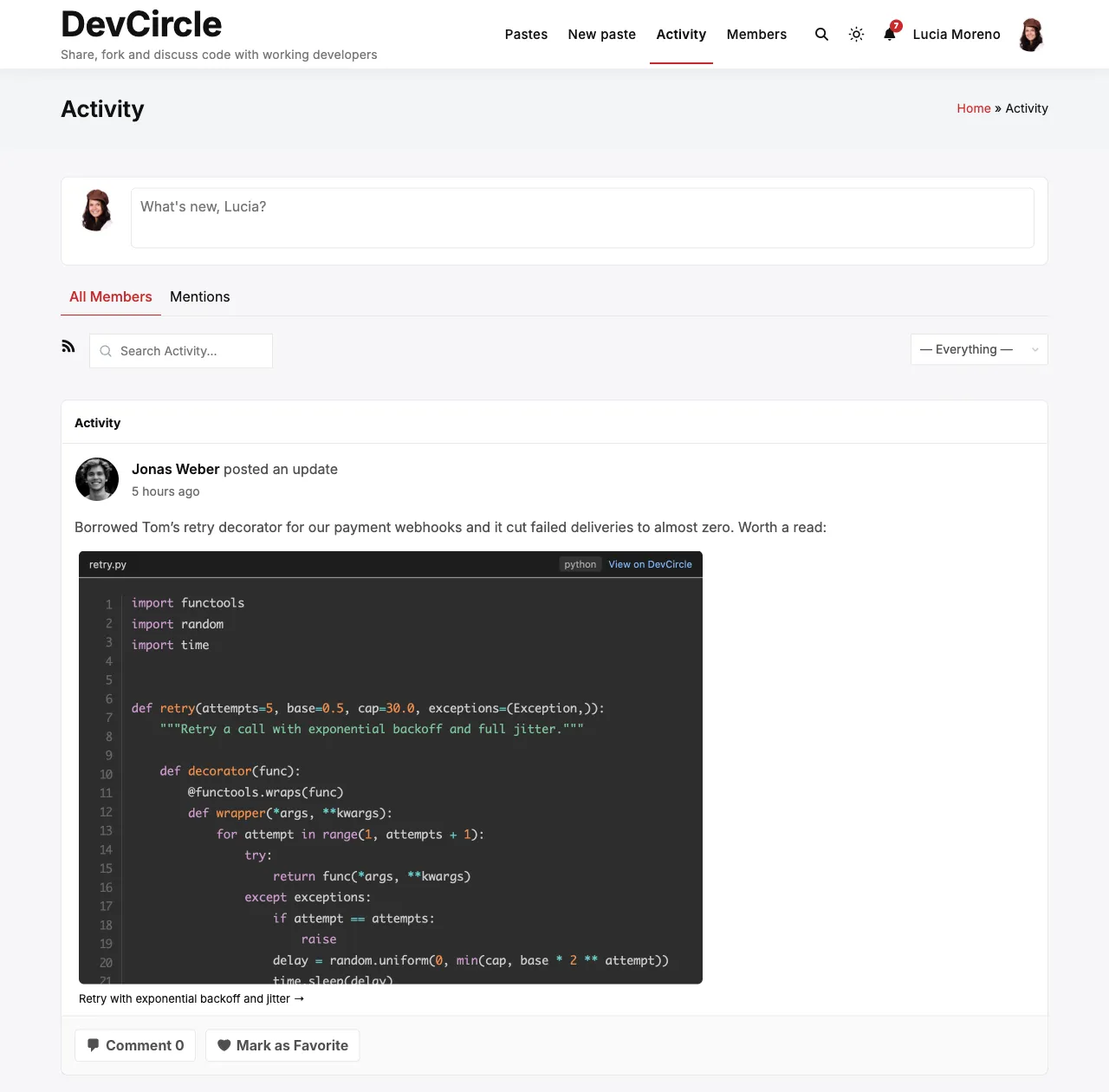
oEmbed in Activity Feed
Section titled “oEmbed in Activity Feed”Paste URLs pasted into BuddyPress activity updates are automatically resolved to inline code viewers via the SnipShare oEmbed provider. This hooks into bp_get_activity_content_body to replace paste URLs with embedded iframes.
Feature 2: Member Profile Tab
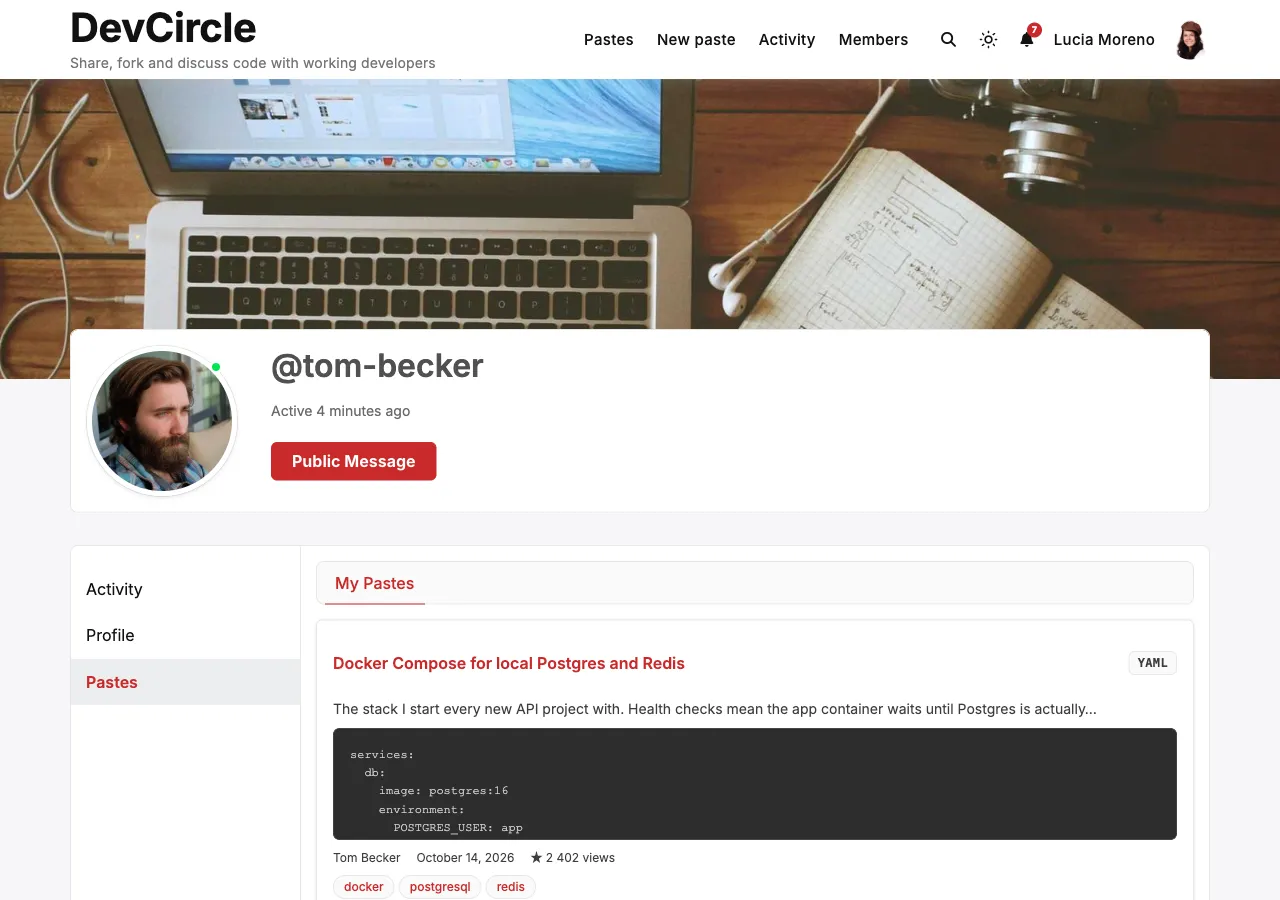
Section titled “Feature 2: Member Profile Tab”When enabled (bp_profile setting), a Pastes tab appears in each member’s BuddyPress profile at navigation position 80.
Tab Structure
Section titled “Tab Structure”/members/{username}/pastes/ → My Pastes sub-tab (default)/members/{username}/pastes/my-pastes/ → My Pastes/members/{username}/pastes/starred-pastes/ → Starred pastesMy Pastes Sub-tab
Section titled “My Pastes Sub-tab”Displays the member’s pastes:
- Profile owner sees all visibilities (public, unlisted, private, burn-after-read) for active pastes
- Other visitors see only public, non-burn pastes
- Profile owner sees a + Add Snip button linking to
/pastes/create/
Starred Sub-tab
Section titled “Starred Sub-tab”Displays the active pastes the member has starred. The tab is shown only on your own profile: other visitors never see it, so a starred unlisted paste cannot leak its link. The 1.0.0 address /members/{username}/pastes/starred/ redirects here.
Customising the Position
Section titled “Customising the Position”To change the tab’s position in the BP navigation:
add_action( 'bp_setup_nav', function() { // The tab is registered at position 80. // Override the position via bp_core_new_nav_item filters if needed.}, 5 );Feature 3: Notifications
Section titled “Feature 3: Notifications”When enabled (bp_notifications setting), SnipShare sends BuddyPress notifications to paste owners.
Notification Triggers
Section titled “Notification Triggers”| Event | Notification |
|---|---|
| Another user stars your paste | “{User} starred your paste ”{Title}“” |
| Another user forks your paste | “{User} forked your paste ”{Title}“” |
Self-notifications are never sent - starring or forking your own paste does not generate a notification.
Notification Format
Section titled “Notification Format”Notifications appear in the BuddyPress notification dropdown as linked text. When clicked, they take the owner to the paste page.
Component Registration
Section titled “Component Registration”SnipShare registers itself on the BuddyPress global object:
buddypress()->snipshare->notification_callback = array( $this, 'format_notification' );Notification Actions
Section titled “Notification Actions”Two component actions are used:
paste_starred- fired when a paste is starredpaste_forked- fired when a paste is forked
These are stored in the bp_notifications table with:
component_name:snipshareitem_id: paste IDsecondary_item_id: user ID who triggered the action
Developer Notes
Section titled “Developer Notes”The BuddyPress integration class is SnipShare_BuddyPress (integrations/class-snipshare-buddypress.php). All hooks are registered externally by the loader:
$this->loader->add_action( 'bp_register_activity_actions', $bp, 'register_activity' );$this->loader->add_action( 'bp_setup_nav', $bp, 'register_profile_tab' );$this->loader->add_action( 'bp_setup_globals', $bp, 'register_notification' );$this->loader->add_action( 'bp_init', $bp, 'enable_autoembed' );Activity and notification recording is triggered by the snipshare_paste_created, snipshare_paste_starred, and snipshare_paste_forked action hooks from the core paste/star classes. Activity removal is triggered by snipshare_paste_trashed, snipshare_paste_deleted, snipshare_paste_burned, and paste updates that change visibility away from public.
Since 1.1.0, activity recording is hooked up (earlier versions did not record it), and star and fork notifications fire.