

Integrations Settings
The Integrations tab controls how SnipShare connects with BuddyPress and bbPress. Options only appear when the respective plugin is active.
Navigate to SnipShare → Settings → Integrations.
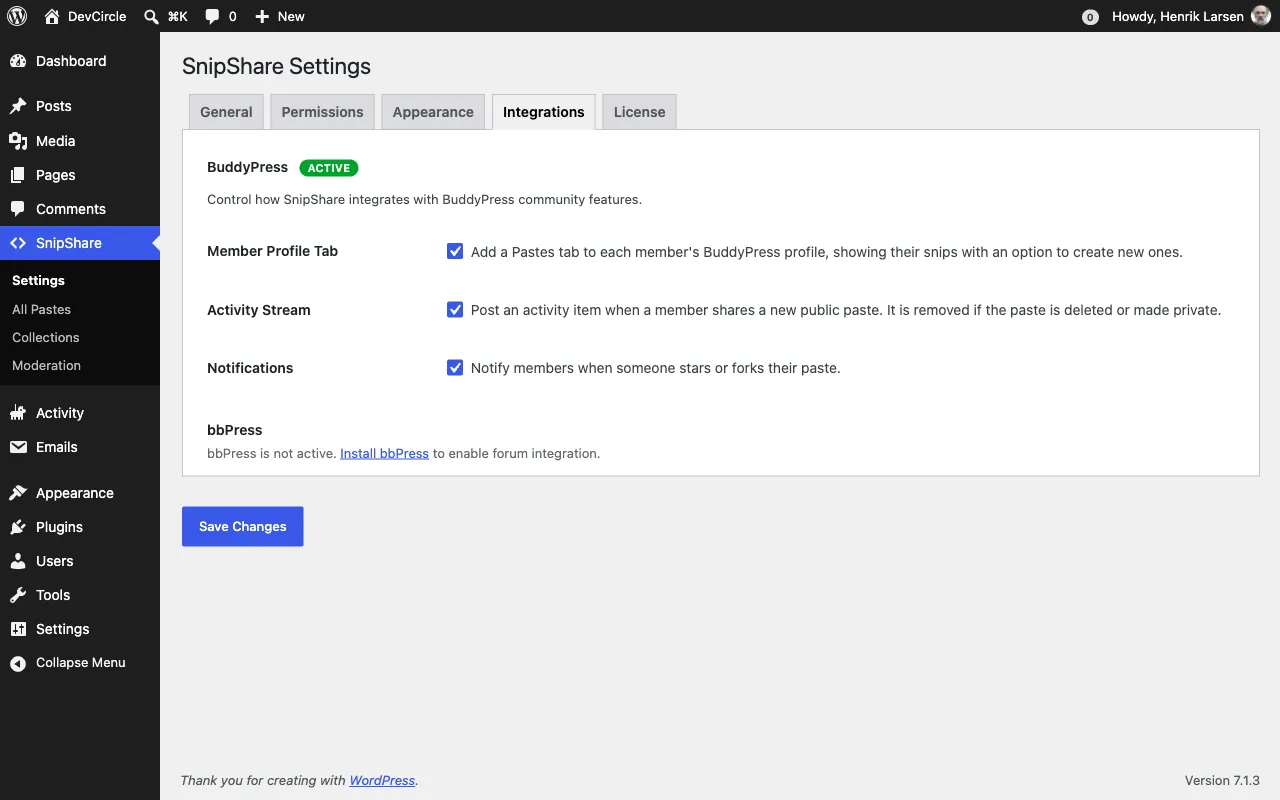
BuddyPress
Section titled “BuddyPress”Requires BuddyPress to be installed and active. If BuddyPress is not detected, this section shows an installation prompt.
Member Profile Tab
Section titled “Member Profile Tab”When enabled, adds a Pastes navigation item to each member’s BuddyPress profile at position 80.
The tab includes two sub-items:
- My Pastes: shows the member’s pastes (all statuses to the owner, public only to visitors)
- Starred: shows pastes the member has starred
Setting key: bp_profile - Default: enabled
Activity Stream
Section titled “Activity Stream”When enabled, records a BuddyPress activity entry whenever a user creates a public paste.
Activity details:
- Component:
snipshare - Action type:
new_paste - Content: Paste description (trimmed to 30 words)
- Only public, non-burn pastes are recorded - unlisted, private, and burn-after-read pastes are never posted to the activity stream
- The activity item is removed when the paste is trashed, deleted, burned, or changed away from public
- Guest pastes (user_id = 0) are skipped
Setting key: bp_activity - Default: enabled
Notifications
Section titled “Notifications”When enabled, sends a BuddyPress notification to a paste owner when:
- Another user stars their paste (
paste_starredaction) - Another user forks their paste (
paste_forkedaction)
Self-actions are never notified - starring or forking your own paste does not trigger a notification.
Setting key: bp_notifications - Default: enabled
bbPress
Section titled “bbPress”Requires bbPress to be installed and active. If bbPress is not detected, this section shows an installation prompt.
Paste Embeds
Section titled “Paste Embeds”When enabled, paste URLs posted in bbPress topics and replies are automatically converted to inline code previews using the SnipShare oEmbed provider.
Paste a URL like https://yoursite.com/paste/abc123 into a topic - it renders as an embedded code viewer instead of a plain link.
Setting key: bbpress_embed - Default: enabled
Reply Toolbar Button
Section titled “Reply Toolbar Button”When enabled, an Insert Paste button appears above the submit area of bbPress reply and topic forms.
The button opens a dropdown that shows:
- The logged-in user’s 10 most recent pastes (click to insert)
- A manual hash input field (type any hash and click Insert)
- A “Create new paste” link (opens in a new tab)
Clicking a paste inserts [snipshare hash="..."] at the cursor position in the bbPress textarea.
Setting key: bbpress_button - Default: enabled
Only visible to logged-in users.
No Integrations Available
Section titled “No Integrations Available”If neither BuddyPress nor bbPress is active, the Integrations tab shows:
No integrations available. Install and activate BuddyPress or bbPress to unlock integration options.
SnipShare works fully without any integrations - these are opt-in enhancements.