

Moderation
SnipShare includes a moderation queue where administrators and editors can review pastes that have been flagged by users.
Requires Content Reporting to be enabled in Settings → General, and the snipshare/moderate ability (editor and administrator roles by default).
Licence: Moderation works on every licence tier, including Personal.
Accessing the Moderation Queue
Section titled “Accessing the Moderation Queue”Go to SnipShare → Moderation in the WordPress admin.
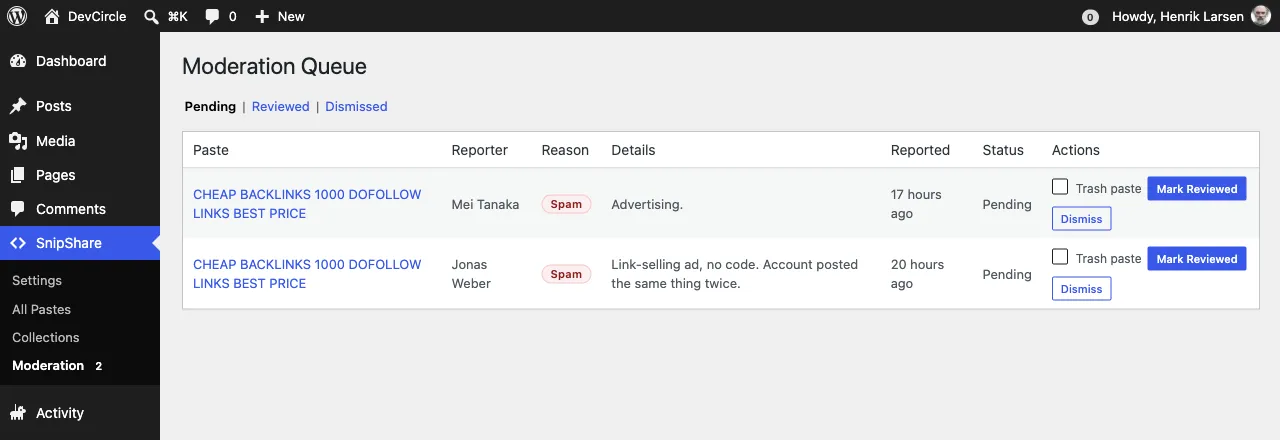
A badge on the Moderation menu item shows the number of pending reports.
Report Reasons
Section titled “Report Reasons”When a logged-in user reports a paste, they choose one of these reasons:
| Reason | Description |
|---|---|
| Spam | Promotional or repetitive content |
| Inappropriate | Offensive or unsuitable content |
| Malicious | Potentially harmful code (malware, exploits) |
| Copyright | Unauthorised use of copyrighted material |
| Other | Any other reason (with optional details) |
Users can also provide an optional explanation in a text field.
The Moderation Queue
Section titled “The Moderation Queue”The moderation page has three status tabs:
| Tab | Description |
|---|---|
| Pending | New reports awaiting review |
| Reviewed | Reports that have been actioned |
| Dismissed | Reports that were closed without action |
Each report card shows:
- The reported paste (title, link, code preview)
- Reporter username and timestamp
- Report reason and details
- Action buttons
Reviewing a Report
Section titled “Reviewing a Report”For each pending report you have two options:
Mark as Reviewed
Section titled “Mark as Reviewed”Confirms you’ve reviewed the content. Optionally check Trash the paste to move it to trash status at the same time.
- Changes report status to
reviewed - Records your user ID in
reviewed_byand the current timestamp inreviewed_at - Fires the
snipshare_report_reviewedaction
Dismiss
Section titled “Dismiss”Closes the report without taking action (e.g., the report was unfounded).
- Changes report status to
dismissed - No action is taken on the paste
Who Can Moderate?
Section titled “Who Can Moderate?”Users with the snipshare/moderate ability can:
- Access the Moderation admin page
- Review and dismiss reports via the admin UI
- Trash any paste via the REST API regardless of ownership (
PUT /wp-json/snipshare/v1/admin/pastes/{id}/status) - Access the admin reports endpoint (
GET /wp-json/snipshare/v1/admin/reports)
By default, editors and administrators have this ability. See Permissions Settings for how to customise role assignments.
Via REST API
Section titled “Via REST API”List Reports
Section titled “List Reports”GET /wp-json/snipshare/v1/admin/reports?status=pendingX-WP-Nonce: YOUR_NONCERequires the snipshare/moderate ability. Filter by ?status=pending, ?status=reviewed, or ?status=dismissed.
Review a Report
Section titled “Review a Report”PUT /wp-json/snipshare/v1/admin/reports/{id}X-WP-Nonce: YOUR_NONCEContent-Type: application/json
{ "status": "reviewed", "trash_paste": true}Force Paste Status
Section titled “Force Paste Status”PUT /wp-json/snipshare/v1/admin/pastes/{id}/statusX-WP-Nonce: YOUR_NONCEContent-Type: application/json
{ "status": "trashed" }