

Frequently Asked Questions
What does each licence tier include?
Section titled “What does each licence tier include?”The core plugin is the same on every tier: pastes, files, forking, stars, collections, visibility and expiry, the BuddyPress and bbPress integrations, and same-site embeds. The Developer licence and above add revision history with diffs, and authenticated REST API access for apps and scripts (Application Passwords). Moderation is included on every tier. Agency adds unlimited sites and priority email support. A licence that has expired keeps its tier, so a lapsed renewal only stops updates and support.
Do I need BuddyPress to use SnipShare?
Section titled “Do I need BuddyPress to use SnipShare?”No. SnipShare works as a standalone plugin on any WordPress site. BuddyPress is optional - when active, it unlocks additional community features: pastes in activity feeds, a Pastes tab on member profiles, and paste-starred notifications.
Can visitors view pastes without logging in?
Section titled “Can visitors view pastes without logging in?”Yes. Public pastes are visible to everyone, including non-logged-in visitors. Unlisted pastes are visible to anyone with the share link. Private pastes are visible only to their author and moderators; everyone else sees “not found”. Password-protected pastes require the correct password. Authors and moderators can read every paste.
Can I disable paste creation for guests?
Section titled “Can I disable paste creation for guests?”Yes. Paste creation always requires a logged-in account. Anonymous paste creation is not supported.
Does it work on multisite?
Section titled “Does it work on multisite?”SnipShare is designed for single-site installs. Multisite is not officially tested or supported in v1.0.
Creating Pastes
Section titled “Creating Pastes”How many files can a paste have?
Section titled “How many files can a paste have?”Up to 10 by default. You can increase or decrease this limit in SnipShare → Settings → General → Max Files Per Paste (range: 1–50).
What languages are supported for syntax highlighting?
Section titled “What languages are supported for syntax highlighting?”Every language in the editor’s language menu (about 40) is highlighted on the paste page, including PHP, JavaScript, TypeScript, Python, HTML, CSS, SQL, Bash, JSON, YAML, Markdown, Go, Ruby, Rust, C, C++, C#, Java, Swift, Kotlin, Dart, Docker, Elixir, Haskell, Lua, Perl, R, Scala, SCSS, TOML, and plain text. Only the languages a page actually shows are loaded.
Is there a size limit on pastes?
Section titled “Is there a size limit on pastes?”Yes. The default maximum combined content size is 100 KB per paste. You can adjust this in Settings → General → Max Paste Size. The minimum is 1 KB; there is no maximum enforced by the plugin (server memory limits apply).
What is “Burn After Read”?
Section titled “What is “Burn After Read”?”When enabled on a paste, the paste is permanently deleted after the first reader clicks Reveal paste. This is designed for one-time secrets or temporary code snippets. Opening the link alone does not burn it, so link previews from Slack, WhatsApp, or email scanners are safe. The author and moderators opening the paste do not burn it either.
After reveal, the content and revisions are deleted immediately and reloading shows “burned after reading”.
Requires Burn After Read to be enabled in Settings → General.
What happens when a paste expires?
Section titled “What happens when a paste expires?”Expired pastes become unreadable for visitors at the exact expiry time. The paste record then stays in the database with status expired, and the author, moderators, and administrators can still read it. Trashed, expired, and burned pastes are permanently deleted after 30 days.
Can I create a paste without a title?
Section titled “Can I create a paste without a title?”Yes. The title is optional. Untitled pastes appear in listings as “Untitled Paste” and are fully functional.
Editing & Versions
Section titled “Editing & Versions”Does editing a paste change its URL?
Section titled “Does editing a paste change its URL?”No. The paste URL (its share_hash) never changes regardless of how many times you edit it.
How do revisions work?
Section titled “How do revisions work?”Every time you save an edit, SnipShare creates a revision record for each changed file, incrementing the paste version number. You can view the full history at /paste/{hash}/revisions/ and compare any two versions with a side-by-side diff at /paste/{hash}/diff/{v1}...{v2}.
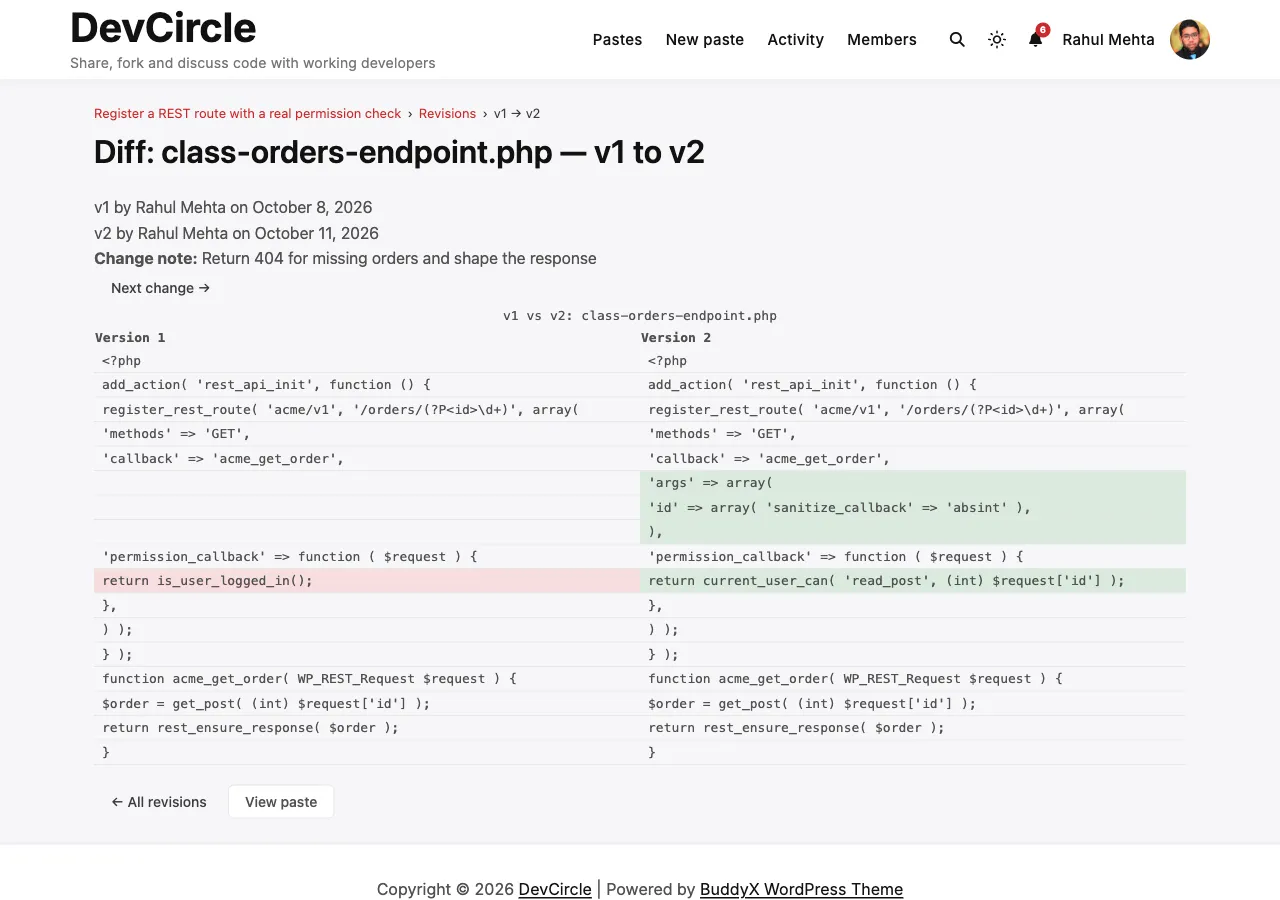
Can I revert to a previous version?
Section titled “Can I revert to a previous version?”Not directly from the UI in v1.0. You can view any historical version and manually copy the content. A one-click revert feature is planned for a future release.
What is the difference between Fork and Edit?
Section titled “What is the difference between Fork and Edit?”- Edit: modifies your own paste and creates a revision history
- Fork: clones someone else’s public paste (no password, no burn-after-read) into your own account as a new paste. You own the fork; it has its own URL and revision history. A link to the original is shown on the forked paste.
Sharing & Embedding
Section titled “Sharing & Embedding”Can I embed a paste in another website?
Section titled “Can I embed a paste in another website?”Yes. SnipShare supports oEmbed - paste the URL of any public paste (not password-protected or burn-after-read) into an oEmbed-enabled site (WordPress, Notion, etc.) and it renders as an inline code viewer. See the oEmbed documentation.
Can I embed a paste on a WordPress page?
Section titled “Can I embed a paste on a WordPress page?”Yes. Use the [snipshare hash="{hash}"] shortcode (or [snipshare id="{id}"] for public pastes) or paste the URL directly into the block editor - it resolves via oEmbed automatically. See the Shortcode Reference.
Is there a raw text view?
Section titled “Is there a raw text view?”Yes. Every paste has a raw text URL:
- All files:
/paste/{hash}/raw/ - Single file:
/paste/{hash}/raw/{filename}
Raw URLs return plain text with no HTML - useful for curl, scripts, or direct download. They follow the same access rules as the paste page, and burn-after-read pastes refuse raw access.
Can I download paste files?
Section titled “Can I download paste files?”Yes. Click Download on any paste to download a ZIP of all files, or download individual files from the raw URL. Multi-file ZIPs require the PHP ZipArchive extension on your server.
Administration
Section titled “Administration”How do I limit who can create pastes?
Section titled “How do I limit who can create pastes?”By default, every logged-in member can create pastes, whatever their role. A developer can restrict this with the snipshare_ability_map filter, for example to require the edit_posts capability. See Permissions Settings and Hooks & Filters.
How does content reporting work?
Section titled “How does content reporting work?”Any logged-in user can report a paste using the Report button on the single paste view. Reports include a reason (spam, inappropriate, malicious, copyright, other) and optional details. Admins review reports in SnipShare → Moderation.
Can I bulk-delete pastes?
Section titled “Can I bulk-delete pastes?”Yes. In SnipShare → All Pastes, use the checkboxes and the Bulk Actions → Trash dropdown to move multiple pastes to trash at once.
Will uninstalling delete all data?
Section titled “Will uninstalling delete all data?”Yes. Deleting the plugin from Plugins → Delete drops all 9 custom database tables and removes all plugin options. This is irreversible - export your data before uninstalling if needed. Deactivating (without deleting) preserves all data.
BuddyPress Integration
Section titled “BuddyPress Integration”What does the BuddyPress integration add?
Section titled “What does the BuddyPress integration add?”Three features (each individually toggleable in Settings → Integrations):
- Activity Stream: new public pastes (not burn-after-read) are automatically posted to the sitewide BuddyPress activity feed. The activity is removed if the paste is trashed, deleted, burned, or made non-public.
- Member Profile Tab: a “Pastes” tab on every member’s profile showing their pastes and starred pastes
- Notifications: paste owners receive a BP notification when someone stars or forks their paste
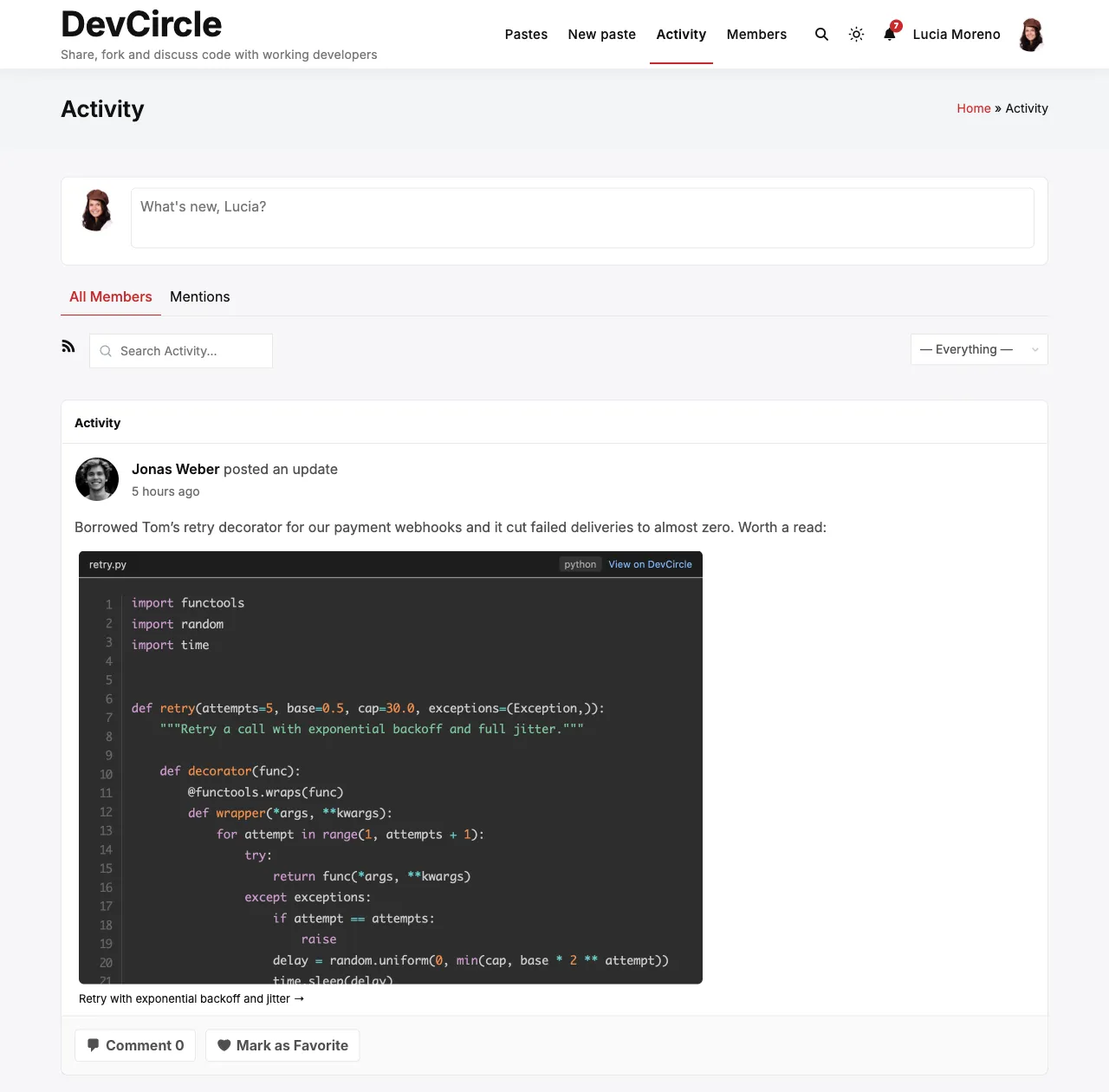
Do pastes show in group activity feeds?
Section titled “Do pastes show in group activity feeds?”No. In v1.0, paste activity is posted to the sitewide stream and the member’s profile activity tab only, not to specific group feeds.
License & Updates
Section titled “License & Updates”Where do I get my license key?
Section titled “Where do I get my license key?”Log in to your account at wbcomdesigns.com, go to My Account → Purchases, find your SnipShare order, and copy the license key. Enter it in SnipShare → Settings → License and click Activate.
What happens if I don’t activate my license?
Section titled “What happens if I don’t activate my license?”The plugin works fully without an active license. The license key is only required for automatic updates delivered via the WordPress dashboard. Without it, you can still update manually by downloading the latest version from wbcomdesigns.com.
Can I use SnipShare on multiple sites?
Section titled “Can I use SnipShare on multiple sites?”That depends on your license type. Check your purchase details at wbcomdesigns.com for the number of site activations included.