

White Label
Jetonomy overviewFree + ProGet Jetonomy →
Rename “Jetonomy” to your own brand across the WordPress admin.
PRO - This feature requires Jetonomy Pro.
What You Will Learn
Section titled “What You Will Learn”- How to enable White Label
- How to set a brand name, admin menu label and icon
- How to change the admin footer text
- What White Label does not change
What White Label Changes
Section titled “What White Label Changes”White Label rebrands the WordPress admin only: the Jetonomy sidebar menu, the plugin name on the Plugins page, and the admin footer. It does not change anything your members see on the community pages, and it does not change notification emails. Community pages do not carry a “Powered by Jetonomy” line, so there is nothing to remove there.
This is useful for agencies who hand a site to a client and want the dashboard to carry the client’s name.
Enabling White Label
Section titled “Enabling White Label”- Go to Jetonomy → Extensions in your WordPress admin.
- Find White Label and switch its toggle on.
- A Branding tab appears under Jetonomy → Settings.
Branding Settings
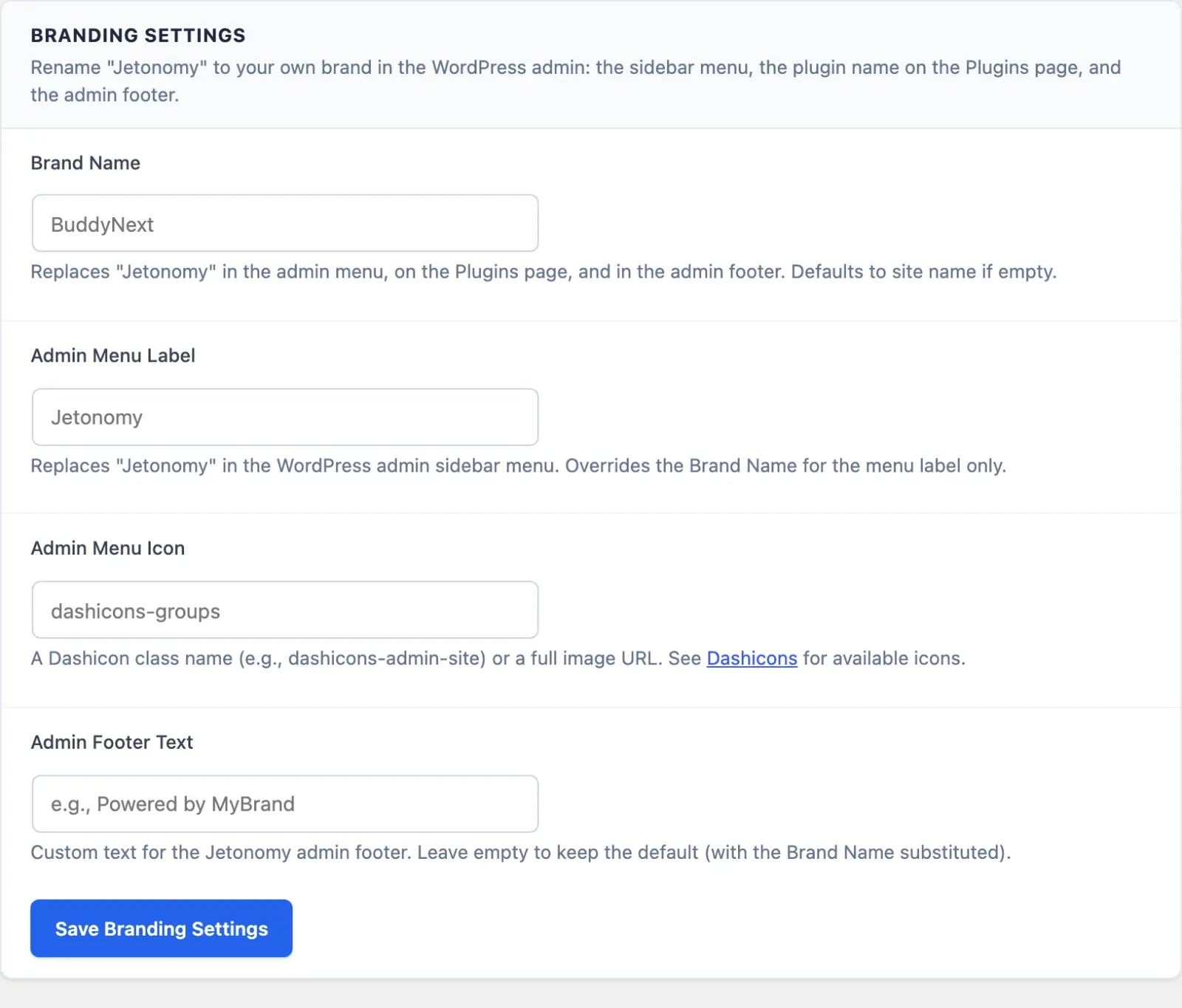
Section titled “Branding Settings”Go to Jetonomy → Settings → Branding. There are four fields:
| Field | What it does |
|---|---|
| Brand Name | Replaces “Jetonomy” in the admin menu, on the Plugins page and in the admin footer. |
| Admin Menu Label | Replaces “Jetonomy” in the admin sidebar only. Overrides the Brand Name for the menu label. |
| Admin Menu Icon | A Dashicons class (for example dashicons-groups) or a full image URL. Leave blank to keep the default icon. |
| Admin Footer Text | Custom text for the Jetonomy admin footer. Leave blank to keep the default footer, with the Brand Name swapped in. |
Leave a field blank to keep the standard Jetonomy wording for it. Click Save Branding Settings to apply your changes.
Not Available
Section titled “Not Available”White Label has no setting for a header or navigation logo, a “Powered by” toggle, custom CSS, or email branding. To match your community pages to your brand colors and fonts, see Match Your Brand.
REST API
Section titled “REST API”White Label exposes its settings under jetonomy/v1:
| Method | Endpoint | Description |
|---|---|---|
GET |
/settings/white-label |
Read the current white-label settings |
PATCH |
/settings/white-label |
Save white-label settings |
Both routes require manage_options. The fields are community_name (Brand Name), admin_label, admin_icon and footer_text. Settings are stored in the jetonomy_pro_white_label option. See the REST API reference for full payloads.
What’s Next?
Section titled “What’s Next?”Bring large language models into your community for smarter spam detection, auto-moderation, reply suggestions, and thread summaries.