

Reactions
Jetonomy overviewFree + ProGet Jetonomy →
Add expressive emoji reactions to every post and reply - so members can respond instantly without writing a full reply.
PRO - This feature requires Jetonomy Pro.
What You Will Learn
Section titled “What You Will Learn”- How to enable Reactions for your community
- How to customize which emojis appear per space
- How members react to and change their reaction on a post
- How to read reaction counts from the REST API
Why Reactions Matter
Section titled “Why Reactions Matter”A quick reaction lowers the bar for engagement. Members who would never write a reply will tap a rocket emoji or a heart. That micro-engagement adds up - you get richer signal on your best content and members feel heard without the pressure of composing a response.
How It Works
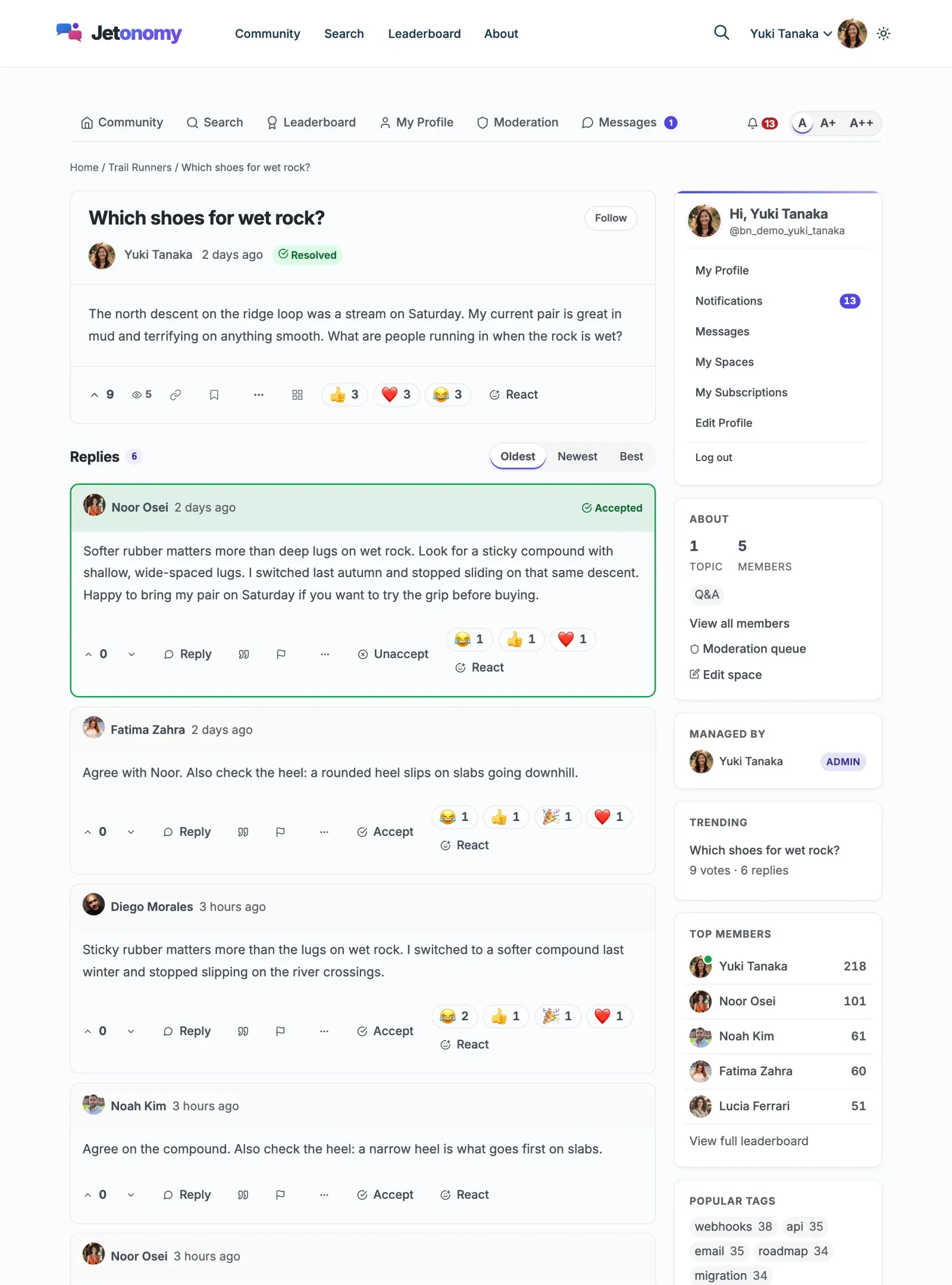
Section titled “How It Works”Every post and every reply in your community shows a reaction strip. Members click any emoji to react. Clicking a different emoji replaces the previous one - each member can hold exactly one reaction per piece of content at a time. Clicking the same emoji again removes the reaction entirely.
The reaction counts are displayed as chips directly below the post body. Each chip shows the emoji and the total count.
See who reacted (2.0.3+)
Section titled “See who reacted (2.0.3+)”Hover over a chip, move to it with the keyboard, or press and hold it on a phone to see who chose that reaction, for example “Like: Maya, Bob and 3 others”. Up to ten names are listed, then the rest are counted. Press Escape, or tap anywhere else, to close it. A quick tap on a phone still adds or removes your reaction. The list refreshes after you react.
Names are shown to anyone who can read the post, including visitors who are not logged in.

Enabling Reactions
Section titled “Enabling Reactions”- Go to Jetonomy → Extensions in your WordPress admin.
- Find Reactions and switch its toggle on.
- Reactions appear on all posts and replies immediately - no page-level configuration needed.
Tip: Enabling Reactions does not affect any existing posts. Historical content simply starts with zero reactions.
Default Emoji Set
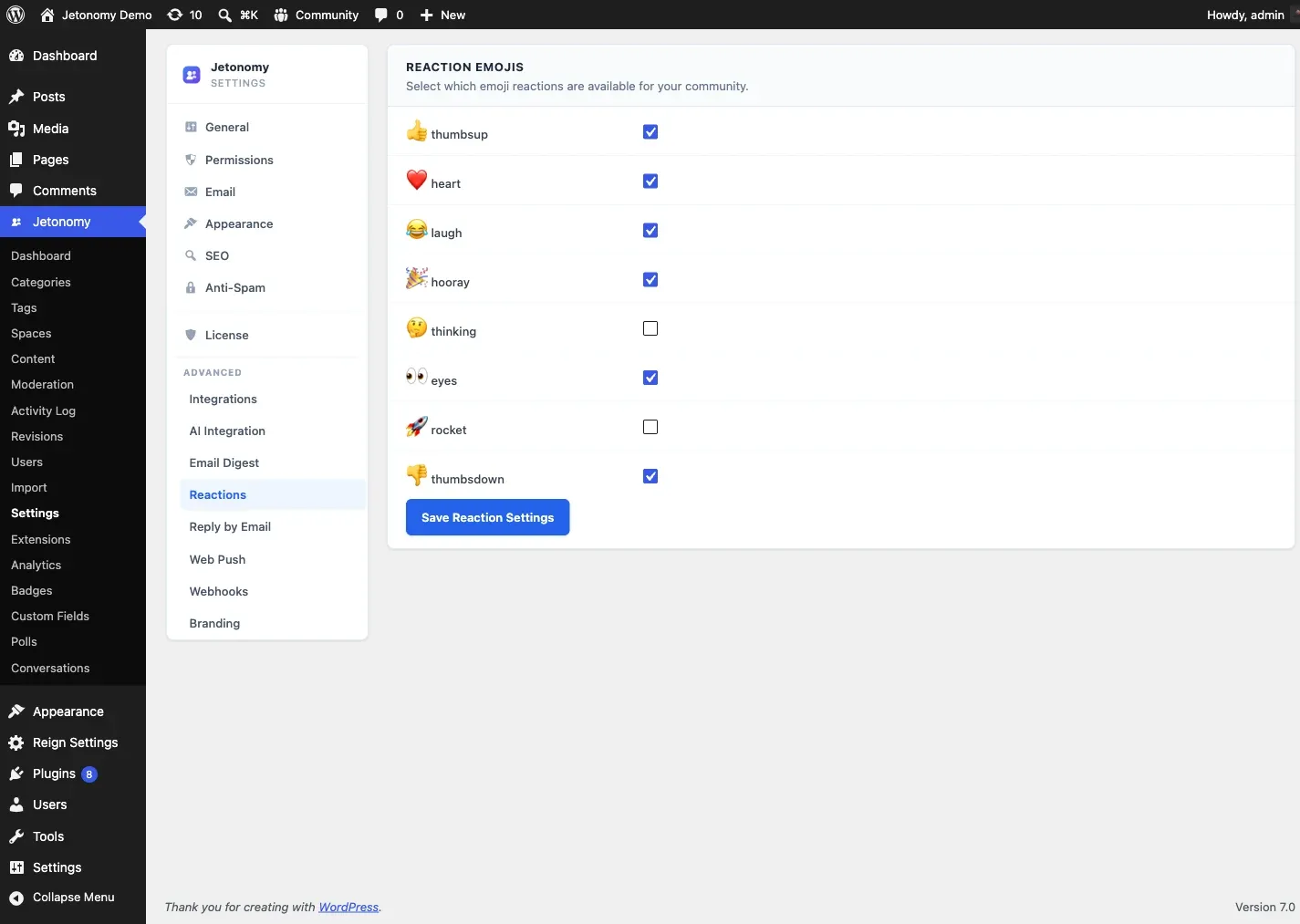
Section titled “Default Emoji Set”Jetonomy ships with eight emoji reactions out of the box:
| Emoji | Label | Use case |
|---|---|---|
| Like | Thumbs up | General agreement |
| Love | Heart | Enthusiasm, appreciation |
| Haha | Laughing face | Humor, something funny |
| Celebrate | Party popper | Wins, announcements |
| Thinking | Thinking face | Interesting, thought-provoking |
| Watching | Eyes | Following along, keeping an eye on it |
| Rocket | Rocket | Fast, shipped, love it |
| Dislike | Thumbs down | Disagreement |
All eight are enabled globally by default. You can adjust which ones appear per space.
Per-Space Customization
Section titled “Per-Space Customization”Different spaces have different tones. A Support space might not need a Celebrate emoji, and a General Chat space might not need Dislike.
- Go to Jetonomy → Spaces and open the space you want to customize.
- Open the Reactions tab in the space settings panel.
- Toggle individual emojis on or off for this space.
- Save. The change takes effect immediately for all posts in that space.
REST API
Section titled “REST API”The Reactions extension registers these endpoints under jetonomy/v1:
| Method | Endpoint | Description |
|---|---|---|
GET |
/posts/{id}/reactions |
Get the reactions and counts for a post |
POST |
/posts/{id}/reactions |
Toggle your reaction on a post (add, replace, or remove) |
GET |
/replies/{id}/reactions |
Get the reactions and counts for a reply |
POST |
/replies/{id}/reactions |
Toggle your reaction on a reply |
{id} is the numeric ID of the post or reply. Add ?emoji=rocket to a GET (2.0.3+) to also receive reactors: total, up to ten names, and a ready-made translated label. A single POST toggles your reaction: sending a new emoji replaces your previous one, and sending your current emoji again clears it.
Example - toggle a reaction:
POST /wp-json/jetonomy/v1/posts/42/reactions{ "emoji": "rocket"}Reading reactions is open to any visitor; toggling a reaction requires the jetonomy_vote capability (logged-in members by default). See the REST API reference for full payloads.
What’s Next?
Section titled “What’s Next?”Allow members to message each other privately, without leaving your community.