

Dashboard Overview
The wiki dashboard is the central hub for your knowledge base. It displays all published wiki pages, provides search and filtering, and gives users access to create, edit, and manage wiki content.
Accessing the Dashboard
Section titled “Accessing the Dashboard”The dashboard is rendered by the [member-wiki-dashboard] shortcode placed on a standard WordPress page. Create a page (or use the Auto-Create button in General Settings), then visit it on the front end. The CPT archive is intentionally disabled - the dashboard page is the single entry point to the wiki.
Dashboard Views
Section titled “Dashboard Views”The dashboard supports multiple views, controlled by URL query parameters:
Page Listing (Default)
Section titled “Page Listing (Default)”The default view shows all published wiki pages in a paginated list. Each entry displays:
- Page title (linked to the full page)
- Category badges
- Author name
- Last modified date
- Edit and history links (for users with permissions)
Pages are displayed according to the Pages Per Page setting (default: 10).
Create New Page
Section titled “Create New Page”Users with create permissions see a Create New Page button. Clicking it loads the wiki editor form where they can:
- Enter a title and content
- Select categories and tags
- Choose a parent page for hierarchical structure
- Save as draft or publish immediately
Edit Page
Section titled “Edit Page”Accessible via the edit link on any page listing or the edit button on a single wiki page. The editor pre-populates with the existing content and metadata.
Revision History
Section titled “Revision History”Each page has a history view showing all revisions with:
- Revision date and time
- Author who made the change
- Edit summary (if provided)
- Links to view the diff between any two revisions
- Restore button for administrators
Revision Diff
Section titled “Revision Diff”Compare two revisions side by side. Title and content changes are highlighted using WordPress’s built-in diff engine.
Search Results
Section titled “Search Results”The search view displays matching wiki pages ranked by relevance. Search is also available as live autocomplete via AJAX.
User Contributions
Section titled “User Contributions”Shows all wiki pages authored or contributed to by a specific user. Accessible from community profile pages (BuddyPress/PeepSo) or via the contributions URL parameter.
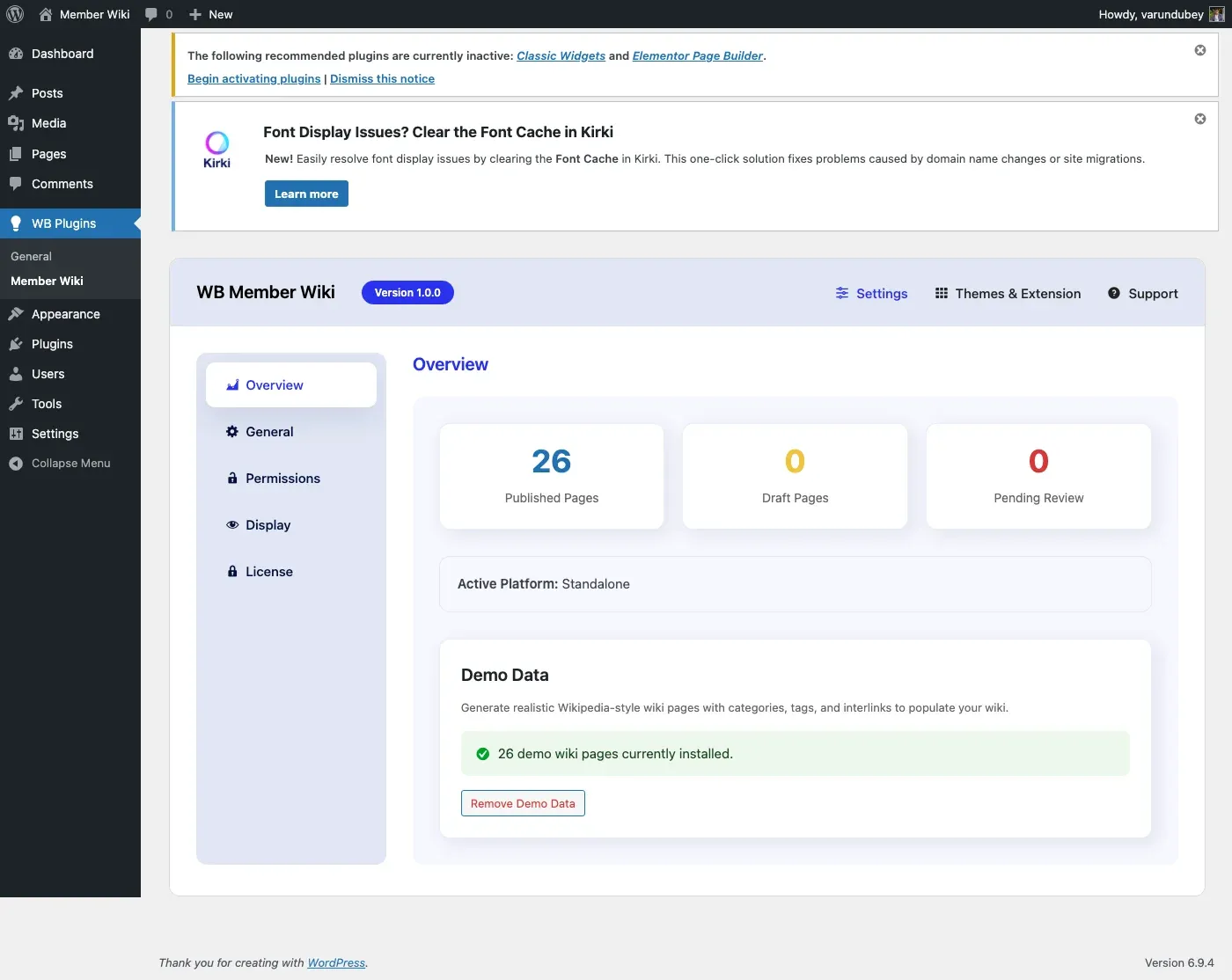
Admin Overview Tab
Section titled “Admin Overview Tab”Site administrators see an Overview tab in WB Plugins > Member Wiki with:
- Quick Stats - Published, draft, and pending review page counts
- Platform Info - Which community platform is detected (BuddyPress, PeepSo, or Standalone)
- Demo Data Wizard - Generate or remove sample wiki content for testing
URL Structure
Section titled “URL Structure”Wiki pages use the URL structure yourdomain.com/{wiki-slug}/{page-slug}/ where {wiki-slug} is configurable in General Settings (default: wiki).
Dashboard actions use query parameters:
| URL Parameter | View |
|---|---|
?wbmw_action=list |
Page listing (default) |
?wbmw_action=create |
Create new page |
?wbmw_action=edit&wbmw_page_id=123 |
Edit page |
?wbmw_action=history&wbmw_page_id=123 |
Revision history |
?wbmw_action=diff&from=10&to=12 |
Compare revisions |
?wbmw_action=search&s=query |
Search results |
?wbmw_action=contributions&user=5 |
User contributions |
?wbmw_action=recent-changes |
Recent changes log |
?wbmw_action=category |
Category browser |
?wbmw_action=random |
Redirect to a random wiki page |