

Permissions
The Permissions tab controls which WordPress user roles can perform specific actions in the wiki. This is the most important configuration for a collaborative wiki since it determines who can create, edit, delete, and protect pages.
Access these settings at WB Plugins > Member Wiki > Permissions.
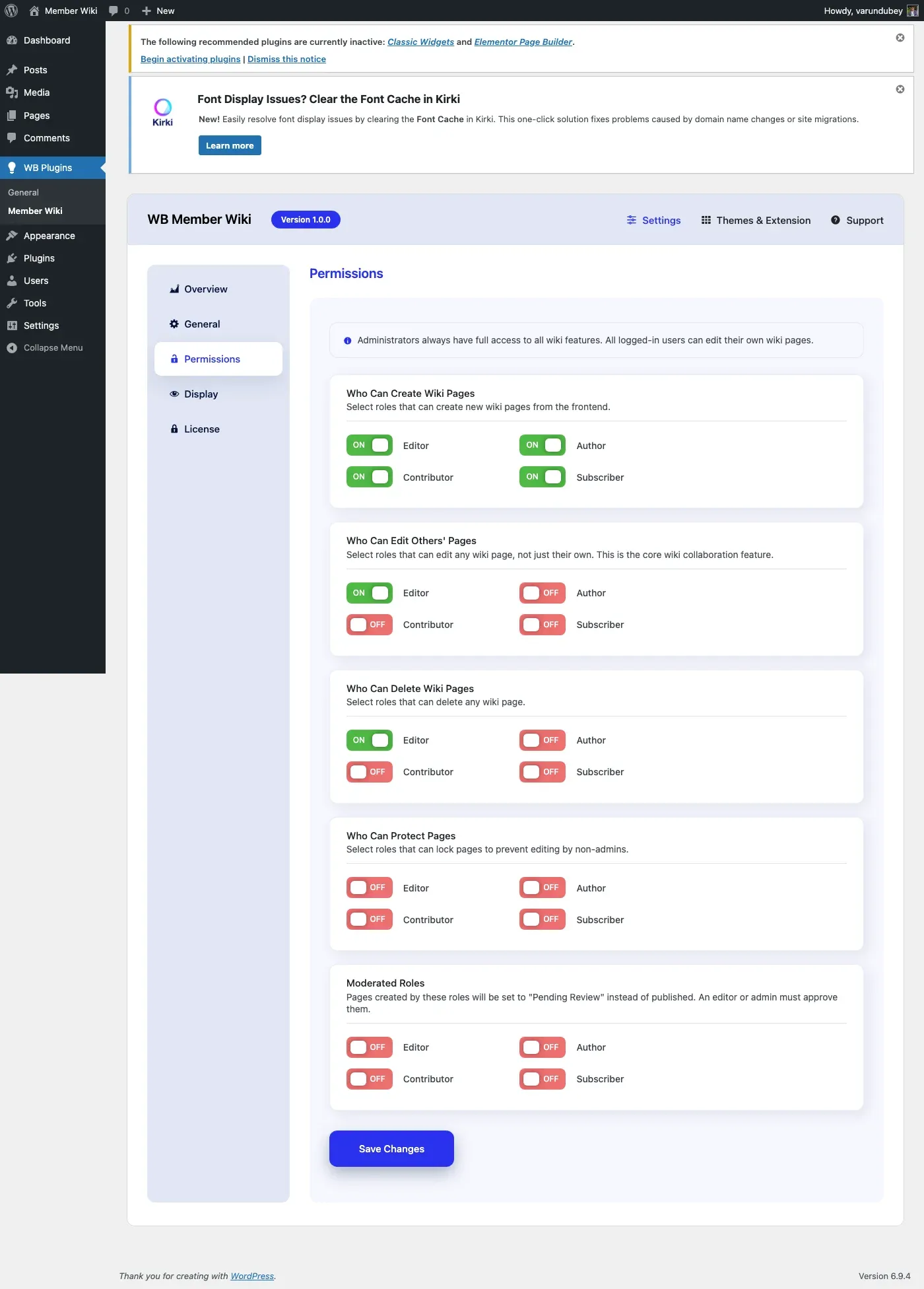
Permission Model
Section titled “Permission Model”WB Member Wiki uses a role-based permission system with four permission types. Administrators (manage_options capability) always have full access regardless of these settings.
Create Pages
Section titled “Create Pages”Setting: Roles that can create wiki pages
Select which user roles are allowed to create new wiki pages. Users with any of the selected roles can:
- Access the “Create New Page” button on the dashboard
- Submit new wiki pages as published, draft, or pending review
- Upload images for use in wiki content
Common configurations:
| Scenario | Roles |
|---|---|
| Open wiki (anyone can contribute) | Subscriber, Contributor, Author, Editor |
| Moderated wiki | Contributor, Author, Editor |
| Staff-only wiki | Editor |
Edit Others’ Pages
Section titled “Edit Others’ Pages”Setting: Roles that can edit any wiki page
This is the core wiki permission. Unlike a blog where only the author can edit their posts, a wiki allows designated roles to edit any page regardless of who created it.
Users with any of the selected roles can:
- Edit any published wiki page (not just their own)
- Save changes to pages created by other users
- Add edit summaries to the revision history
Note: Users who created a page can always edit their own page, as long as they have the create permission. The “edit others” permission extends this to all pages.
Common configurations:
| Scenario | Roles |
|---|---|
| Fully collaborative wiki | Contributor, Author, Editor |
| Trusted editors only | Editor |
| Admin-only editing | (none selected - only admins can edit others’ pages) |
Delete Pages
Section titled “Delete Pages”Setting: Roles that can delete wiki pages
Select which roles can move wiki pages to the trash. Users with any of the selected roles can:
- Delete any wiki page (moved to trash, not permanently deleted)
- Page authors can always delete their own pages if they have create permission
Recommendation: Keep this restricted to Editor or higher. Deletion should be a deliberate action by trusted users.
Protect Pages
Section titled “Protect Pages”Setting: Roles that can protect/unprotect pages
Page protection locks a page so only administrators can edit it. Users with the protect permission can:
- Protect a page (lock it to admin-only editing)
- Unprotect a previously protected page
Protected pages display a lock indicator and reject edit attempts from non-admin users.
Recommendation: Only grant this to roles you trust with editorial oversight, typically Editor or higher.
Permission Hierarchy
Section titled “Permission Hierarchy”The following table shows how permissions interact:
| Action | Admin | Protect Role | Edit Others Role | Create Role | No Role |
|---|---|---|---|---|---|
| Create page | Yes | Per setting | Per setting | Yes | No |
| Edit own page | Yes | Per setting | Per setting | Yes | No |
| Edit others’ page | Yes | Per setting | Yes | No | No |
| Edit protected page | Yes | No | No | No | No |
| Delete any page | Yes | Per setting | Per setting | Own only | No |
| Protect page | Yes | Yes | No | No | No |
| View published page | Yes | Yes | Yes | Yes | Yes |
| View revision history | Yes | Per edit | Per edit | Own only | No |
| Restore revision | Yes | Per edit | Per edit | Own only | No |
Customizing Permissions with Filters
Section titled “Customizing Permissions with Filters”Developers can override permission checks using filters:
// Allow all logged-in users to edit wiki pagesadd_filter( 'wbmw_can_edit', function( $can_edit, $page_id, $user_id ) {    return is_user_logged_in();}, 10, 3 );
// Restrict creation to users with a custom capabilityadd_filter( 'wbmw_can_create', function( $can_create, $user_id ) {    $user = get_userdata( $user_id );    return $user && $user->has_cap( 'wiki_contributor' );}, 10, 2 );
Available permission filters:
| Filter | Parameters | Purpose |
|---|---|---|
wbmw_can_view |
$can_view, $page_id, $user_id |
Control page visibility |
wbmw_can_create |
$can_create, $user_id |
Control page creation |
wbmw_can_edit |
$can_edit, $page_id, $user_id |
Control page editing |
wbmw_can_delete |
$can_delete, $page_id, $user_id |
Control page deletion |
Saving Settings
Section titled “Saving Settings”Click Save Changes at the bottom. Permission changes take effect immediately for all users.