

Analytics
MediaShield overviewFree + ProGet MediaShield →
MediaShield Pro adds heatmaps, realtime monitoring, suspicious activity detection, and data export to the free plugin’s basic analytics.
Playback Heatmaps
Section titled “Playback Heatmaps”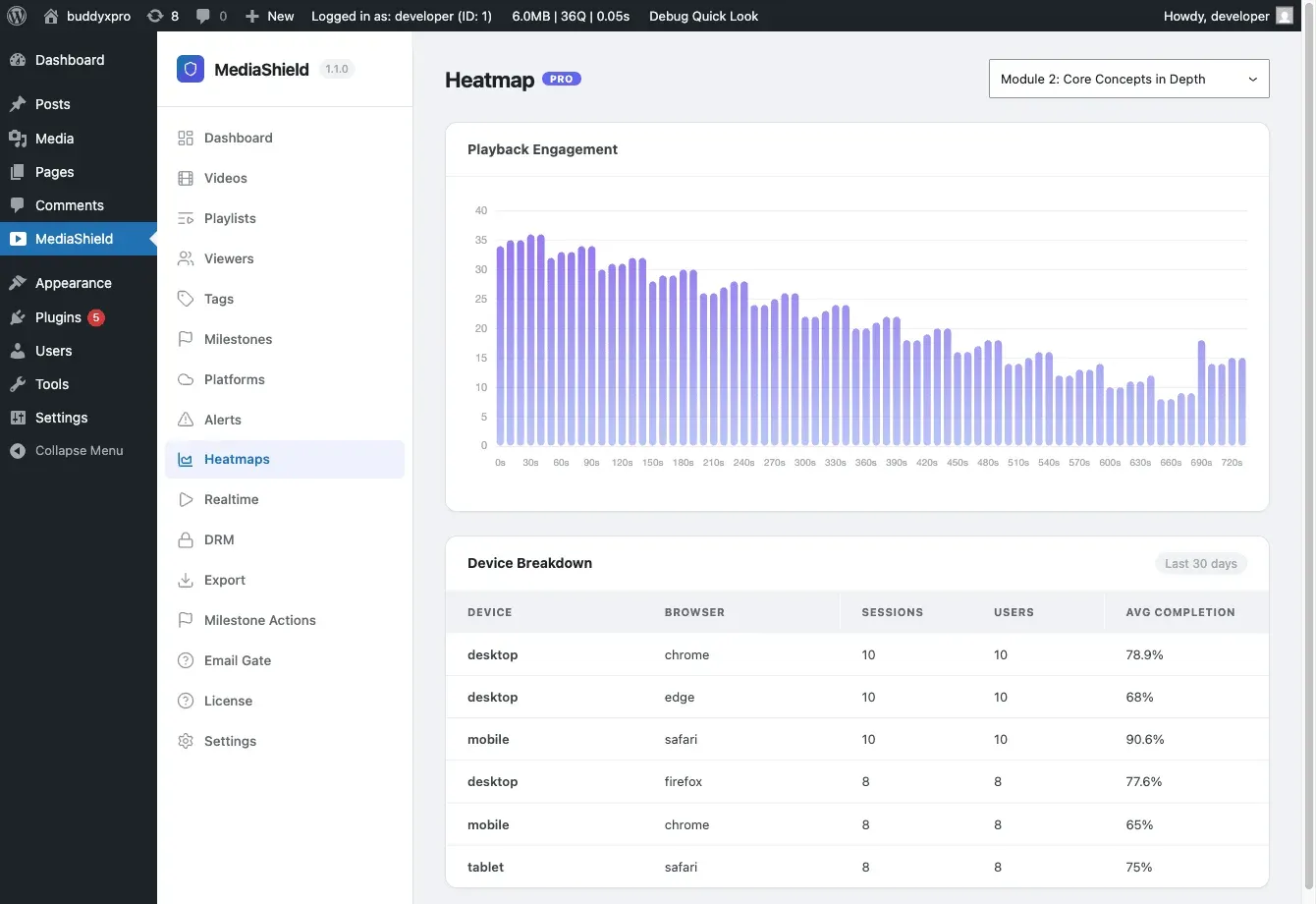
Heatmaps show where viewers are watching, re-watching, or dropping off. MediaShield aggregates playback events into 10-second position buckets and displays them as a bar chart.
- High bars – frequently watched segments.
- Steep drops – where viewers stop watching.
- Spikes after drops – sections viewers seek back to.
The heatmap page also shows a device and browser breakdown for the last 30 days, so you can optimize your player layout for your actual audience.
Two things to keep in mind when reading a heatmap:
- It lags up to an hour. Aggregation runs hourly in the background, so the newest viewing is not in the chart yet.
- It is built from playback heartbeats, not individual clicks. The player reports its position roughly every 30 seconds, so the chart shows where viewers spent time, at 10-second resolution. It is not a log of every seek and pause.
- Bars are cumulative. Counts accumulate over the life of the video rather than resetting, so an older video naturally shows taller bars than a new one.
Realtime Dashboard
Section titled “Realtime Dashboard”Located at MediaShield > Realtime, the dashboard shows all active sessions (last heartbeat within 5 minutes) with 15-second auto-refresh. Each row shows the viewer, video, progress percentage, device type, and how long they have been watching.
Suspicious Activity Detection
Section titled “Suspicious Activity Detection”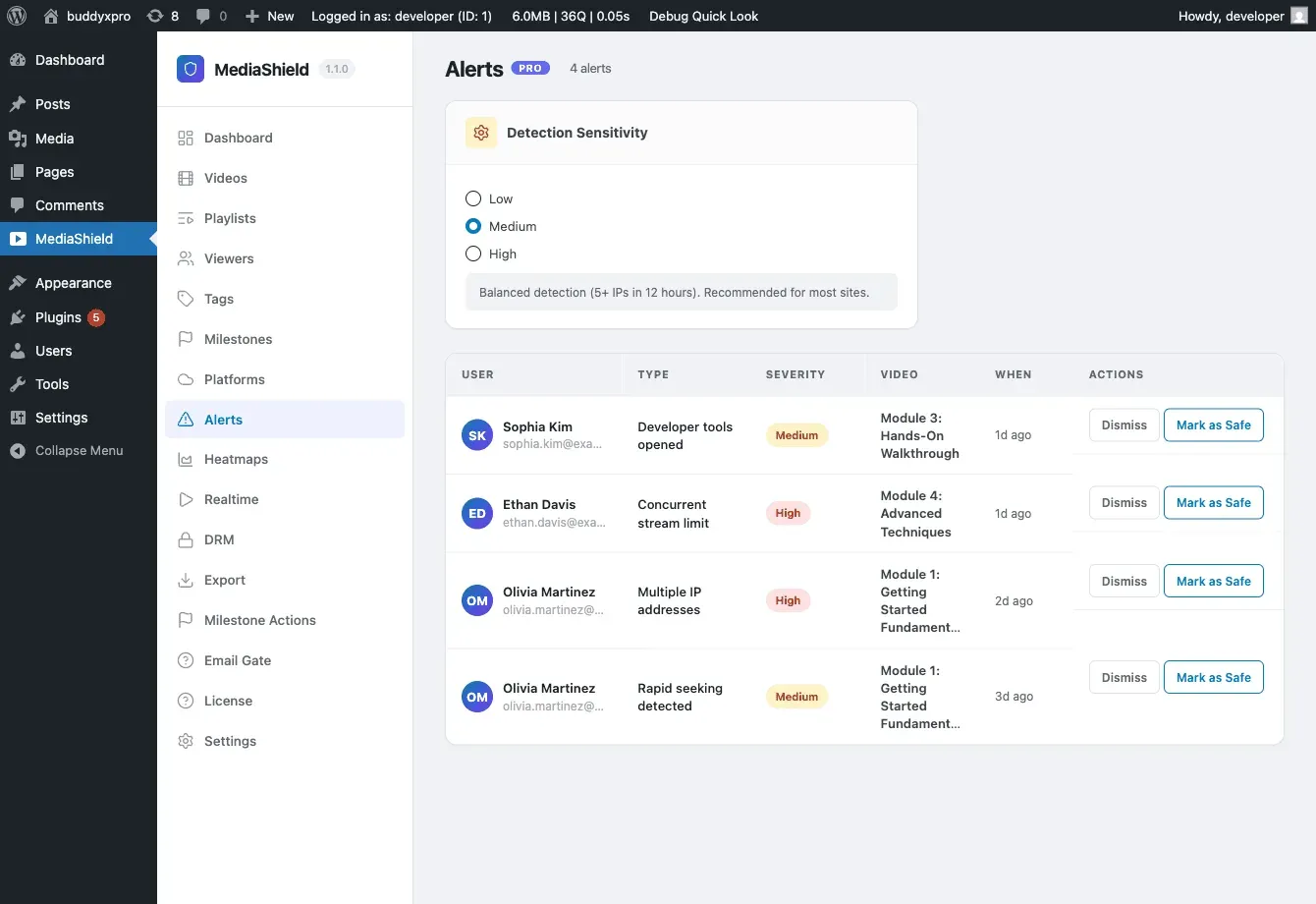
MediaShield Pro monitors viewing patterns and flags suspicious behavior:
| Alert Type | What it detects | Status |
|---|---|---|
| Multiple IP addresses | One account starting sessions from several IPs inside the sensitivity window | On |
| Developer tools opened | Viewer opened browser developer tools. Free rate-limits this to one event per user and IP per hour | On |
| Rapid seeking | Viewer jumped past 80% of the video within 30 seconds of starting it | On |
| VPN/proxy detected | The viewer’s IP is flagged as a proxy or a datacenter address | Off until you turn it on and supply an API key - see below |
| Concurrent stream limit | - | Not generated in 1.3.0. The label exists in the alerts table, but nothing creates alerts of this type. Free still enforces the concurrent-stream limit itself; it just does not raise an alert here |
Sensitivity levels (MediaShield > Alerts > Detection Sensitivity):
Sensitivity only tunes the multiple-IP detector. Developer-tools and rapid-seeking detection are not affected by it.
| Level | Behavior |
|---|---|
| Low | Flag at 10 or more distinct IPs in 24 hours. Fewest false positives |
| Medium (default) | Flag at 5 or more distinct IPs in 12 hours. Recommended for most sites |
| High | Flag at 3 or more distinct IPs in 6 hours. Produces more alerts |
VPN and proxy detection
This is off by default and stays off until two things are true: the toggle on the Alerts page is on, and an API key for the lookup provider is stored. The lookup sends the viewer’s IP address to a third party over HTTPS, and the provider only serves HTTPS to key holders - so rather than fall back to an unencrypted request, MediaShield leaves the feature off. An IP address is personal data in the EU and UK, so only enable this if your privacy policy covers it.
The key field is not on the Alerts screen in 1.3.0. Setting a key requires either the settings REST endpoint (ms_vpn_api_key) or a developer pointing the lookup at your own resolver. If you turn the toggle on without a key, nothing is sent anywhere and no VPN alerts are raised.
Managing alerts (MediaShield > Alerts):
- Dismiss – mark as reviewed. Dismissed alerts are deleted by a daily job once they are more than 90 days old. Alerts you have not dismissed are kept indefinitely.
- Safe User – whitelist a user to suppress future alerts and dismiss their outstanding ones.
Data Export
Section titled “Data Export”CSV Export
Section titled “CSV Export”Go to MediaShield > Export and choose an export type:
- Watch sessions
- Milestones
- Users
Optionally set a From and To date, then click Download CSV. No cap on watch-session and milestone exports since 1.3.0 - they page through and export in full. The user export keeps a 200,000-row ceiling and writes a NOTE row into the CSV if it is reached. Full column lists are in Data Export.
PDF Reports
Section titled “PDF Reports”Pick a period and click Generate PDF at MediaShield > Export. The report generates in the background; the page polls for it and offers a Download PDF link when it is ready, and an email with the same link goes to your site’s admin address. The report contains three sections: overview stats (unique viewers, total sessions, total watch time, unique videos), the top 10 videos by watch time, and a count of completion milestones reached. It does not include a per-user engagement section or an alerts summary.
Weekly Digest Email
Section titled “Weekly Digest Email”An automated email sent every seven days to the address you configure (your site admin address by default). Contains total views, completions, average completion rate, top 5 videos, and the unresolved alert count for the week.
Configure it at MediaShield > Export, in the Weekly Digest card. Send test digest renders the real digest and mails it to your own address, so you can check it without mailing the configured recipient.