

Friend Lists Tab
BuddyPress Auto Friends overviewPremiumGet BuddyPress Auto Friends →
Go to WB Plugins → Auto Friends → Friend Lists to configure the optional Friend Lists feature.
All settings on this tab are stored in the bpaf_friend_lists WordPress option.
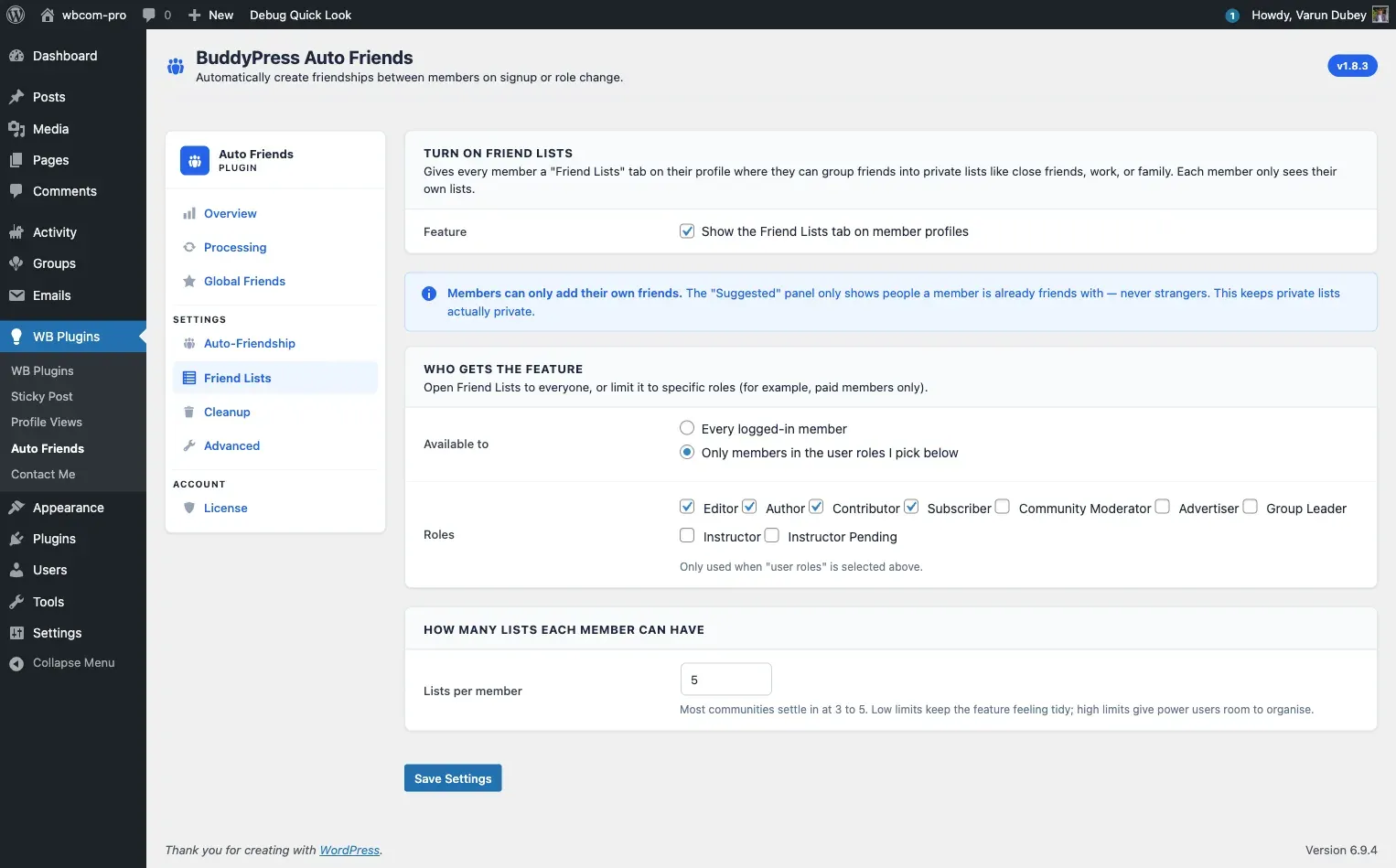
Turn On Friend Lists
Section titled “Turn On Friend Lists”Check Show the Friend Lists tab on member profiles to enable the feature. When enabled, a private Friend Lists tab appears under the Friends section on qualifying members’ BuddyPress profiles.
When disabled, all Friend Lists UI is hidden across the site. Existing list data in the database is preserved - it reappears if you re-enable the feature.
Who Gets the Feature
Section titled “Who Gets the Feature”Choose which members can create and manage friend lists:
| Option | Who gets access |
|---|---|
| Every logged-in member | All members regardless of role or type |
| Only members in the user roles I pick below | Members holding at least one of the selected WordPress roles |
| Only members with the BuddyPress member types I pick below | Members with at least one of the selected BuddyPress member types |
The member types option only appears if your site has registered BuddyPress member types.
Restricting by role
Section titled “Restricting by role”With “user roles” selected, a list of all non-administrator roles appears. Check the roles that should have access.
Restricting by member type
Section titled “Restricting by member type”With “member types” selected, a list of your registered BuddyPress member types appears. Check the types that should have access.
How Many Lists Each Member Can Have
Section titled “How Many Lists Each Member Can Have”Enter the maximum number of lists any one member can create. The default is 5. Accepted range is 1 to 50.
Members who have reached the limit cannot create new lists until they delete an existing one. Administrators have no limit.
BuddyBoss note
Section titled “BuddyBoss note”On BuddyBoss Platform, each friend list adds a filter tab on the member’s profile activity feed (e.g. a “Close Friends” feed). These tabs require BuddyBoss’s Activity Tabs feature to be enabled. If Activity Tabs are off, the lists still work for organizing friends - only the activity feed filter is suppressed.
When Friend Lists is enabled on a BuddyBoss site where Activity Tabs are off, a yellow notice on this tab explains the dependency and links directly to the BuddyBoss activity settings screen.
Saving
Section titled “Saving”Click Save Changes to apply all Friend List settings.