Skip to content
Wbcom Designs Docs

Wbcom Designs Docs

Menu

Close
  • Home
  • Changelog
  • Roadmap
  • Home
  • Changelog
  • Roadmap

BuddyX Theme

  • Getting Started (3)
    • Installation
    • Theme Setup
    • Demo Installation
  • Branding with BuddyX (1)
    • Site Identity
  • Menu Management (2)
    • Primary Menu
    • User Menu
  • Theme Options (18)
    • Site loader & Page Mapping
    • Site Layout
    • Site typography
    • Site Header
    • Site Sub Header
    • Site Skin(Site Color Scheme)
    • Site Blog
    • Site Sidebar
    • WP Login
    • Site Footer
    • Site Performance
    • Header Image
    • Background Image
    • Menus
    • Widgets
    • Homepage Setting
    • BuddyPress Nouveau
    • Additional CSS
  • Translate BuddyX (2)
    • Translating BuddyX with WPML Plugin
    • Translate with Loco
  • Meta Setting (1)
    • Meta Settings
  • FluentCart Integration Guide (1)
    • BuddyX Theme - FluentCart Integration Guide
  • SureCart Integration With BuddyX (1)
    • SureCart Integration User Guide for BuddyX Theme
  • Wbcom Essentials (1)
    • Wbcom Essentials
  • Code Snippets (1)
    • Custom Login Page with BuddyBoss - BuddyX Theme

Additional CSS

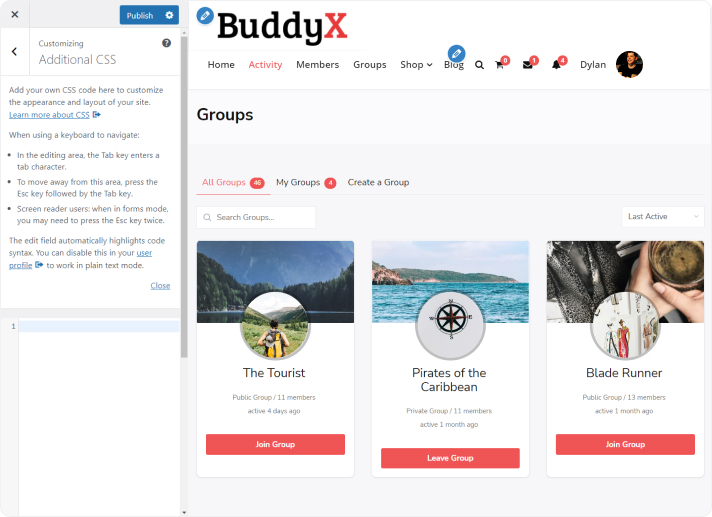
You can tweak CSS with this built-in theme customizer.

Navigate to Appearance >> Customizer section of your dashboard, scroll down to the bottom of the page and click Additional CSS. This will open an in-built tool that will allow you to add any CSS code.
Last updated: October 6, 2023
Previous BuddyPress Nouveau
Copyright © 2026 Wbcom Designs
Privacy Policy