Skip to content
Wbcom Designs Docs

Wbcom Designs Docs

Menu

Close
  • Home
  • Changelog
  • Roadmap
  • Home
  • Changelog
  • Roadmap

BuddyPress Check-ins

  • Intro (1)
    • BuddyPress Check-ins Introduction
  • System Requirement (1)
    • System Requirement
  • Installation (1)
    • How to install the Buddypress Check-ins plugin?
  • Configuration Settings (2)
    • How to rename the Check-in Tab?
    • How to configure the BuddyPress Check Ins backend settings?
  • Frontend View (3)
    • How to display Check-ins tab on buddypress profile page?
    • BuddyPress Check-ins with Auto suggestion feature
    • How to find a list of all already list check-ins locations?
  • FAQ's (3)
    • Does this plugin requires current location service?
    • How to create and add Google Place API Key?
    • How to use Check-ins options for nearby places?
  • Support (2)
    • What if I have a question?
    • What if I need more features?

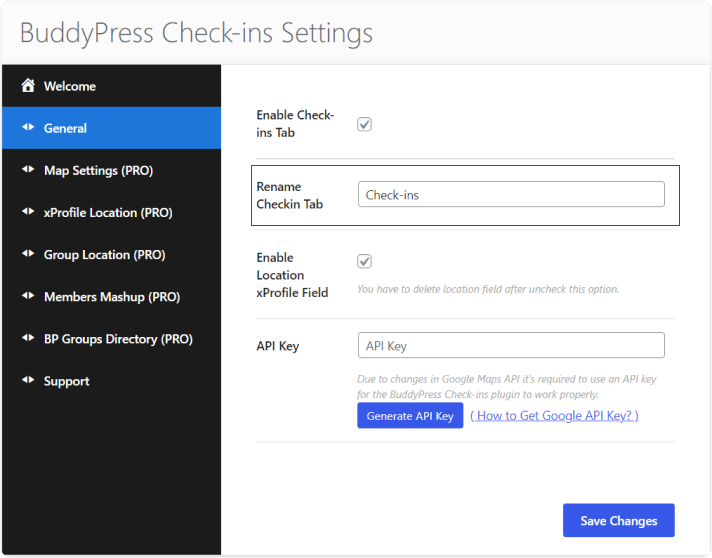
How to rename the Check-in Tab?

If the admin wants to change the Check-ins tab name, then he can easily change it from general settings.
For this, Navigate to general settings and rename the tab and then click on the save button.
Last updated: July 14, 2025
Next How to configure the BuddyPress Check Ins backend settings?
Copyright © 2026 Wbcom Designs
Privacy Policy