

Courses on member profiles (Profile Courses tab)
Reign Tutor LMS Addon overviewPremiumGet Reign Tutor LMS Addon →
Also called: student profile courses, my courses, enrolled courses, instructor courses, courses tab, BuddyPress courses, BuddyBoss courses, PeepSo courses.
What this does
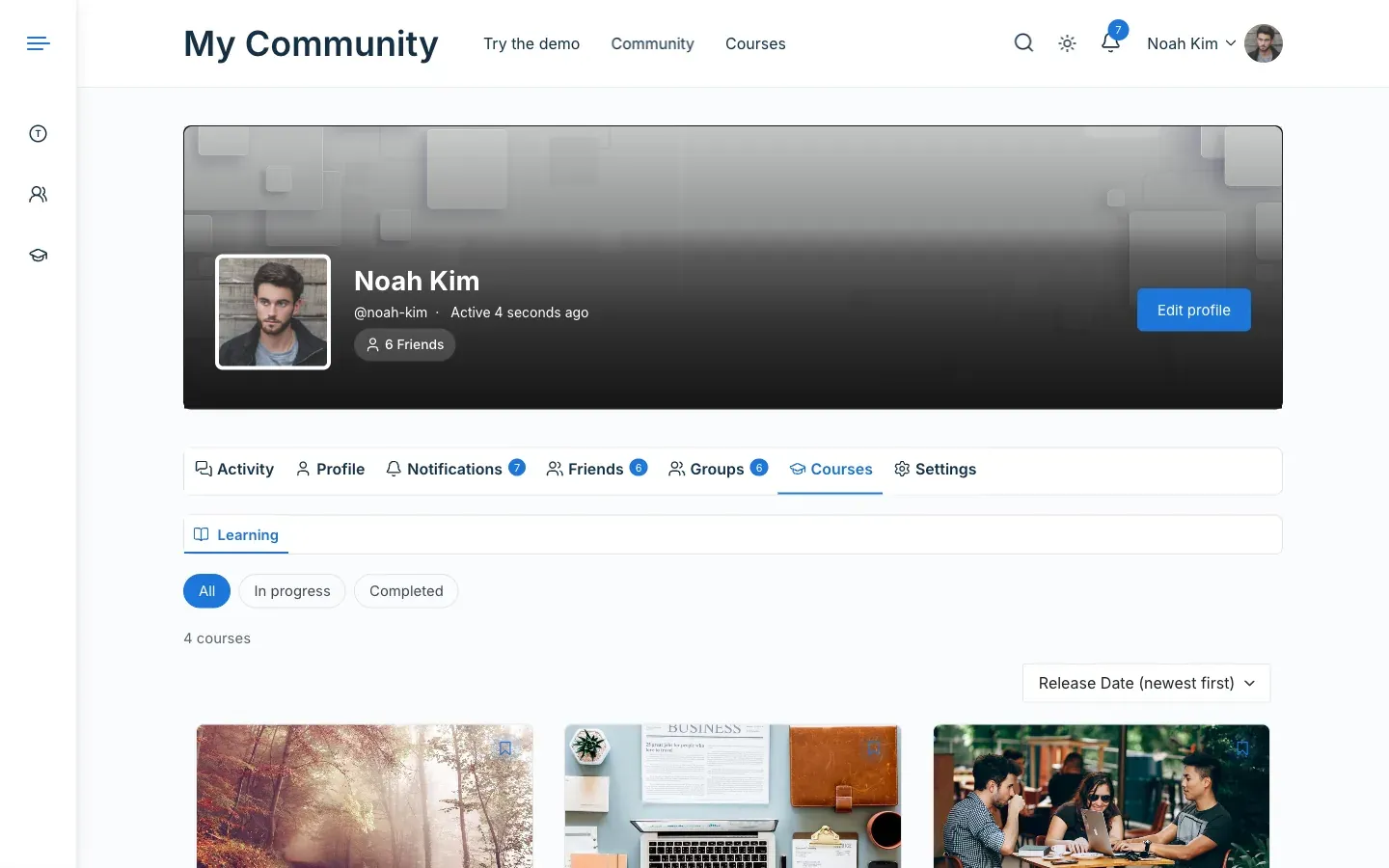
Section titled “What this does”Each member profile gets a Courses tab. It works on BuddyPress, BuddyBoss and PeepSo profiles. It is on by default for new sites.
The tab has two lists.
| List | Who sees it |
|---|---|
| Learning | The member’s courses. The member always sees it. Other visitors see it when the member has courses. |
| Teaching | The published courses an instructor wrote or co-teaches. Shown to everyone. |
Before you start
Section titled “Before you start”Turn on BuddyPress, BuddyBoss Platform or PeepSo. The setting only shows while one of them is active.
- Go to Reign Settings > Integrations, then Configure on the Tutor LMS tile.
- In the Member profiles card, switch Courses tab on or off.
- Click Save changes.
You’ll know it worked when
Section titled “You’ll know it worked when”Open a member profile. It shows a Courses tab. When you switch the setting off, the tab is gone.
Good to know
Section titled “Good to know”What does a member see on their own Learning list?
Section titled “What does a member see on their own Learning list?”The member sees their progress. Once they have a course, an All, In progress and Completed filter shows too. With no courses yet, it says “You are not enrolled in any course yet.” and links to the course catalog.
What does an instructor with no enrolments see?
Section titled “What does an instructor with no enrolments see?”The tab opens on Teaching.
Can I hide a member’s courses from other visitors?
Section titled “Can I hide a member’s courses from other visitors?”Yes. Set Tutor LMS > Settings > Design > Student Public Profile Layout to Private. Other visitors then do not see the member’s Learning list. Site admins still do.
What happens on PeepSo?
Section titled “What happens on PeepSo?”When PeepSo x Tutor LMS shows its own courses tab, the add-on adds none. A profile never has two. PeepSo has no sub-tabs, so Learning and Teaching show as links above the list.
Why is the tab missing?
Section titled “Why is the tab missing?”See Troubleshooting.
For developers
Section titled “For developers”reign_tutor_courses_tab_visible( $visible, $profile_user_id, $viewer_id ) decides whether the tab shows to a viewer. Returning false hides both the menu item and the page. For example, to show the tab only to the member and to administrators:
add_filter( 'reign_tutor_courses_tab_visible', function ( $visible, $profile_user_id, $viewer_id ) { return $visible && ( $viewer_id === $profile_user_id || current_user_can( 'manage_options' ) );}, 10, 3 );Tutor LMS Pro’s own BuddyPress group courses tab is a Tutor feature. The add-on leaves it alone.