

Update from version 2.6.0
Reign LifterLMS Addon overviewPremiumGet Reign LifterLMS Addon →
Also called: upgrade the add-on, move to 2.7.0, migrate settings, old settings, update status, shortcode change, course list shortcode
What this does
Section titled “What this does”Updating never deletes saved data. The add-on moves your old settings to new names for you. This page lists what moves, what stays and what is gone.
Before you start
Section titled “Before you start”You need to be an administrator. On a large site, plan to run the update from the command line.
- Update the add-on as you would any plugin.
- Visit any admin page as an administrator. The first visit moves your settings, one small step at a time.
- If no administrator visits, WordPress finishes the work in the background on its own schedule.
- On a large site, run the command below instead. It repeats until everything is moved, then prints a log.
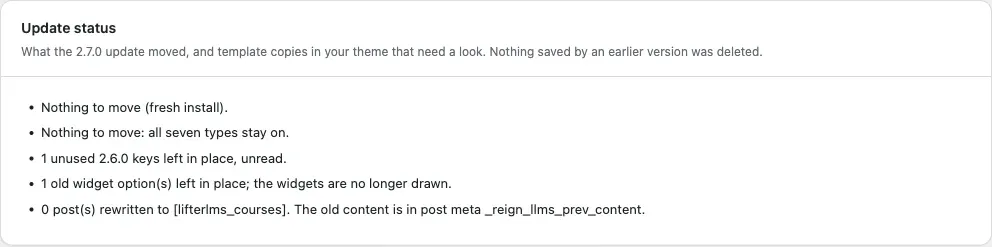
wp reign-lifterlms upgrade- Open Reign Settings > Integrations, then Configure on the LifterLMS tile and look at the Update status card. It lists each step the update ran.
You’ll know it worked when
Section titled “You’ll know it worked when”The Update status card lists the steps that ran. The card shows only when there is an update log or an outdated template override to show.
Good to know
Section titled “Good to know”What moved to the new version?
Section titled “What moved to the new version?”- Your related courses, reading mode, columns and group choices were copied to the new setting names. The old values stay in place, unread.
- The group switch, now called Link courses to groups, is On only if you had saved the old switch as on. A 2.6.0 site that never saved it ends with the switch Off. Turn it on under Community. A fresh install starts On.
- The seven activity switches became one list under Community, called Post to the activity feed when a member. A switch you never saved counts as on. A site that kept the defaults keeps all seven. A new site starts with three milestones.
- Posts that use
[reign_lifterlms_courses]were rewritten to[lifterlms_courses]. Only the course IDs, the category and the number of courses per page (default 12) carry over. Other settings, such as the number per row, the slider and the post type, are dropped. The old content is kept in the post meta_reign_llms_prev_content. - The same shortcode in a page builder widget, a text widget or a template keeps working. It shows as
[lifterlms_courses]with the same mapping.
What stays in the database but is no longer used?
Section titled “What stays in the database but is no longer used?”- The old settings keys that the new screen replaces, the
course_tab_flagoption, the widget options and any edited activity sentences. - Each member’s activity opt-out. There is no opt-out per member now.
- The old reading mode cookie. A student’s choice is now kept in the browser.
- The group link on a course keeps its meta key, so saved links keep working.
What went away?
Section titled “What went away?”- The old widgets are no longer drawn.
- The progress bar on the profile Courses tab is gone. It cost several queries for each course.
- Group removal is gone. A member who leaves a course or is unenrolled stays in the group.
How do I undo the shortcode change?
Section titled “How do I undo the shortcode change?”Run this command:
wp reign-lifterlms upgrade --revert-shortcodesA post that you edited after the update is left as it is and counted as skipped.
For developers
Section titled “For developers”The settings moved from reign_options to reign_options['lifterlms']. See Settings keys and stored data.