

What Reign LearnDash Addon does
Reign LearnDash Addon overviewPremiumGet Reign LearnDash Addon →
Also called: Reign LearnDash add-on, course page layouts, course grid, course list, LearnDash styling, online course look, student dashboard cards, LMS add-on
What this does
Section titled “What this does”Reign LearnDash Addon gives your LearnDash courses more ways to look. You get new course page layouts, course grid and course list styles, and a filter bar. If you run BuddyPress or BuddyBoss, it also links courses and groups to community groups.
It is an add-on for the Reign theme, which has its own Reign documentation. It is sold separately from the theme. Buy it here.
Your courses, lessons, quizzes, groups and reviews stay in LearnDash. The add-on only changes how they look and adds a few extras. Version 5.2.0 is a full rebuild that works with LearnDash’s own pages and data instead of copying them.
Before you start
Section titled “Before you start”You need Reign 8.1.0 or newer, LearnDash 5.2 or newer and PHP 8.1 or newer. If one is missing, the add-on pauses, shows a notice and keeps your settings. Updates need your licence key in Reign Settings > License. See What you need before installing for the full list.
What you get
Section titled “What you get”- Course page templates. Classic, Spotlight and Academy, set for the whole site or for one course.
- Course archive layouts. Classic cards, Soft cards and Catalog, with a Grid or List switch and a filter bar.
- Reviews. LearnDash’s own course reviews. The add-on only styles them.
- Groups. LearnDash’s own group page and group list, styled by Reign.
- Community sync. Community groups for courses and LearnDash groups on BuddyPress and BuddyBoss. It also adds roles, privacy, activity posts, Courses tabs and a Sync now button.
- Buy buttons. Closed courses sold through WooCommerce or Easy Digital Downloads go straight to checkout. Paid Memberships Pro courses get a Buy membership button.
- Shortcodes and a block.
[modern_courses],[modern_groups]and the Courses grid block. - Widgets. Course categories, course search and a course list.
- Focus mode link. An optional Back to course link in LearnDash’s focus mode.
Where the settings are
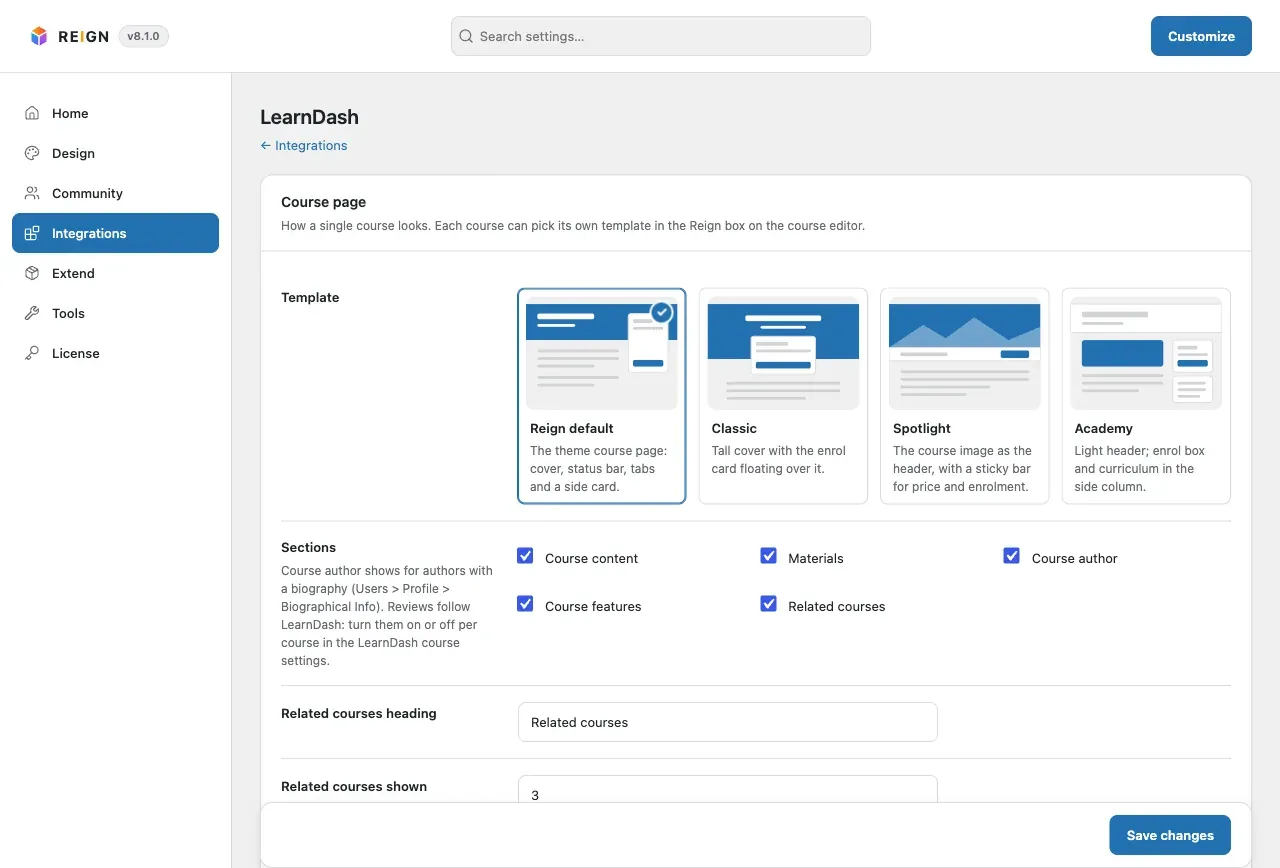
Section titled “Where the settings are”- Go to Reign Settings > Integrations, then Configure on the LearnDash tile.
- Look at the first card, Course page. It shows four templates.
- Open any course or group editor to find the Reign box in the side column.
You’ll know it worked when
Section titled “You’ll know it worked when”You see the LearnDash screen under Reign Settings > Integrations, and the Reign box appears in the course editor.
Good to know
Section titled “Good to know”What changed from version 5.1.0?
Section titled “What changed from version 5.1.0?”The add-on’s own review system, its copied LearnDash templates, its own dark mode and the old LearnMate class names are gone. A one-time upgrade moves your saved settings, shortcodes and reviews. See Upgrade from version 5.1.0.
Where do I start?
Section titled “Where do I start?”If LearnDash is not set up yet, follow Set up LearnDash for Reign. If it is, go to Change the add-on settings. More help is in Resources and downloads.