

Fix a job board problem (Troubleshooting)
Reign WP Job Manager Addon overviewPremiumGet Reign WP Job Manager Addon →
Also called: job page not showing, job list empty, resume layout missing, extra field missing, add-on paused, Posted by link missing.
The add-on shows a notice and does nothing
Section titled “The add-on shows a notice and does nothing”It needs WP Job Manager and Reign 8.1.0 or newer. Activate or update the one the notice names. Your settings are kept while the add-on is paused.
Nothing shows on the jobs pages
Section titled “Nothing shows on the jobs pages”The job pages belong to WP Job Manager. An empty list, a missing form or a “not found” error usually means WP Job Manager is not set up yet. Check the Jobs, Post a Job and Job Dashboard pages, and the permalinks. The steps are in Set up your job board.
The Reading layout does not appear
Section titled “The Reading layout does not appear”The Reign layer, and Reading with it, steps aside in four cases. Check each one.
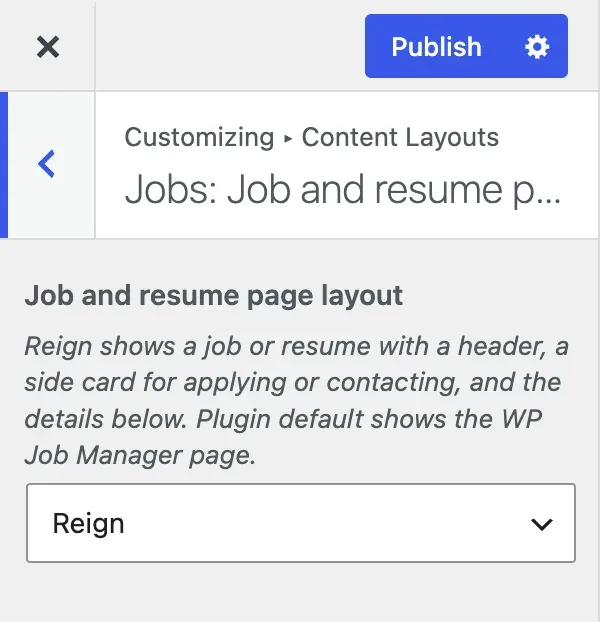
- In the Customizer, go to Content Layouts and find Jobs: Job and resume pages. If it uses the plugin’s own layout, set it to the Reign layout.
- A child theme may hold its own copy of the job or resume page template. Remove or update it. The file names are under For developers.
- Custom code may turn the Reign layer off. See For developers.
- For resumes, Resume Manager must be active.
The Grid or Rows choice does nothing on a page
Section titled “The Grid or Rows choice does nothing on a page”The choice applies to the [jobs] and [resumes] shortcodes and the archive pages. A list placed by a widget or a block keeps the Reign default.
An extra field is missing from the form
Section titled “An extra field is missing from the form”Go to Reign Settings > Integrations, then Configure on the WP Job Manager tile. Check that the field is ticked in the Job fields or Resume fields card. A field with no choices is not shown on the form, so add its choices in the Jobs or Resumes menu. On a new site, Age and Gender on resumes start switched off.
The poster link is missing
Section titled “The poster link is missing”It needs BuddyPress, BuddyBoss or PeepSo, and the setting must be on. The job needs a company name. A member with a profile must have posted it.
A page still shows [jobmate_job_search_filter] as text
Section titled “A page still shows [jobmate_job_search_filter] as text”That search bar was removed in 3.2.0. Edit the page and delete the shortcode. The notice stops listing the page after you save it.
A comment query fails with “Unknown column wp_posts.post_type”
Section titled “A comment query fails with “Unknown column wp_posts.post_type””This can happen when WP Job Manager Applications and WooCommerce are both active. The add-on repairs the query for you. If you still see the error, check that the add-on is not paused.
The upgrade notice stays on screen
Section titled “The upgrade notice stays on screen”The “moving your saved settings” notice stays until the move finishes. Open the admin once more. Or run wp reign-jb upgrade until it stops printing “Still moving data…”.
Still stuck?
Section titled “Still stuck?”- Check that the add-on is not paused. When something it needs is missing, it shows a notice on your admin screens. The notice names what is missing.
- Open Reign Settings > Tools and copy the System status.
- Note the version of Reign, of this add-on and of the plugin it works with.
- Open a support ticket and paste the System status and the three versions.
For developers
Section titled “For developers”- Template files that block the Reading layout:
job_manager/content-single-job_listing.phpandwp-job-manager-resumes/content-single-resume.php. - Filters that turn the Reign layer off when they return false:
reign_job_layout_enabledandreign_resume_layout_enabled. - The comment query repair runs on
comments_clausesat priority 20.