

Upgrade your job board add-on from 3.1.0 (Upgrade from 3.1.0)
Reign WP Job Manager Addon overviewPremiumGet Reign WP Job Manager Addon →
Also called: update the add-on, upgrade to 3.2.0, move my settings, lost job map, lost job search bar, job list shortcode changed, migrate settings.
What this does
Section titled “What this does”Version 3.2.0 is a rebuild. The first time it runs, it moves your saved choices to the new settings. It never deletes anything you saved. If you go back to 3.1.0, your old data is still there.
Before you start
Section titled “Before you start”- Take a backup, as you would before any update.
- Make sure the Reign theme is 8.1.0 or newer and WP Job Manager is active. If either is missing, the add-on pauses, but the move still works.
- Update the add-on to 3.2.0.
- Open any admin screen. The move starts on its own and runs in small batches.
- Wait for the notice “Reign WP Job Manager Addon is moving your saved settings to version 3.2.0”. It shows on the Plugins, Dashboard, Updates and Reign Settings screens, and it finishes by itself.
- When the move ends, read the success notice. It shows once and lists what moved.
- Go to Reign Settings > License and check that your licence key is there. A saved key is passed to Reign, which moves it.
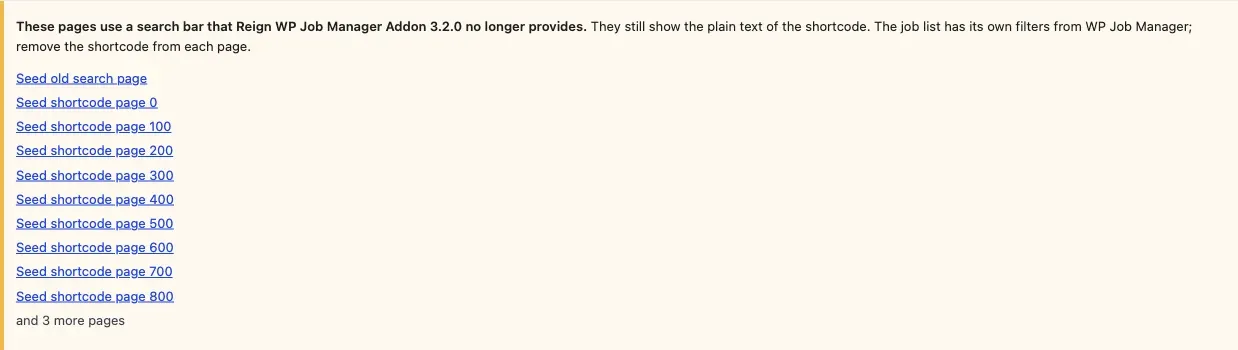
- If a warning lists pages that use the old search bar, open each page and remove the shortcode. The warning has a link to each page.
What is moved
Section titled “What is moved”- Single job and resume layouts. Every old layout becomes the Reign default. Version 3.2.0 offers the Reign default and Reading.
- Job list. The old list layout becomes the default rows. The old grid or card layout becomes Grid. The old column count is dropped.
- Resume list. The old list layout becomes Rows. The old grid or card layout becomes the Reign cards.
- Extra fields. The thirteen on or off choices move over. A field that was off but already has terms stays on, so no saved term disappears from a page.
- List shortcodes.
[jobmate_job_listing]and[jobmate_resume_listing]become[jobs]and[resumes]in the content of every post type. Revisions and menu items are left out. Old versions of a page keep the old text in the revision history.
What is dropped
Section titled “What is dropped”- The map at the top of the job and resume lists, and the map on the job page.
- The search bar shortcode
[jobmate_job_search_filter]. WP Job Manager’s own filters above the list replace it. - The slider, the colour options and the add-on’s own licence page.
You’ll know it worked when
Section titled “You’ll know it worked when”One success notice says what moved. Your job and resume pages open with the layouts you expect. No warning is left about the old search bar.
Good to know
Section titled “Good to know”What does the warning about the old search bar mean?
Section titled “What does the warning about the old search bar mean?”A page still holds [jobmate_job_search_filter]. The warning lists up to 10 pages, each with a link, and then says “and N more”. The add-on remembers up to 200 pages. A page leaves the list when it no longer holds the shortcode.
Does a new site get a move or a notice?
Section titled “Does a new site get a move or a notice?”No. A site that never ran 3.1.0 starts on the defaults. A site that only has the 3.1.0 on or off options counts as a 3.1.0 site.
What stays in my database?
Section titled “What stays in my database?”The old settings key, the map options, the extra field options, all terms, and all post and user meta. They stay unread. You can go back to 3.1.0 at any time.
My site is large. How do I move everything at once?
Section titled “My site is large. How do I move everything at once?”The data moves in small batches when an administrator opens the admin. It also moves in the background with WP-Cron. To move it all now, run wp reign-jb upgrade. It prints “Still moving data…” until it is done, and it is safe to run again. It also works while the add-on is paused.
Why does a list shortcode still show as plain text?
Section titled “Why does a list shortcode still show as plain text?”The add-on rewrites only post content. It changes only a tag followed by a space, ] or /. A list shortcode inside page-builder data or a widget keeps its old name. Change it by hand to [jobs] or [resumes].
Where is the wording of each notice?
Section titled “Where is the wording of each notice?”See Messages and notices.
For developers
Section titled “For developers”The add-on keeps these options. All of them are removed on uninstall.
| Option | Holds |
|---|---|
reign_options['wpjm'] |
Your settings (values equal to the default are not stored) |
reign_jb_upgrades |
Which upgrade steps are finished |
reign_jb_upgrade_log |
The lines shown in the success notice |
reign_jb_upgrade_noticed |
Set once the success notice has been shown |
reign_jb_upgrade_cursor |
Progress of the shortcode rewrite on large sites |
reign_jb_search_pages |
Pages that still hold the dropped search shortcode |
The WP-Cron event reign_jb_upgrade runs the move in the background. It is cleared on uninstall. The 3.1.0 data is never touched. The batch budget is 5 seconds per request.