

Modern Member Widget
BuddyPress Statistics overviewPremiumGet BuddyPress Statistics →
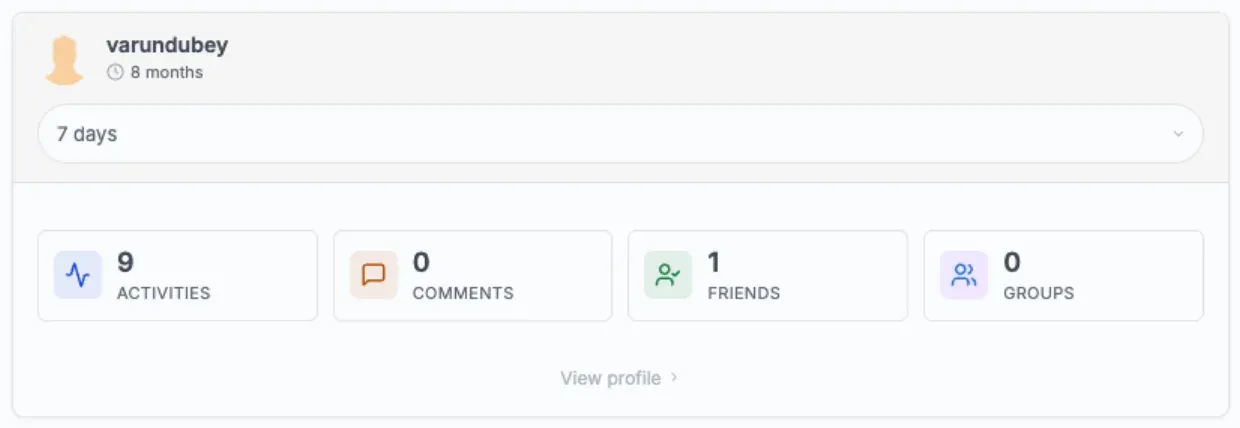
The Member Activity Summary widget shows a compact statistics card for a single member: their avatar, name, how long they’ve been a member, their activities, comments, friends, and groups, an optional activity chart, and a link to their profile.
It can be used two ways:
- As a sidebar widget listed under Appearance > Widgets as BP Stats - Member Activity Summary.
- As the
[bp_stats_modern_widget]shortcode anywhere on the site.
Shortcode
Section titled “Shortcode”[bp_stats_modern_widget]Attributes
Section titled “Attributes”| Attribute | Default | What it does |
|---|---|---|
user_id="auto" |
auto |
Shows the profile owner on member profile pages, the author on author archive pages, and the logged-in member everywhere else. |
user_id="current" |
- | Always shows the currently logged-in member, whichever page they’re on. |
user_id="123" |
- | Shows the member with user ID 123. |
user_id="username" |
- | Shows the member with that username. |
title="" |
- | Optional title shown above the card. |
Examples
Section titled “Examples”[bp_stats_modern_widget][bp_stats_modern_widget user_id="current"][bp_stats_modern_widget user_id="42"][bp_stats_modern_widget user_id="alice"][bp_stats_modern_widget title="Your activity"]Who sees the card
Section titled “Who sees the card”A member always sees their own card. Another member’s card (for example user_id="42") is only shown to people allowed to see that member’s statistics: a site administrator, or anyone allowed by the bp_stats_can_view_user_stats filter. Everyone else sees nothing at that spot, so the shortcode is safe to leave on public pages.
If no member can be found (for example, a logged-out visitor on a page that isn’t a profile), visitors see nothing. Editors and administrators see a short notice instead, so they can tell the shortcode is there.
Sidebar widget
Section titled “Sidebar widget”To use it:
- Go to Appearance > Widgets.
- Find BP Stats - Member Activity Summary.
- Add it to any widget area.
- Set the options below.
- Save.
Settings
Section titled “Settings”| Setting | Default | What it does |
|---|---|---|
| Title | Activity Summary (when left empty) | Widget heading. |
| Show statistics for | Auto-detect (context-aware) | Which member the widget shows. See the options below. |
| Show activity chart | On | Shows or hides the activity chart. |
Show statistics for options:
- Auto-detect (context-aware) - the profile owner on member profiles, the author on author pages, the current member elsewhere.
- Always current logged-in user - always the member viewing the page.
- Displayed user on profiles, current elsewhere - the profile owner on profiles, the current member everywhere else.
Logged-out visitors on pages without a member to show see nothing: the widget hides itself.
What the widget shows
Section titled “What the widget shows”| Section | Content |
|---|---|
| Header | Avatar, display name, and how long they’ve been a member (days, months, or years). |
| Filter | A 7 days / 30 days / 3 months period menu. |
| Stats | Activities, Comments, Friends, and Groups for the selected period, one per row. |
| Chart | A small chart of the member’s recent activity (when enabled). |
| Footer | A View profile link to the member’s profile. |
The numbers load right after the page appears, so a brief placeholder is normal.
Theming
Section titled “Theming”The widget follows your theme’s colors and spacing, including dark mode on BuddyX and Reign.
What changed in 2.0.2
Section titled “What changed in 2.0.2”- In a sidebar the widget sits inside your theme’s widget box like the theme’s own widgets: no inner card, plain rows, a 50px rounded avatar, a full-width period menu and theme colours in light and dark mode.
- The shortcode’s
titleattribute now shows above the card.
What changed in 2.0.1
Section titled “What changed in 2.0.1”- Widget styling follows BuddyX 5.1 and Reign color settings, including dark mode.
What changed in 2.0.0
Section titled “What changed in 2.0.0”- New icons throughout the card.
- The period menu has a proper label for screen reader users, and screen readers announce the new numbers when the period changes.
- The card design matches the rest of the plugin.
- Widget data is cached, so a widget on many pages doesn’t slow your site down.