LifterLMS BuddyPress integration

Get Started

The Reign LifterLMS integration with BuddyPress groups allows you to connect a BuddyPress private group to a LifterLMS course. When a user enrolls in a course that has an associated BuddyPress group, they are automatically enrolled in the related BuddyPress group as well. Additionally, course-related activities, such as course completion, lesson completion, and course enrollment, will trigger notifications and activity updates within the associated BuddyPress group.

Purpose

This integration enables the automatic enrollment of users in a BuddyPress private group when they enroll in a related LifterLMS course. It also ensures that course activities are reflected in the associated BuddyPress group’s activity feed.

How It Works

    • Once you associate a BuddyPress private group with a LifterLMS course, any user who enrolls in that course will automatically join the linked BuddyPress group.
    • Activities such as course completion, lesson completion, and enrollment will trigger notifications and be logged as activity inside the associated BuddyPress private group.

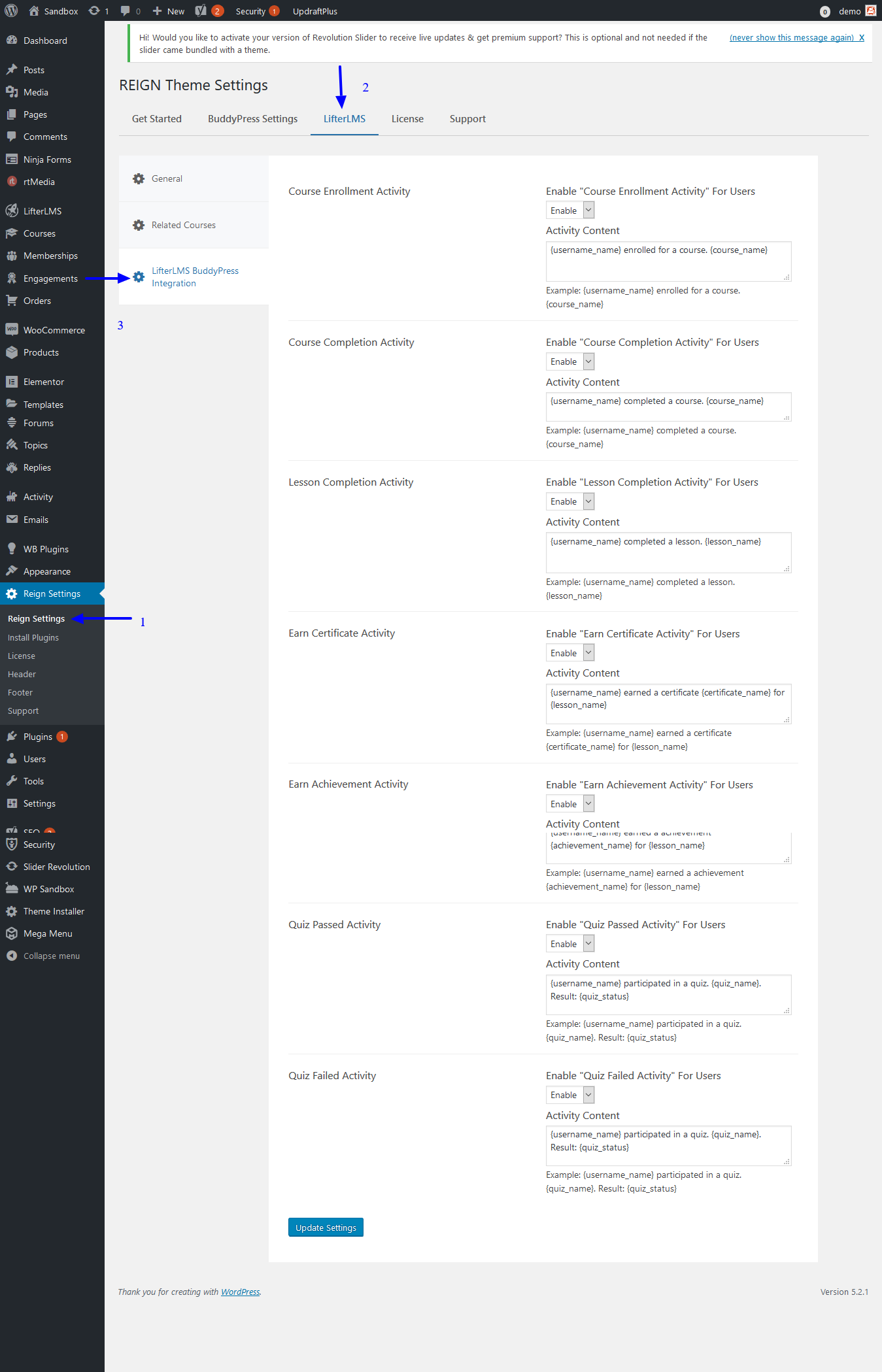
Head towards Dashboard >> Reign Settings >> LifterLMS BuddyPress Integration and enable the options.


Steps to Associate a BuddyPress Group with a Course:

  1. Edit the Course:
    • Go to your LifterLMS Courses section and edit the course you want to associate with a BuddyPress private group.
  2. Find the Meta Box:
    • Locate the “BuddyPress Group” meta box within the course edit page. This box allows you to link a BuddyPress group to the course.
  3. Choose a Group:
    • In the “BuddyPress Group” meta box, select the BuddyPress group of your choice from the available list of groups.
  4. Enable BP Activity:
    • Check the option “Enable BP Activity” to ensure that course activities, such as enrollment, course completion, and lesson completion, will trigger activity updates in the associated BuddyPress group.
  5. Save Changes:
    • Save the course to apply the changes.

Example

After associating a BuddyPress group with a course, when a user enrolls in the course, they will be added to the linked BuddyPress group. Any actions related to the course, such as completing a lesson or the course itself, will trigger activity updates in the group’s activity feed, allowing group members to see these milestones.

This integration helps create a seamless experience between your course content and the community features of BuddyPress, making it easier for learners to interact and stay engaged.


Course Enrollment Activity

Description:
Settings to enable or disable course enrollment activity for users.

Activity Content
{username_name} enrolled in the course {course_name}.
Example: Andre enrolled in the course Introduction to Web Development.

Course Completion Activity

Description:
Settings to enable or disable course completion activity for users.

Activity Content
{username_name} completed the course {course_name}.
Example: Andre completed the course Introduction to Web Development.

Lesson Completion Activity

Description:
Settings to enable or disable lesson completion activity for users.

Activity Content
{username_name} completed the lesson {lesson_name}.
Example: Andre completed the lesson HTML Basics.

Earn Certificate Activity

Description:
Settings to enable or disable certificate earning activity for users.

Activity Content
{username_name} earned a certificate "{certificate_name}" for the lesson {lesson_name}.
Example: Andre earned a certificate “HTML Mastery” for the lesson HTML Basics.

Earn Achievement Activity

Description:
Settings to enable or disable achievement earning activity for users.

Activity Content
{username_name} earned the achievement "{achievement_name}" for the lesson {lesson_name}.
Example: Andre earned the achievement “Lesson Champ” for the lesson HTML Basics.

Quiz Passed Activity

Description:
Settings to enable or disable quiz passed activity for users.

Activity Content
{username_name} participated in the quiz "{quiz_name}". Result: {quiz_status}
Example: Andre participated in the quiz “HTML Fundamentals Quiz”. Result: Passed

Quiz Failed Activity

Description:
Settings to enable or disable quiz failed activity for users.

Activity Content
{username_name} participated in the quiz "{quiz_name}". Result: {quiz_status}
Example: Andre participated in the quiz “HTML Fundamentals Quiz”. Result: Failed

Last updated: May 26, 2025