Skip to content
Wbcom Designs Docs

Wbcom Designs Docs

Menu

Close
  • Home
  • Changelog
  • Roadmap
  • Home
  • Changelog
  • Roadmap

Shortcode for BuddyPress Pro

  • Intro (2)
    • Shortcodes for BuddyPress Pro Introduction
    • Shortcode for BuddyPress Pro Features Highlight
  • System Requirement (1)
    • System Requirement
  • Installation (1)
    • How to install the Shortcode for BuddyPress Pro Plugin
  • License (2)
    • Add License
    • Upgrade License
  • Activity Parameters (3)
    • Activity ShortCode Examples - Shortcode for BuddyPress Pro
    • Activity ShortCode Usage - Shortcode for BuddyPress Pro
    • What are accepted parameters for activity shortcodes?
  • member Parameters (3)
    • Member ShortCode Parameters - Shortcodes for BuddyPress Pro
    • Member ShortCode Usage Examples - Shortcode for BuddyPress Pro
    • What are accepted parameters for members listing shortcodes?
  • Group Parameters (3)
    • Group ShortCode Examples - Shortcode for BuddyPress Pro
    • Group ShortCode Usage - Shortcodes for BuddyPress Pro
    • What are accepted parameters for group shortcodes?
  • Shortcodes (5)
    • How can I manage the Action Filter?
    • What is the use of Filter by Search Term?
    • What is the use of Activity Exclude?
    • What is the use of Activity Include?
    • How to Add Pagination in BuddyPress Users Listing?
  • Support (2)
    • How to override the activity template - Shortcode for BuddyPress Pro
    • Snippet to use BuddyPress Widgets with BuddyBoss Platform

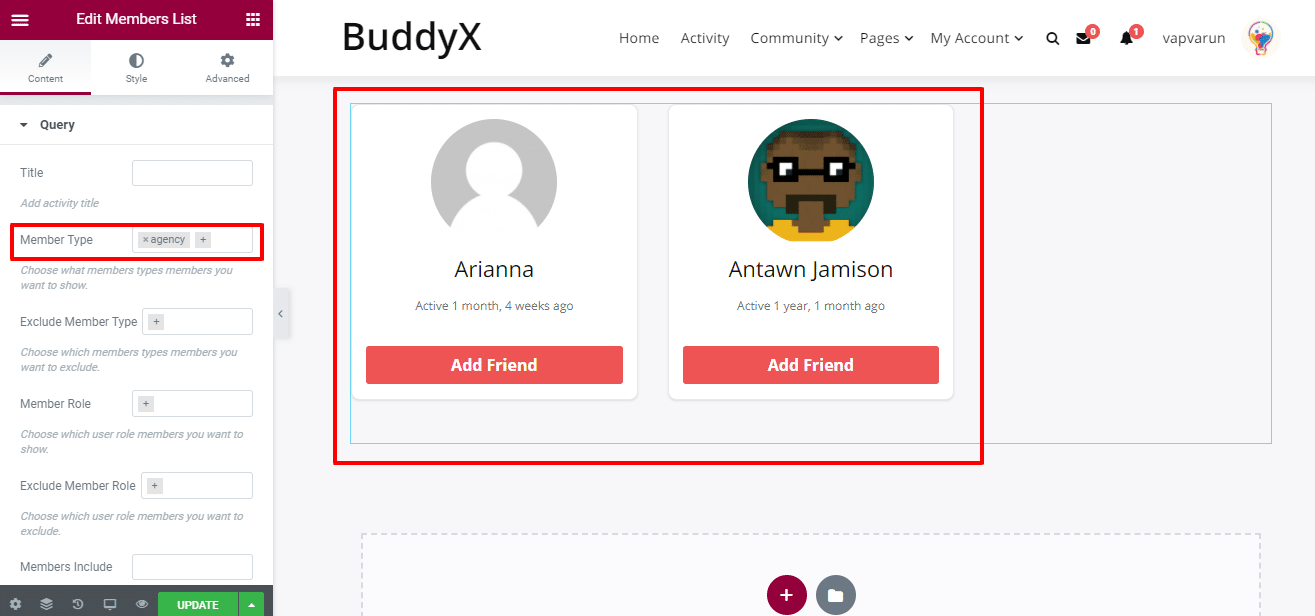
What is the role of Member Type?

Get Started

With the help of this, you can choose the member types you want to show on your Elementor Frontend Page. 

Last updated: February 24, 2021
Previous How can I use Exclude Member Type?
Next How can I manage the Action Filter?
Copyright © 2026 Wbcom Designs
Privacy Policy