Skip to content
Wbcom Designs Docs

Wbcom Designs Docs

Menu

Close
  • Home
  • Changelog
  • Roadmap
  • Home
  • Changelog
  • Roadmap

WP Stories

  • Intro (2)
    • Introduction
    • Features of WP Stories
  • Installation (2)
    • System Requirement
    • Installation
  • License (2)
    • Add License
    • Upgrade License
  • User Guide for Wp Stories (1)
    • User Guide
  • Developer Guide for Wp Stories (1)
    • Developer Guide
  • Admin Capibilities (2)
    • User Stories - WP Stories
    • Shortcodes - WP Stories
  • Global Settings (5)
    • General Settings
    • Display Options
    • User Publishing
    • Styling Option
    • Integrations
  • Integrations (2)
    • BuddyPress
    • PeepSo
  • Story Creation (3)
    • Create Story from the frontend
    • Create Story from the backend
    • Create Story Boxes
  • Widgets (3)
    • Stories with Cover Image
    • Single Stories Widget
    • Activity Feed Widget
  • FAQ's (2)
    • Available Hooks and Filter
    • Does this plugin work with BuddyBoss Platform?

User Stories – WP Stories

Get Started

Site admin can view a list of user stories and similarly can take action as well. To view the user story listing, You will have to navigate:

WordPress Dashboard >> WP Stories >> User Stories
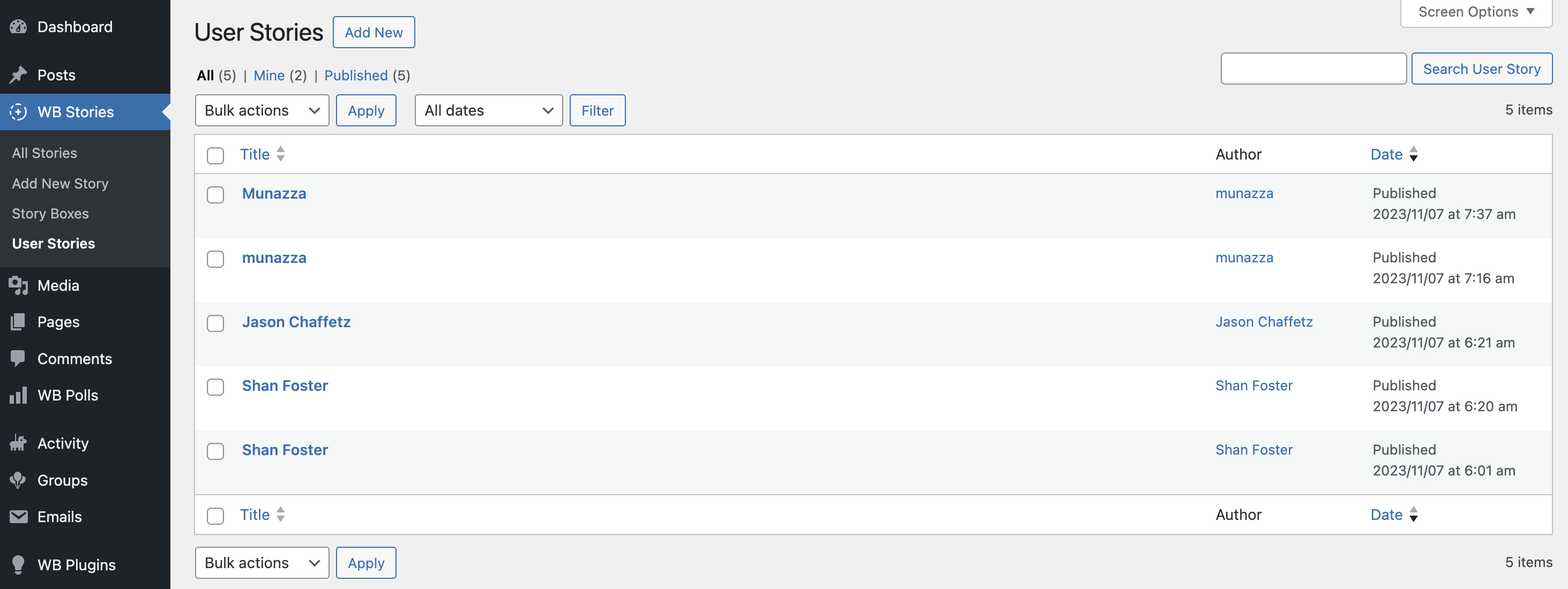
 

The site admin can take the following actions:

  • Can change the status of the stories
  • Can View, edit, and delete the story

This story listing is divided according to the status, i.e

  • Private
  • Draft
  • Published
Last updated: April 18, 2025
Next Shortcodes - WP Stories
Copyright © 2026 Wbcom Designs
Privacy Policy