Skip to content
Wbcom Designs Docs

Wbcom Designs Docs

Menu

Close
  • Home
  • Changelog
  • Roadmap
  • Home
  • Changelog
  • Roadmap

Woo Pincode Checker

  • Intro (2)
    • Woo Pincode Checker Feature Highlights
    • Woo Pin Code Checker Introduction
  • System Requirement (1)
    • System Requirement
  • Installation (1)
    • How to install the Woo pin code checker plugin?
  • License (1)
    • Add License
  • General Settings (6)
    • How does the plugin calculates shipping and COD amount ?
    •  Can I hide the shipping availability on specific categories?
    • Can I set the delivery date text color, button color, and button text color?
    • How to set the delivery date format?
    • Can delivery dates be hidden?
    • How to configure the backend settings of pincode checker?
  • Add/Upload pincodes (4)
    • How to edit and delete Pin codes?
    • Can I upload the Pin codes in bulk?
    • Can I enable Cash on delivery option for a product?
    • How to upload the Pincodes?
  • Frontend View (2)
    • How to check that delivery is available or not in the given Pin code?
    • How to use the plugin?
  • Pincode List
  • FAQ's (2)
    • I have 2,00,000+ pincodes, can I use your plugin?
    • Does this plugin requires WooCommerce?
  • Support (2)
    • What if I have a question?
    • What if I need more features?

How to check that delivery is available or not in the given Pin code?

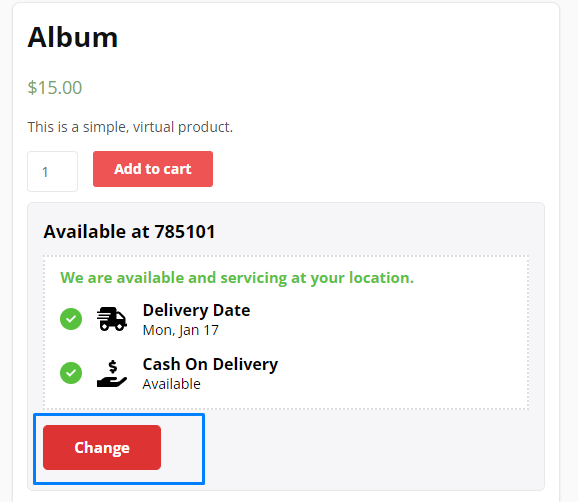
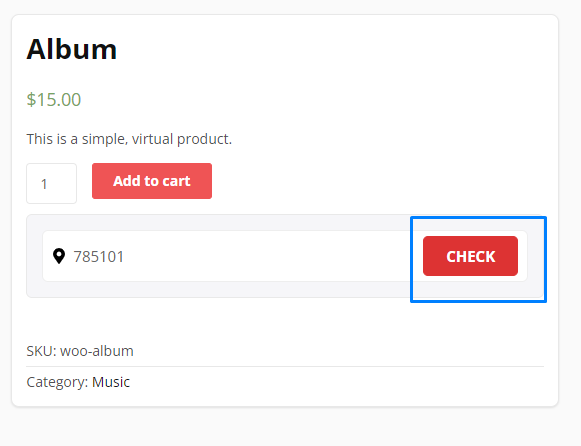
If you want to check that delivery is available or not in the given Pin code then navigate to the single product page and here you will find the “check” button. Now type the Pincode here and click on the button.  It will display the message if the product is available or not on the given Pincode.
 

Last updated: May 25, 2022
Next How to use the plugin?
Copyright © 2026 Wbcom Designs
Privacy Policy