Skip to content
Wbcom Designs Docs

Wbcom Designs Docs

Menu

Close
  • Home
  • Changelog
  • Roadmap
  • Home
  • Changelog
  • Roadmap

Woo Custom My Account Page

  • Intro (2)
    • Woo Custom My Account Page Features Highlights
    • Woo Custom My Account Introduction
  • System Requirement (1)
    • System Requirement
  • Installation (1)
    • How to Install Woo Custom My Account
  • License (2)
    • Add License
    • Upgrade License
  • WooCommerce Custom My Account Page - User Guide
  • WooCommerce Custom My Account Page - Developer Guide (1)
    • Developer Guide
  • Backend Settings (5)
    • How to set the default endpoint for the "My Account" page?
    • Can I choose the Sidebar position?
    • How to set the menu style for the "My Account" page?
    • Can I display the profile picture on the “ My Account" page?
    • How to configure the backend settings?
  • Endpoint Styling (1)
    • Can I style the "My Account" page?
  • Custom Endpoints (5)
    • Can I add the custom links?
    • How to add custom endpoints?
    • How to add groups to display on the “My Account" page?
    • How to show and hide the endpoints(tabs) on the "My Account" page?
    • Can I re-order( sort) the endpoints (tabs)?
  • Frontend View (1)
    • Front End Layout
  • FAQ's
  • Support (2)
    • What if I have a question?
    • What if I need more features?

Can I re-order( sort) the endpoints (tabs)?

Get Started

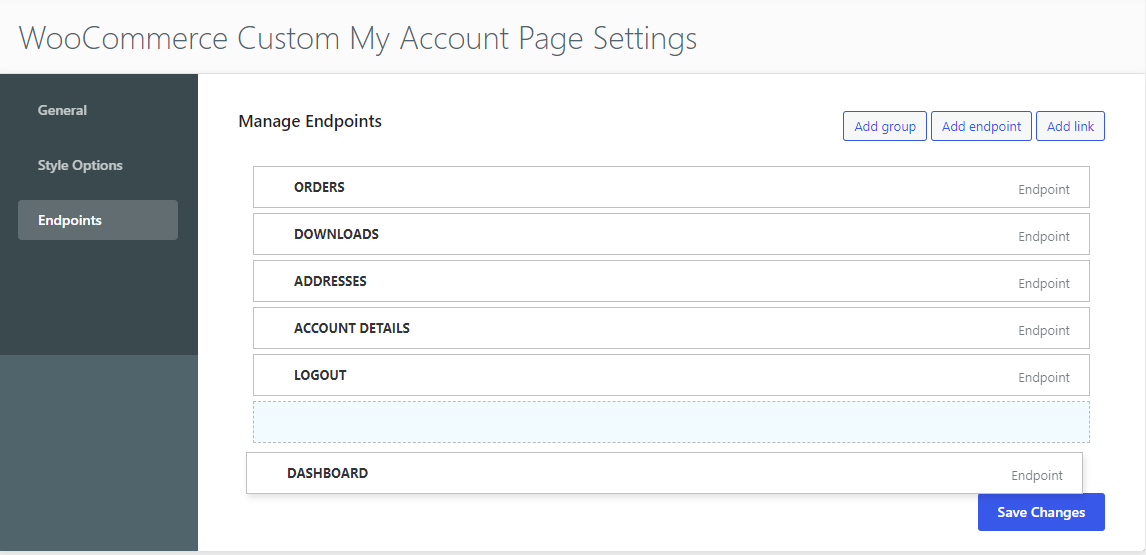
Navigate to the WB plugins >> Woo custom My Account Page >> endpoint settings. Here you can manage the re-ordering ( sorting) of the endpoints according to you. Just drag and drop the endpoint as per your choice.
Last updated: May 25, 2022
Previous How to show and hide the endpoints(tabs) on the "My Account" page?
Copyright © 2026 Wbcom Designs
Privacy Policy