Skip to content
Wbcom Designs Docs

Wbcom Designs Docs

Menu

Close
  • Home
  • Changelog
  • Roadmap
  • Home
  • Changelog
  • Roadmap

BuddyPress Search

  • Intro (2)
    • Feature Highlights
    • Buddypress search Introduction
  • Installation (1)
    • How to install the BuddyPress search Plugin?
  • Configuration Settings (1)
    • How to configure the plugin settings?
  • Frontend View (4)
    • Can I search product categories also?
    • How live search settings works?
    • How to display the search form in the frontend?
    • How search settings works?
  • FAQ's (3)
    • Does this plugin allow me to search user profile fields and xprofile fields ?
    • Can I search hidden and private groups also?
    • Does it require any other plugin?

How to display the search form in the frontend?

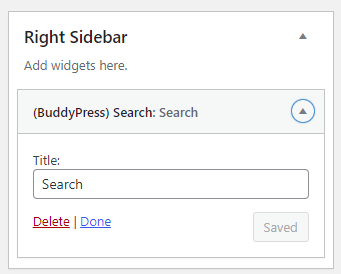
Navigate to the WordPress widget tab and add the BuddyPress search widget into the right sidebar for displaying the search form. You cal also change the widget title as per your choice.

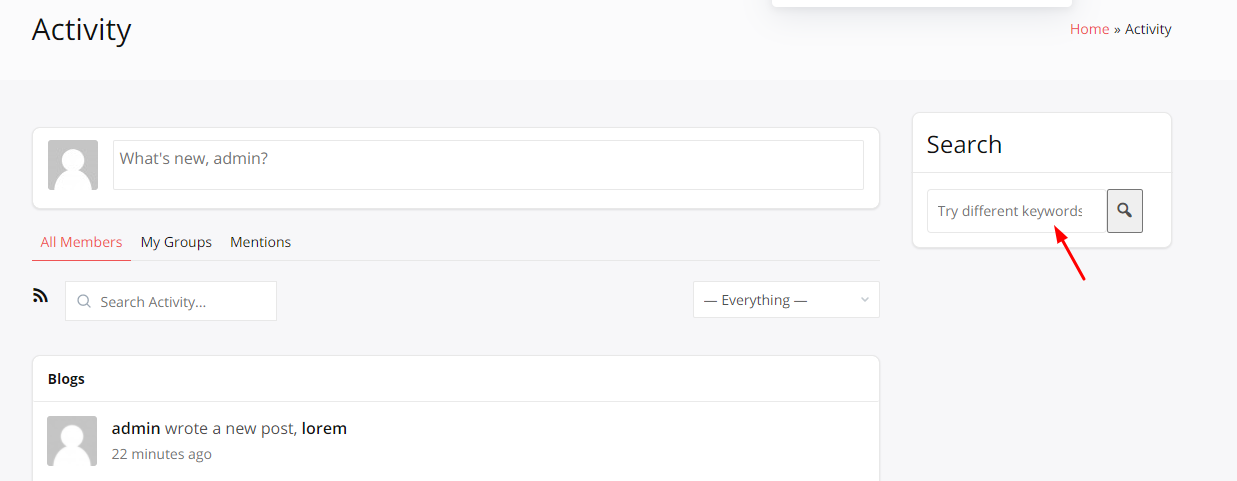
Now this widget will be displayed on the right side of your page.
 

Last updated: May 24, 2022
Previous How live search settings works?
Next How search settings works?
Copyright © 2026 Wbcom Designs
Privacy Policy