Skip to content
Wbcom Designs Docs

Wbcom Designs Docs

Menu

Close
  • Home
  • Changelog
  • Roadmap
  • Home
  • Changelog
  • Roadmap

BuddyPress Member Type

  • Intro (1)
    • Introduction of the plugin
  • System Requirement (1)
    • Requirements for BuddyPress Member Type
  • Installation (1)
    • How to install BP Member Type
  • Conftiguration Settings (3)
    • How to show member type field on users profile?
    • How to assign a field based on member type ?
    • How to create member types?
  • Frontend View (1)
    • Frontend View
  • FAQ's (2)
    • Why the Member Types directory not working ?
    • How to assign a member type to an existing user ?

How to assign a field based on member type ?

Get Started

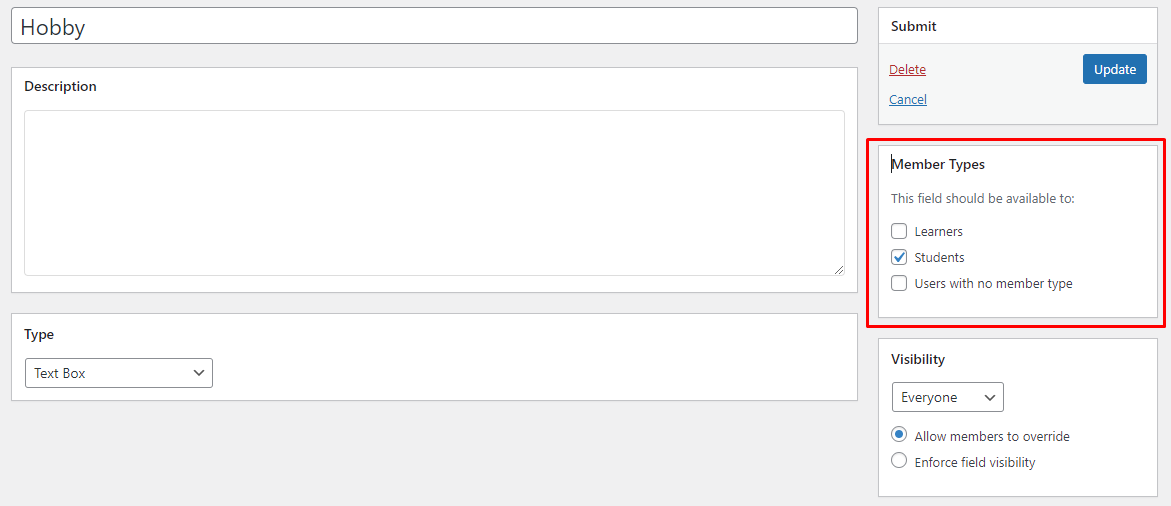
If you want to show a specific profile field to a particular member type’s profile. Do the following:

  • Navigate to WordPress Dashboard > Users > Profile Fields.
  •  Access the field edit page.
  • Assign the field to the member type you want through the member types box
Last updated: January 12, 2023
Previous How to show member type field on users profile?
Next How to create member types?
Copyright © 2026 Wbcom Designs
Privacy Policy