Skip to content
Wbcom Designs Docs

Wbcom Designs Docs

Menu

Close
  • Home
  • Changelog
  • Roadmap
  • Home
  • Changelog
  • Roadmap

BuddyPress Job Manager

  • Intro (2)
    • Buddypress Job Manager Features HighLights
    • BuddyPress Job Manager Introduction
  • Installation (1)
    • How To Install BuddyPress Job Manager Plugin ?
  • General Settings (1)
    • How to configure the backend settings of BP Job Manager?
  • BuddyPress Integration (4)
    • What tabs displays on the candidate's profile page?
    • How many tabs displays on employer profile page?
    • Can I display the resume at BuddyPress Profile ?
    • From where users can access their applied job listing?
  • Activity Generation (1)
    • Can I display the Buddypress activity when posting jobs and resumes?
  • Notifications (1)
    • How BP Job manager Notification functionality works?
  • FAQ's (4)
    • How can I remove the job tab from the BP profile when there is no job available?
    • How can I remove the resume tab from the BP profile when there is no resume available?
    • Can I allow other user roles to post a job or apply for a job?
    • Required and Optional Plugins for BuddyPress Job Manager to work with.

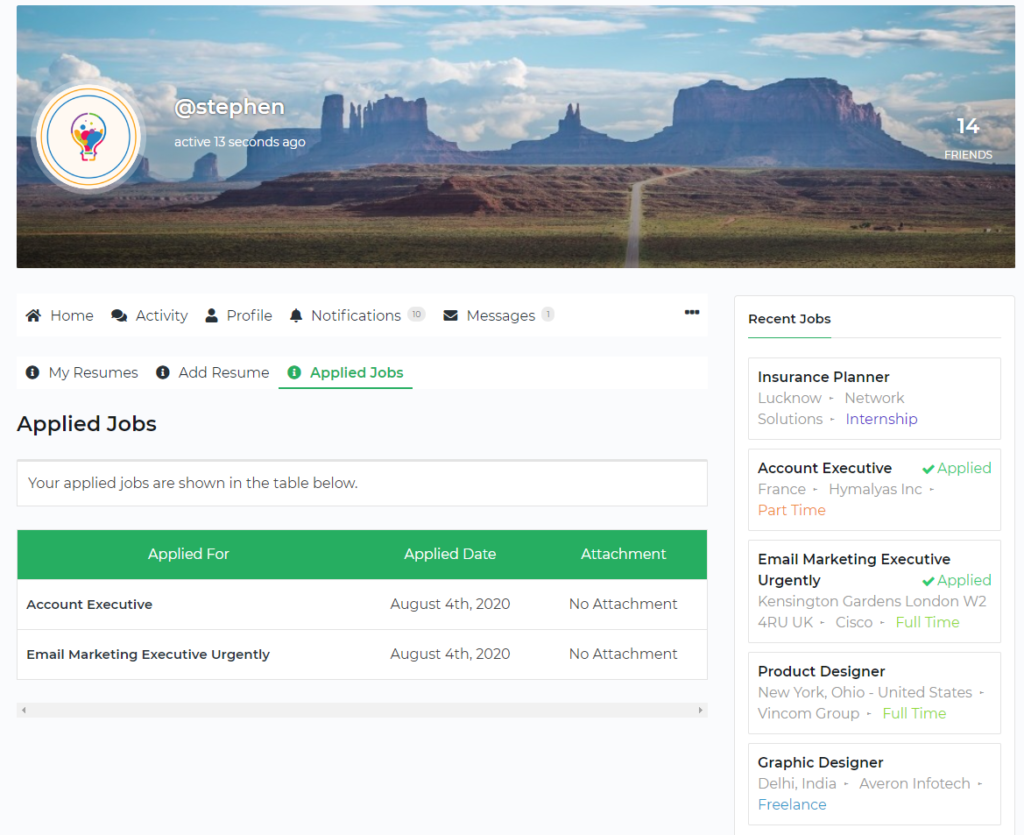
From where users can access their applied job listing?

Get Started

If you have WP Job Manager  Resume Manager installed and activated on your site, the Applied job listing can be accessed by the users on their profile. Logged-in members can navigate to the following path to access the applied job listing.

  1. Profile > resumes > Applied Jobs
Applied Job Listing
Last updated: May 27, 2022
Previous Can I display the resume at BuddyPress Profile ?
Copyright © 2026 Wbcom Designs
Privacy Policy